MIX BUS, MEET YOUR NEW BEST FRIEND.
The Black Box Analog Design HG-2 is a line level, stereo unit designed to add saturation, harmonics, natural compression, increased RMS and enhancement during mixing and mastering. It is designed to easily and naturally do what usually requires multiple pieces of gear and do it better!
Tubes, transformers & tone!
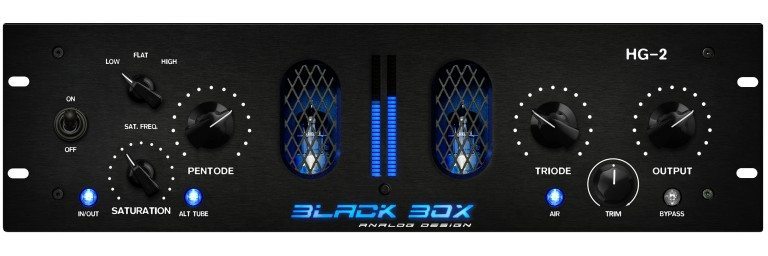
The HG-2 uses custom input transformers to feed two paths: The main signal path travels through a 6U8A Pentode tube stage that then drives into the Triode stage that follows, resulting in everything from subtle harmonics to full on saturation.
Also fed from the input transformer is a parallel signal path that utilizes a set of 12AT7 tubes, voiced specifically for harmonics and saturation. This parallel saturation circuit is outfitted with a 3 way “Freq. Select” switch that allows the user to choose the frequency content returning from the circuit. The “low position saturates just the low mids and sub frequencies, the “flat” position saturates full bandwidth and the “high” position saturates only the high mids and high frequencies. The result is the ability to add top end to dull tracks, enhance low end or enhance and add energy to the entire signal. The “saturation” knob allows the user to control how much of the processed, parallel signal is fed into the main signal before hitting the Pentode stage. Finally, both stages reach the passive output attenuation before a pair of custom output transformers.
In addition to the saturation stages, an “air” switch adds a subtle top end lift and the “alt” tube button switches between two different 12AT7 tubes in the parallel circuit. Switching between tubes allows the user to select between differently voiced tubes for different types of saturation, instantly.
The meter button switches between 3 modes (VU, VU/Peak & Energy), and the “bypass” switch is a true bypass that shorts the input directly to the output with no additional circuitry in line.
Features:
- High voltage Pentode & Triode tube stages
- Parallel saturation with mix control
- Selectable parallel saturation frequency
- Instantly selectable saturation tubes
- Ultra fine L/R trim adjust
- Custom input and output transformers
- Selectable 30 segment meter (3 modes)
- Illuminated push buttons & sealed relays
- Internally modular design for easy servicing









Reviews
There are no reviews yet.