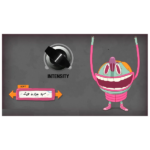
Dada Life Sausage Fattener (Windows)
£19.99
Discover Dada Life Sausage Fattener (Windows)
Here is our first plugin – the Sausage Fattener! People always ask us how we get our greasy sound…here is the answer. Hook up this fat bastard to your favorite DAW (AU and VST on both PC/Mac) and get dirty. The plugin is already used by Tiësto, Kaskade, Diplo, Laidback Luke, and others (see below…
Explore product features & full description
DADA LIFE
SAUSAGE FATTENER
Here is our first plugin – the Sausage Fattener! People always ask us how we get our greasy sound…here is the answer. Hook up this fat bastard to your favorite DAW (AU and VST on both PC/Mac) and get dirty. The plugin is already used by Tiësto, Kaskade, Diplo, Laidback Luke, and others (see below for more).
The Sausage Fattener only has two knobs. But don’t be fooled. With those seemingly simple parameters, you can create loads of different sounds. Use the Sausage Fattener on a single channel with moderate settings as a musical compressor. Turn it up and you have a dirty bastard of distortion. But you can also use the plugin on a bus (for example all the drums and the bass) or the whole track as a mastering plugin.
Compatibility checklist
- Windows 10,11 (32,64 Bit)
- VST, VST3
- Formats: VST3 · VST
Requirements vary by supplied version. Confirm your setup with support before purchasing.
Delivery & activation
- Complete your purchaseReview compatibility and purchase details.
- Download your filesAccess available downloads through your order and account.
- Follow the included setup guideContact GetPlugins if you need installation help.
Activation, where included, is provided by GetPlugins. Publisher-account registration, transferable publisher keys and a publisher-issued licence are not included. Read the activation policy.
Frequently asked questions
How do I receive my download?
After payment, access available files from your order details and GetPlugins account. Contact support if a download is missing.
What activation is included?
Follow the activation instructions supplied with your download. Activation is provided by GetPlugins. Confirm device allowances and reinstall arrangements before ordering.
Will this work with my computer and DAW?
Check the compatibility information for this listing and ask us to confirm the exact supplied build. Libraries may require a compatible sampler or additional software.
What if I need installation help?
Email support@getplugins.io with your order number, operating system, DAW and any error message.
Which updates are included?
Activation and updates are separate. Confirm the available version and update arrangements before ordering; do not assume access to future publisher releases.
How do I request a refund?
Contact support with your order number and issue details. Read our Refund Policy for eligibility and the request process.

Reviews
There are no reviews yet.