Output – Portal (Windows)
£20.00
Discover Output – Portal (Windows)
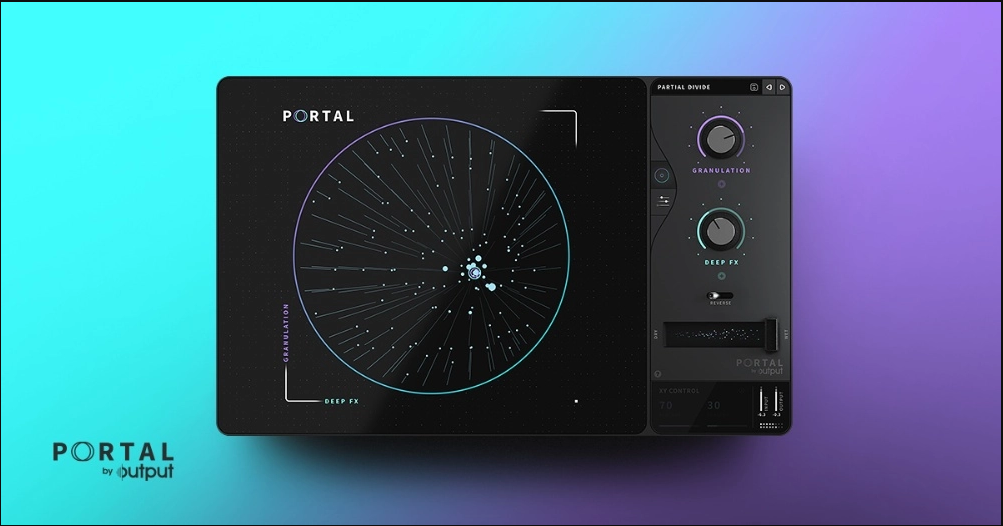
With PORTAL, granular synthesis takes your sounds to another dimension. Easily alter any audio input—VSTs, drums, vocals, live guitar, you name it—in a new and musical way.
Advanced: Go beyond the presets and mess with grain controls, modulation and FX in PORTAL’s advanced features.
Time Stretch: Slow down and stretch your sounds, then easily sync them to your master tempo or leave them unsynced for a…
Humanize: Add natural-sounding variations to envelopes for less repetitive, more organic sounds.
Explore product features & full description
Built to be Musical
With PORTAL, granular synthesis takes your sounds to another dimension. Easily alter any audio input—VSTs, drums, vocals, live guitar, you name it—in a new and musical way.
Infinite Ideas in Seconds
Experience the playability of granular effects that are actually centered around the music you make. While in the past granular sounds have been chaotic and abstract, PORTAL re-synthesizes sounds that are more closely related to the original input.
Explore the Details
Get into the far-reaching depths of PORTAL’s advanced features to dial in the exact sound you want.
- Advanced: Go beyond the presets and mess with grain controls, modulation and FX in PORTAL’s advanced features.
- Time Stretch: Slow down and stretch your sounds, then easily sync them to your master tempo or leave them unsynced for a more experimental vibe.
- Humanize: Add natural-sounding variations to envelopes for less repetitive, more organic sounds.
- Pitch Shift: Alter the pitch of your sound without affecting its length or timing. Lock it into a scale for the most musical result.
Key Features
- 250+ presets for immediate playability
- A circular visualizer linked to granular parameters
- Powerful time manipulation engine
- Tempo-synced grain delay
- Musical scale-based pitch modulation
- 7 built-in FX with an additional master compressor and filter
- Value readout panel for better understanding of controls
- Favoriting feature in Presets menu
- Built-in Tool Tips on Advanced page
System Requirements
- Windows 7 or higher
- 32 and 64 bit compatible (PC)
- 4GB of RAM required, 8GB recommended
- At least 300 MB of free drive space
Supported Interfaces
- VST
- VST3
- AAX
Compatibility checklist
- Confirm the supplied build, operating system and required host before ordering.
Requirements vary by supplied version. Confirm your setup with support before purchasing.
Delivery & activation
- Complete your purchaseReview compatibility and purchase details.
- Download your filesAccess available downloads through your order and account.
- Follow the included setup guideContact GetPlugins if you need installation help.
Activation, where included, is provided by GetPlugins. Publisher-account registration, transferable publisher keys and a publisher-issued licence are not included. Read the activation policy.
Frequently asked questions
How do I receive my download?
After payment, access available files from your order details and GetPlugins account. Contact support if a download is missing.
What activation is included?
Follow the activation instructions supplied with your download. Activation is provided by GetPlugins. Confirm device allowances and reinstall arrangements before ordering.
Will this work with my computer and DAW?
Check the compatibility information for this listing and ask us to confirm the exact supplied build. Libraries may require a compatible sampler or additional software.
What if I need installation help?
Email support@getplugins.io with your order number, operating system, DAW and any error message.
Which updates are included?
Activation and updates are separate. Confirm the available version and update arrangements before ordering; do not assume access to future publisher releases.
How do I request a refund?
Contact support with your order number and issue details. Read our Refund Policy for eligibility and the request process.

Reviews
There are no reviews yet.