Audified – Linda Ironverb (Windows)
£15.00
Discover Audified – Linda Ironverb (Windows)
Classic algorithmic reverb with many functions and unique Ironize modulation.
Explore product features & full description
Classic algorithmic reverb with many functions and unique Ironize modulation.
Peculiarities
Unique Ironize Modulation
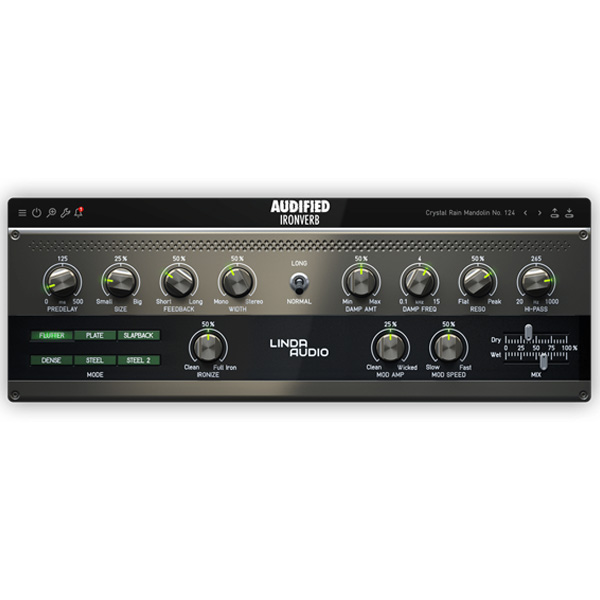
Ironize is the feature that makes IronVerb special. It gives the sound a smooth or shiny character reminiscent of iron, making it perfect for pads, atmospheric sounds, and ambient soundscapes. Thanks to this feature, the reverb sounds like no other!
Six Different Modes
Choose from 6 different modules for a variety of sonic characters. Each module shapes the sound in a unique way – from subtle Slapback to crazy ambient soundscapes with Flutter or Dense modes. Combine your chosen mode with other parameters and you will get a virtually endless number of reverb sounds.
Modulation Section
A simple and effective Mod Amp parameter controls the amount of chorus/vibrato applied to the reverb sound, while Mod Speed controls the speed of modulation. By adding modulation to the reverb, you can transform it from ordinary to special in a matter of seconds.
Damping, Resonance and Hi-pass
Damp Amt and Damp Freq allow you to darken or brighten the reverb tails. Resonance helps shape the entire spectrum, and Hi-pass helps to deal with dirty low frequencies. These controls are essential for creating the perfect reverb sound that will fit in the mix. I am a new block of paragraphs.

Compatibility checklist
- Windows 10,11 (64Bit Only)
- VST3, AAX
- Formats: VST3 · AAX
Requirements vary by supplied version. Confirm your setup with support before purchasing.
Delivery & activation
- Complete your purchaseReview compatibility and purchase details.
- Download your filesAccess available downloads through your order and account.
- Follow the included setup guideContact GetPlugins if you need installation help.
Activation, where included, is provided by GetPlugins. Publisher-account registration, transferable publisher keys and a publisher-issued licence are not included. Read the activation policy.
Frequently asked questions
How do I receive my download?
After payment, access available files from your order details and GetPlugins account. Contact support if a download is missing.
What activation is included?
Follow the activation instructions supplied with your download. Activation is provided by GetPlugins. Confirm device allowances and reinstall arrangements before ordering.
Will this work with my computer and DAW?
Check the compatibility information for this listing and ask us to confirm the exact supplied build. Libraries may require a compatible sampler or additional software.
What if I need installation help?
Email support@getplugins.io with your order number, operating system, DAW and any error message.
Which updates are included?
Activation and updates are separate. Confirm the available version and update arrangements before ordering; do not assume access to future publisher releases.
How do I request a refund?
Contact support with your order number and issue details. Read our Refund Policy for eligibility and the request process.

Reviews
There are no reviews yet.