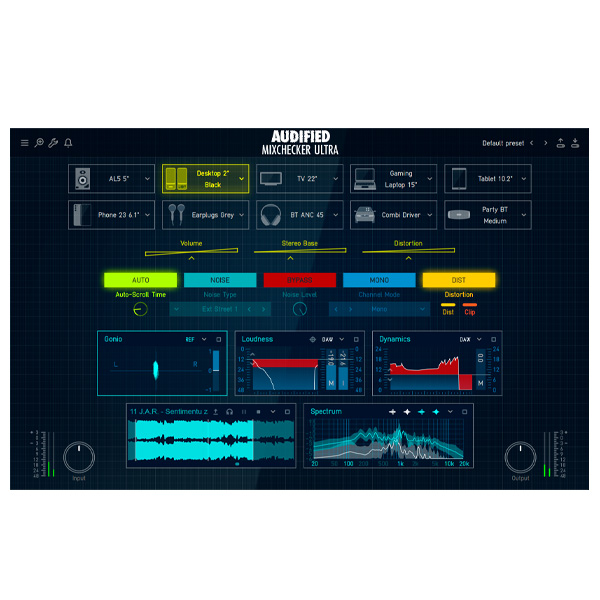
With over 90 professional audio system and consumer device models, a new graphical style, and a practical analytics section, MixChecker Ultra is the next step in the evolution of your reference mix testing system.
Over 90 simulators of popular audio devices such as laptops, phones, and headphones.
Test how your mix sounds on standard studio monitors, club headphones, car speakers, and small Bluetooth speakers.
Simulate playback in noisy environments like subways, busy streets, and shopping malls.
Explore product features & full description
Improve your mix!
With over 90 professional audio system and consumer device models, a new graphical style, and a practical analytics section, MixChecker Ultra is the next step in the evolution of your reference mix testing system.
Key Features and Capabilities
Ultra-Realistic Device Simulators
Over 90 simulators of popular audio devices such as laptops, phones, and headphones.
Test how your mix sounds on standard studio monitors, club headphones, car speakers, and small Bluetooth speakers.
Simulate playback in noisy environments like subways, busy streets, and shopping malls.
IR Loader
Import your Impulse Responses (IRs) to simulate how your mix would sound in different acoustic spaces.
Simulate environments from your friend’s studio to a cathedral using standard WAV IR files.
Advanced Device Control
Adjust device-specific settings to simulate real-world conditions better.
Control volume independently for each device or simulate a basic stereo system.
The engine simulates non-linear behavior and distortion to help you spot issues like clipping or distortion on certain devices.
Dive into Your Mix: Analytical Tools
Loudness meter, dynamometer, spectral analysis, stereo analysis, and goniometer help you assess the quality of your mix.
Use the included player module to compare your track’s metrics to a reference track.
Analysis Modules
Volume
Monitor the volume of your track.
Use presets for popular streaming services to check if your track meets their volume criteria.
Dynamics
Measure the dynamic range (PSR – peak-to-short-term ratio) to understand the difference between your track's loudest and quietest parts.
Spectrum
View the frequency spectrum analysis of your track and compare it with a reference track.
Identify key frequencies that need adjustment.
Goniometer
Analyze the stereo image of your mix.
Detect stereo issues like inverted signals or unbalanced mixes.
Stereo Field
Check how frequencies are spread across the stereo field to ensure no important frequencies are isolated to one side.
Player
Import a reference track (WAV or MP3 formats) to quickly compare it with your mix.
Use the player module across all other analysis modules to streamline your workflow and improve your mix.
Complete your purchaseReview compatibility and purchase details.
Download your filesAccess available downloads through your order and account.
Follow the included setup guideContact GetPlugins if you need installation help.
Activation, where included, is provided by GetPlugins. Publisher-account registration, transferable publisher keys and a publisher-issued licence are not included. Read the activation policy.
Frequently asked questions
How do I receive my download?
After payment, access available files from your order details and GetPlugins account. Contact support if a download is missing.
What activation is included?
Follow the activation instructions supplied with your download. Activation is provided by GetPlugins. Confirm device allowances and reinstall arrangements before ordering.
Will this work with my computer and DAW?
Check the compatibility information for this listing and ask us to confirm the exact supplied build. Libraries may require a compatible sampler or additional software.
What if I need installation help?
Email support@getplugins.io with your order number, operating system, DAW and any error message.
Which updates are included?
Activation and updates are separate. Confirm the available version and update arrangements before ordering; do not assume access to future publisher releases.
How do I request a refund?
Contact support with your order number and issue details. Read our Refund Policy for eligibility and the request process.
Customer Reviews
Reviews
There are no reviews yet.
Be the first to review “Audified – MixChecker Ultra (Windows)” Cancel reply








Reviews
There are no reviews yet.