In 2012, Kush dropped the UBK-1 into a world where nobody expected plugin compressors to have any special or interesting vibe. Built on faithful models of the strange and aggressive curves Gregory Scott developed for the enigmatic UBK Fatso hardware, UBK-1 was the first plugin to give ITB mixers a movement-and-groove-based tool that encouraged blind turning of a few knobs to quickly get at sounds and textures that tended to be as surprising and novel as they were useful.
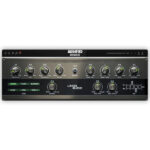
UBK-2 takes all of the things that made the original special — one big knob for more-or-less compression tuning, rapid switching thru preset attack-release-knee-ratio curves, analog-voiced saturation — and leaves them all intact, you can use UBK-2 the same way you used UBK-1.
Alternatively, you can dive deeper and exert control over nearly every aspect of the UBK-2’s functions. Three new compression presets enable compression styles that are not possible with UBK-1, including the very gentle low-ratio cream for delicate jobs like the mix bus. All 8 compression curves can have their baseline attack and release times adjusted faster or slower, and all feature tight Gain Reduction matching, so you can freely switch between them while keeping gain reduction and overall gains consistent.
UBK-2 flanks the updated compressor section with two newly-tuned saturation engines, one pre- and one post-compression, each voiced to suit the types of transients it’s likely to be presented with. An old school. pre-everything 4 band EQ leverages Kush’s new, Magpha-based equalizer algorithms. All of these linear and non-linear processes can now be monitored via Kush’s signature ‘Tri-Meter’ display, first introduced in the dirt-loving Silika compressor. This VU meter allows for effortless, at-a-glance monitoring of Input and Output levels, Gain Reduction, or all three at once. The ability to dial saturation and compression while seeing the impact this has on the movement of the output signal vs. the input signal, and level-match them with ease… Tri-Meter is a deceptively powerful workflow enhancement, consider getting to know it.
We hope that UBK-2 represents a massive leap forward from the original, while still retaining the character and ease of use that make the original such a popular and beloved plugin that still holds its own 12 years after its release.











Reviews
There are no reviews yet.