




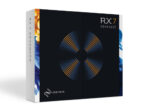
Discover iZotope RX7 Audio Editor Advanced (Windows)
Critical restoration projects demand powerful tools. That's why forensic audio experts and post-production engineers rely on iZotope RX Advanced. Like a photo editor, RX Advanced paints away buzz, clicks, hiss, and more with a single mouse gesture. It's a must-have — and version 7 ups the ante with a bevy of new features. Repair Assistant…
Repair Assistant uses machine learning to solve common audio issues faster than ever.
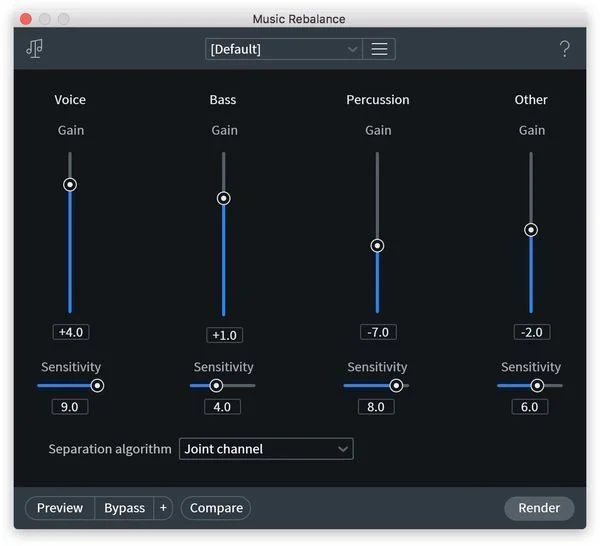
Music Rebalance grants you independent gain adjustment of the elements of a mix — after it's already mixed.
Variable Time adjusts the time stretch amount of an audio selection without altering its pitch.
Explore product features & full description
| Platform | Windows Only |
|---|---|
| Trial/Full | Full Version |
| Download/Boxed: | Instant Download |
| Format | Standalone, AAX, AudioSuite, VST2, VST3 |
| System Requirements - PC | Intel Core 2 Duo / AMD Athlon 64 X2 or higher, 4GB RAM minimum bit depth 32bit,64-bit |
Pro-level Audio Restoration Software
Critical restoration projects demand powerful tools. That's why forensic audio experts and post-production engineers rely on iZotope RX Advanced. Like a photo editor, RX Advanced paints away buzz, clicks, hiss, and more with a single mouse gesture. It's a must-have — and version 7 ups the ante with a bevy of new features. Repair Assistant uses intelligent processing to solve common audio issues faster than ever. Music Rebalance grants you independent gain adjustment of the elements of a mix — after it's already mixed. Dialogue Contour reshapes the intonation and inflection of a dialogue track, while Dialogue De-reverb removes unwanted ambience. Beyond that, you get multichannel support up to Dolby Atmos 7.1.2. Enhance. Restore. Repair. If it's broken, RX 7 Advanced can fix it.
iZotope RX 7 Advanced is loaded with powerful restoration tools:
- Repair Assistant uses machine learning to solve common audio issues faster than ever.
- Music Rebalance grants you independent gain adjustment of the elements of a mix — after it's already mixed.
- Variable Time adjusts the time stretch amount of an audio selection without altering its pitch.
- Variable Pitch adjusts the pitch of an audio selection while preserving its time and length.
- De-bleed eliminates headphone bleed from acoustic guitar tracks, removes click track bleed from vocal takes, and solves other signal bleed problems.
- De-ess tames overly aggressive sibilance. The new Spectral De-ess mode transparently attenuates sibilance with iZotope’s spectral shaping technology.
- Mouth De-click gets rid of distracting mouth noises.
- Spectral Repair visually paints away audio problems like ringing cell phones, birds, and squeaky bass drum pedals.
- Voice De-noise is fine-tuned for vocals, reducing unwanted steady-state or changing background noise like air conditioning, refrigerator hum, and amp hiss.
- De-plosive repairs unwanted plosives with a single click.
- Spectral De-noise reduces amp buzz, tape hiss, and other unwanted steady-state background noise.
- De-click cleans up vinyl clicks, softens up clicky bass guitars, and more. A new low-latency algorithm enables you to use De-click directly within your DAW or NLE without introducing sync issues.
- De-clip patches up digital and analog clipping artifacts to restore distorted audio.
- De-hum removes ground loop hum and line noise.
- Composite View removes unwanted sounds captured with multiple microphones by editing multiple files at once.
As well as these exclusive Advanced-only features:
- Dialogue Contour reshapes the intonation and inflection of a dialogue track.
- Dialogue De-reverb removes unwanted ambience from dialogue clips.
- De-rustle eliminates lavalier mic rustle from dialogue with a single click.
- Dialogue Isolate extracts dialogue from loud environments with background sounds like clanging plates in a restaurant, traffic noise, and machinery.
- De-wind removes low-frequency wind rumble from location dialogue.
- Ambience Match fills in the constant background noise under constructed sentences and ADR lines.
- EQ Match imparts the EQ profile of one file to another, great for matching ADR to location dialogue.
Enhanced options for audio pros
If you work in film or television, RX 7 Advanced is a worthy update. It makes recovering a dialogue performance easier than ever, thanks to its Dialogue Contour. Easily reshape the intonation and inflection of a dialogue track and avoid time-consuming ADR. Remove unwanted ambience from dialogue tracks with Dialogue De-reverb. You also get modules such as De-rustle, which eliminates lavalier mic rustle from dialogue, while De-wind removes low-frequency wind rumble from location dialogue. EQ Match creates consistent sonics between two different dialogue recordings, while Ambience Match fills in the constant background noise under constructed sentences and ADR lines. RX Advanced's Dialogue Isolate module can even extract dialogue from loud environments with background sounds like clanging plates in a restaurant, traffic noise, and machinery. On top of that, RX Advanced supports multichannel audio up to Dolby Atmos 7.1.2, making it an indispensable tool for post production and video game projects.
Repair Assistant makes audio restoration easier than ever
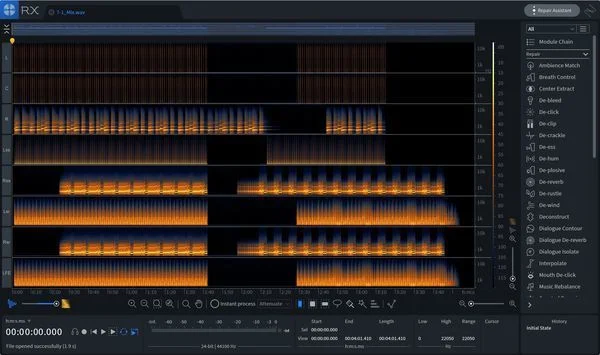
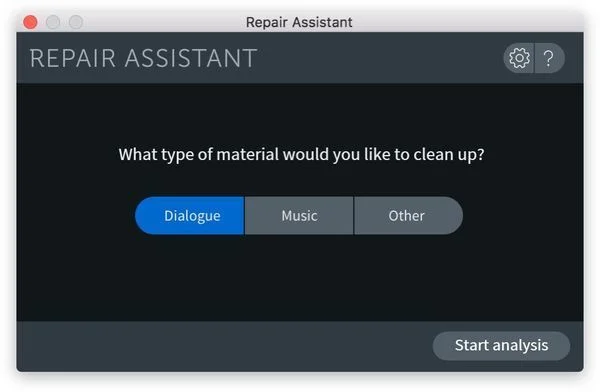
The engineers here at Sweetwater will tell you — audio restoration is a time-intensive endeavor. But not anymore! RX Advanced's Repair Assistant makes short work of clipping, clicks, and more without the usual tedious trial-and-error workflow. All you need to do is select the type of material, be it music, dialogue, or other, and let RX Advanced analyze the audio. It then gives you processing suggestions to point you in the right direction, along with three different intensities for each. You then review and audition the different suggestions, hit render, and you're good to go.
Music Rebalance gives new meaning to "fix it in the mix"
Mastering a badly mixed song is an uphill battle. Now, thanks to RX Advanced, that's no longer the case. Its Music Rebalance tool allows for independent gain adjustment of vocals, bass, percussion, and other elements of a mix — after the project has been mixed. Drums too loud? Vocals not loud enough? Music Rebalance allows you to fix these problems, and more, without requesting the original tracks or stems. Beyond that, it's great for creating karaoke tracks. Music Rebalance is also available as an AudioSuite plug-in.
iZotope RX 7 Advanced Features:
- NEW Repair Assistant uses machine learning to solve common audio issues quickly and easily
- NEW Music Rebalance supplies independent gain adjustment of the elements of a mix after it's already mixed
- NEW Dialogue Contour reshapes the intonation and inflection of a dialogue track
- NEW Dialogue De-reverb removes unwanted ambience from dialogue tracks
- NEW Multichannel support up to Dolby Atmos 7.1.2
- Music-optimized tools remove mic bleed, sibilance, mouth clicks, breaths, and other common irritants
- Composite View for repairing multiple files at once
- Straightforward interface makes operation intuitive
- Task-based modules focus on specific audio issues
Compatibility checklist
- Confirm the supplied build, operating system and required host before ordering.
Requirements vary by supplied version. Confirm your setup with support before purchasing.
Delivery & activation
- Complete your purchaseReview compatibility and purchase details.
- Download your filesAccess available downloads through your order and account.
- Follow the included setup guideContact GetPlugins if you need installation help.
Activation, where included, is provided by GetPlugins. Publisher-account registration, transferable publisher keys and a publisher-issued licence are not included. Read the activation policy.
Frequently asked questions
How do I receive my download?
After payment, access available files from your order details and GetPlugins account. Contact support if a download is missing.
What activation is included?
Follow the activation instructions supplied with your download. Activation is provided by GetPlugins. Confirm device allowances and reinstall arrangements before ordering.
Will this work with my computer and DAW?
Check the compatibility information for this listing and ask us to confirm the exact supplied build. Libraries may require a compatible sampler or additional software.
What if I need installation help?
Email support@getplugins.io with your order number, operating system, DAW and any error message.
Which updates are included?
Activation and updates are separate. Confirm the available version and update arrangements before ordering; do not assume access to future publisher releases.
How do I request a refund?
Contact support with your order number and issue details. Read our Refund Policy for eligibility and the request process.







Reviews
There are no reviews yet.