System Requirements
Windows:
- Windows 7 or higher (64-bit only)
- DAW capable of hosting VST plugins, or Pro Tools.
- DAW with sidechain functionality.
Important Note: This software is 64-bit compatible only and will not function on 32-bit systems.
One of a Kind
Trackspacer is an award-nominated plugin that creates space in a mix by carving the frequencies that the main track needs into another track in real-time.
Trackspacer is no ordinary plugin, it is similar to a sidechain compressor plugin but much more powerful, transparent and precise.
Insert it in a track and see for yourself what Trackspacer can do for you.
Secret Mixing Weapon
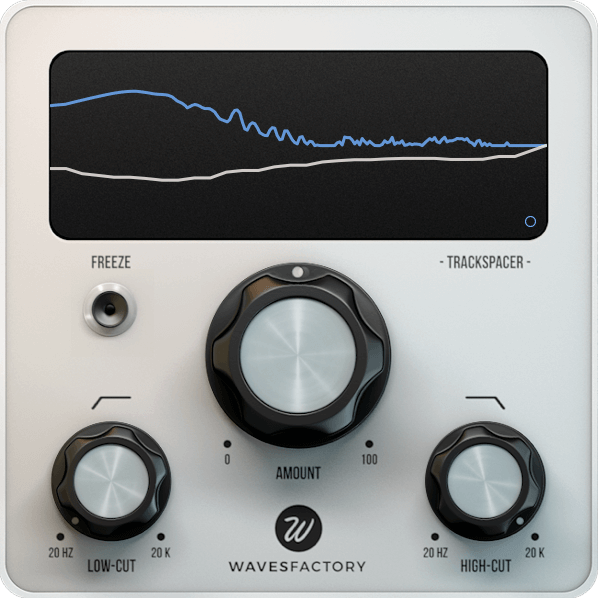
The Trackspacer plugin features a 32 band EQ that reacts to the incoming sidechain signal. It analyses the spectrum of the sidechain and applies a reversed EQ curve to another track. As if by magic, Trackspacer creates space for the primary track by cutting the exact frequencies on other tracks.
No more fighting for space for the vocal in a mix, or any other instrument for that matter. If you have a solo that needs the room to breathe then Trackspacer makes the task easy.
Complicated automation moves on your mix are a thing of the past!
Simple to Use
Trackspacer features a big centred knob that lets you set the amount of reduction applied in a simple and straightforward way, but it also features a set of parameters that let’s you go deep into how the signal is processed.
- Pan: lets you choose exactly where you want to apply the effect. In default stereo mode you can select the left channel, right channel or anything in between.
- M/S: in Mid / Side mode you can apply the effect to the mid-channel, the sides or anything in between.
- Attack/Release: set how Trackspacer reacts to the incoming signal, making it smoother or punchier like a regular compressor plugin.
- Sidechain: lets you listen to the incoming sidechain for easy tweaking of the low-cut and high-cut filters.
Not a Multi-band Compressor
Compressors react to the amplitude/volume/level of the audio signal on the track. Based on how loud the source signal is, they apply more or less compression.
Multi-band compressors split the signal in different bands and apply different settings on each band, but the detection is still the same as regular ones.
Trackspacer splits the sidechain source signal into 32 bands and analyses them individually. Then, it reverses the result and applies a 32 band EQ to duck (or carve) those exact same frequencies, giving the source track the space it needs to occupy in the mix… and all in real time!
That’s why the Trackspacer plugin is much better, more transparent and easier to use than regular compressors. It’s all in the detection!











Reviews
There are no reviews yet.