

Discover Wavesfactory Spectre (Windows)
Spectre is a sound-shaping tool that combines the best features of an enhancer coupled with a graphical parametric EQ.
DAW capable of hosting VST plug-ins, or Pro Tools.
Mono and Stereo signals
Left or Right channels only
Explore product features & full description
System Requirements
Windows
- Windows 7, 8 or 10 (64-bit only)
- DAW capable of hosting VST plug-ins, or Pro Tools.
Important note: this software is 64-bit only and will not function on 32-bit systems.

Colour Your Sound
Spectre is a sound-shaping tool that combines the best features of an enhancer coupled with a graphical parametric EQ.
Spectre processes the difference between the input signal and the EQ signal, introducing harmonic content to just the part of the spectrum that you want from a variety of saturation algorithms based on classic recording hardware.
Spectre can be used on individual tracks, sub-mixes, the entire mix and is ideal for mastering.
Multi-Band Enhancer
Spectre does not work like a conventional EQ. Spectre introduces harmonic content that was not in the original recording, bringing colour and life to the sound, not possible with a conventional EQ. This ability to offer almost phantom content across the audio spectrum led us to the name Spectre.
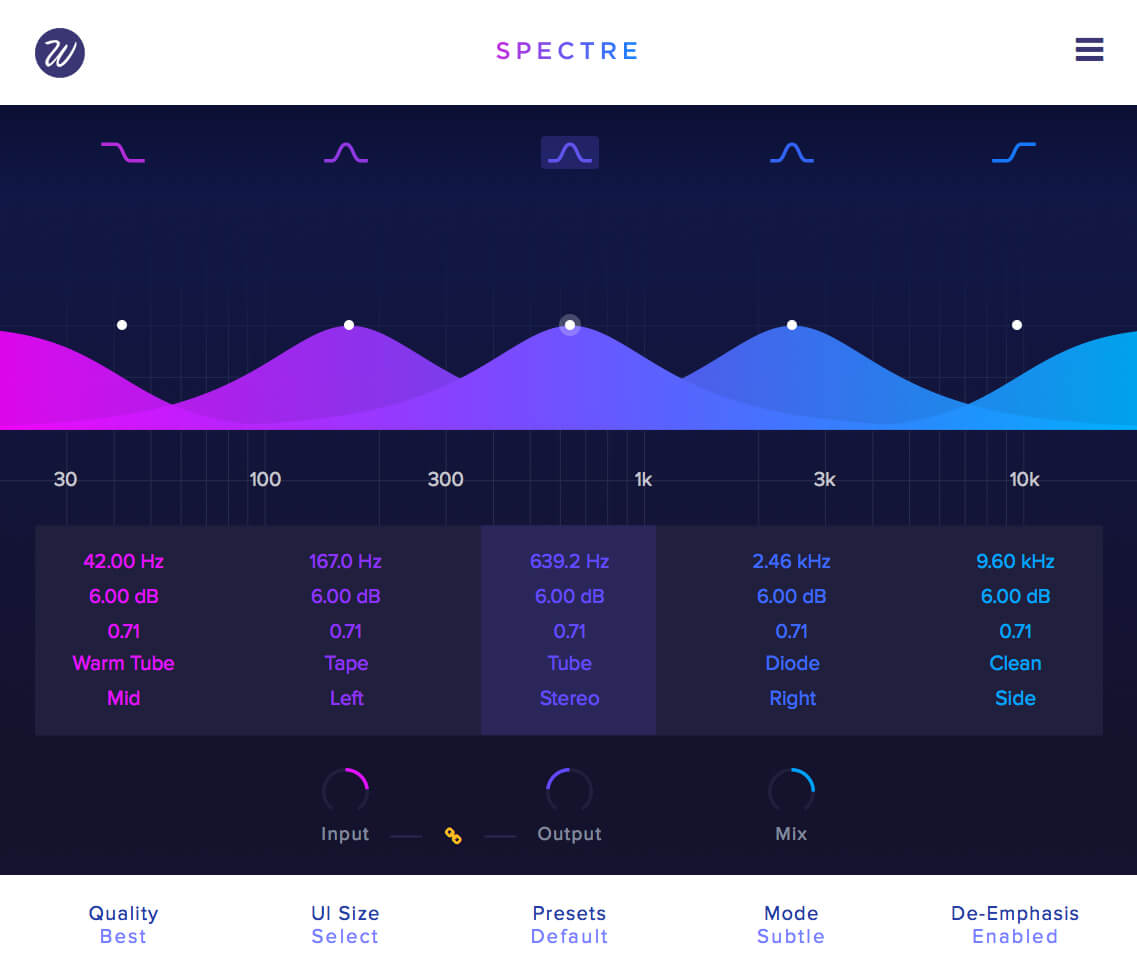
Spectre processes the incoming audio with a five-band parallel EQ: it extracts the difference between this signal and the dry input and processes it through one of the ten saturation algorithms included. It then it mixes it back with the dry input. The result is a signal full with character, colour, with bigger and warmer low frequencies, shiny shimmering highs and powerful mids.
It can bring dull recordings back to life, it can make a bass track more suitable for small speakers and it can even work as a high-end stereo widener thanks to the mid/side matrix.
Spectre lets you sculpt the sound of your tracks with an easy and familiar EQ workflow.
10 Saturation Algorithms
Spectre is more versatile than a simple enhancer as you can choose from ten different saturation algorithms to get different colours per band. It can go from the warmth of the valve to a harsh digital clipper, from creamy tape saturation to a chip bit crusher.
- Tube
- Warm Tube
- Solid
- Tape
- Diode
- Class B
- Bit
- Digital
- Rectify
- Half Rectify
You’ll find an additional mode which can be really useful: Clean. This mode doesn’t saturate the difference signal, converting Spectre into a parallel EQ where the results feel extremely natural, almost like if there were no process at all. It takes away the harshness of traditional EQ plug-ins and brings in the sweetness of parallel processors.
Elevate Your Sound
Optional 4x and 16x oversampling modes offer pristine audio quality with no aliasing even with aggressive settings.
With 3 saturation modes: subtle, medium and aggressive you have a quick way of warming up your tracks. Adjust the amount of harmonics with the input and output volume parameters for a more precise gain control.
The de-Emphasis mode compensates the EQ boosts after the distortion state. In practice, this means that the EQ boosting effect will be reduced or removed altogether, depending on the distortion style and how hard you’re driving it. You can add harmonics to parts of the spectrum without changing the level of existing content.
Spectre can process per band:
- Mono and Stereo signals
- Left or Right channels only
- Mid / Side channels only
When we say it’s the ultimate enhancer, they really mean it.
Compatibility checklist
- Confirm the supplied build, operating system and required host before ordering.
Requirements vary by supplied version. Confirm your setup with support before purchasing.
Delivery & activation
- Complete your purchaseReview compatibility and purchase details.
- Download your filesAccess available downloads through your order and account.
- Follow the included setup guideContact GetPlugins if you need installation help.
Activation, where included, is provided by GetPlugins. Publisher-account registration, transferable publisher keys and a publisher-issued licence are not included. Read the activation policy.
Frequently asked questions
How do I receive my download?
After payment, access available files from your order details and GetPlugins account. Contact support if a download is missing.
What activation is included?
Follow the activation instructions supplied with your download. Activation is provided by GetPlugins. Confirm device allowances and reinstall arrangements before ordering.
Will this work with my computer and DAW?
Check the compatibility information for this listing and ask us to confirm the exact supplied build. Libraries may require a compatible sampler or additional software.
What if I need installation help?
Email support@getplugins.io with your order number, operating system, DAW and any error message.
Which updates are included?
Activation and updates are separate. Confirm the available version and update arrangements before ordering; do not assume access to future publisher releases.
How do I request a refund?
Contact support with your order number and issue details. Read our Refund Policy for eligibility and the request process.







Reviews
There are no reviews yet.