W A Production – Detroubler (Windows)
£10.00
Discover W A Production – Detroubler (Windows)
Tired of mixes that sound muddy, harsh, or just... off? 🚫 Say hello to Detroubler – the revolutionary audio plugin by W.A. Production, crafted with cutting-edge psychoacoustic technology to target and tame the most fatiguing frequencies in your mix. 🧠🎶
Explore product features & full description
🎚️ W.A. Production – Detroubler
Tired of mixes that sound muddy, harsh, or just... off? 🚫 Say hello to Detroubler – the revolutionary audio plugin by W.A. Production, crafted with cutting-edge psychoacoustic technology to target and tame the most fatiguing frequencies in your mix. 🧠🎶
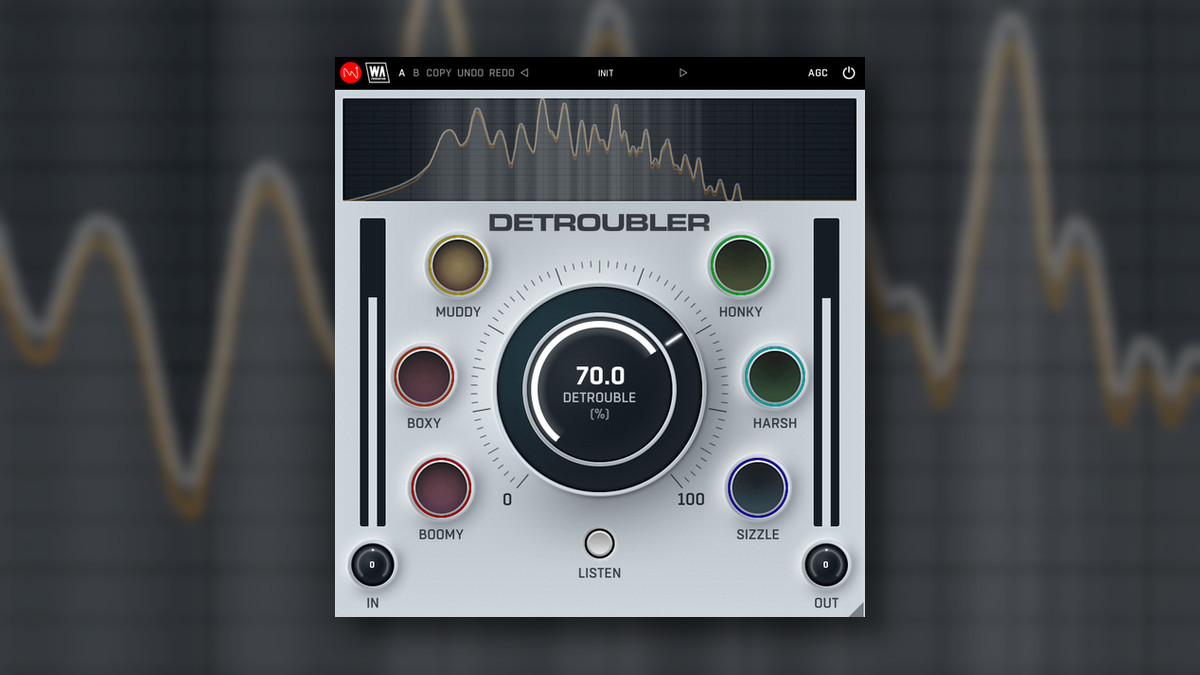
Unlike traditional EQs, Detroubler doesn’t just cut—it intelligently analyzes and softens problematic areas across six key frequency bands using the Bark Scale. The result? A smoother, more pleasant, and more professional-sounding mix that feels good to the ears. 🎵💡
🎯 Focus Areas – Fix What's Holding Your Mix Back:
🔊 Boomy – Eliminate low-end overload (100–250 Hz)
📦 Boxy – Remove the small-room resonance (150–250 Hz)
🌫️ Muddy – Clean up midrange clutter (200–500 Hz)
🎺 Honky – Tame brassy mids (500–1500 Hz)
⚠️ Harsh – Smooth piercing frequencies (2–6 kHz)
✨ Sizzle – Control excessive brightness (8–12 kHz)
🖥️ Advanced Visual Feedback
Watch your audio transform in real-time with a sleek, vector-based, resizable GUI and live spectrum display. Dive into the details with A/B comparison, undo/redo, and copy/paste options for a seamless workflow. 🎨📊
🎛️ Presets for Every Scenario
From subtle fixes to bold transformations, Detroubler comes packed with a massive library of factory presets – all designed by real producers for real results. Load, tweak, and go. 🔥
💡 Why Choose Detroubler Over Deres?
While Deres tackles resonant midrange build-up, Detroubler goes further—using psychoacoustic insights to refine how audio is perceived. It doesn’t just clean—it enhances. 🎯👂
🚀 Key Features:
✅ Psychoacoustic-based frequency correction
✅ Targets 6 ear-fatiguing zones
✅ Real-time spectrum display
✅ Listen Mode for surgical precision 🔍
✅ AB comparison + Undo/Redo
✅ Resizable & CPU-efficient interface
✅ Broad preset library for instant results
Compatibility checklist
- Windows 10,11 (64-bit Only)
- VST3, AAX
- Formats: VST3 · AAX
Requirements vary by supplied version. Confirm your setup with support before purchasing.
Delivery & activation
- Complete your purchaseReview compatibility and purchase details.
- Download your filesAccess available downloads through your order and account.
- Follow the included setup guideContact GetPlugins if you need installation help.
Activation, where included, is provided by GetPlugins. Publisher-account registration, transferable publisher keys and a publisher-issued licence are not included. Read the activation policy.
Frequently asked questions
How do I receive my download?
After payment, access available files from your order details and GetPlugins account. Contact support if a download is missing.
What activation is included?
Follow the activation instructions supplied with your download. Activation is provided by GetPlugins. Confirm device allowances and reinstall arrangements before ordering.
Will this work with my computer and DAW?
Check the compatibility information for this listing and ask us to confirm the exact supplied build. Libraries may require a compatible sampler or additional software.
What if I need installation help?
Email support@getplugins.io with your order number, operating system, DAW and any error message.
Which updates are included?
Activation and updates are separate. Confirm the available version and update arrangements before ordering; do not assume access to future publisher releases.
How do I request a refund?
Contact support with your order number and issue details. Read our Refund Policy for eligibility and the request process.

Reviews
There are no reviews yet.