Roland Cloud – RE 201 (Windows)
£33.00
Discover Roland Cloud – RE 201 (Windows)
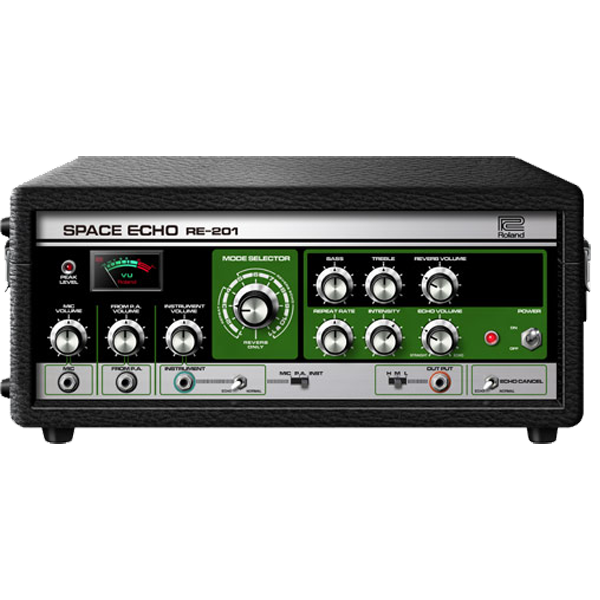
🌌 Roland Cloud – RE-201 Space Echo 🎛️✨ | Legendary Tape Delay, Perfectly Reborn
🌀 Authentic Analog Sound – Classic tape echo, spring reverb, and multi-head delay with precise modeling of the original hardware
🎧 Tape Texture Tools – Add vibe with Wow, Flutter, Motor Torque, and Condition controls for that worn-in analog feel
🎚️ Full Creative Control – Shape your echoes with adjustable Rate, Intensity, Reverb Volume, and more
Explore product features & full description
🌌 Roland Cloud – RE-201 Space Echo 🎛️✨ | Legendary Tape Delay, Perfectly Reborn
Step into a new dimension of delay with the Roland Cloud RE-201 Space Echo — a faithful virtual recreation of the iconic tape echo unit that shaped generations of music. From vintage dub to psychedelic rock, ambient soundscapes to modern lo-fi vibes, the RE-201 delivers lush, swirling delays and warm tape-saturated textures that instantly elevate your productions. 🎶🚀
🎸 Vintage Vibe Meets Modern Muscle
-
🌀 Authentic Analog Sound – Classic tape echo, spring reverb, and multi-head delay with precise modeling of the original hardware
-
🎧 Tape Texture Tools – Add vibe with Wow, Flutter, Motor Torque, and Condition controls for that worn-in analog feel
-
🎚️ Full Creative Control – Shape your echoes with adjustable Rate, Intensity, Reverb Volume, and more
-
🔄 Tempo Sync & LFO Modulation – 6 LFO shapes give you dynamic, rhythmic echoes locked to your track’s tempo
-
🔊 Built-In Preamp Coloration – Get that iconic analog warmth and presence with modeled preamp saturation
-
🎛️ Resizable UI + 50+ Inspiring Presets – A sleek, modern interface that fits any workflow, plus a huge library of ready-to-use sounds
Compatibility checklist
- Windows 10,11 (64-bit Only)
- VST3, AAX
- Formats: VST3 · AAX
Requirements vary by supplied version. Confirm your setup with support before purchasing.
Delivery & activation
- Complete your purchaseReview compatibility and purchase details.
- Download your filesAccess available downloads through your order and account.
- Follow the included setup guideContact GetPlugins if you need installation help.
Activation, where included, is provided by GetPlugins. Publisher-account registration, transferable publisher keys and a publisher-issued licence are not included. Read the activation policy.
Frequently asked questions
How do I receive my download?
After payment, access available files from your order details and GetPlugins account. Contact support if a download is missing.
What activation is included?
Follow the activation instructions supplied with your download. Activation is provided by GetPlugins. Confirm device allowances and reinstall arrangements before ordering.
Will this work with my computer and DAW?
Check the compatibility information for this listing and ask us to confirm the exact supplied build. Libraries may require a compatible sampler or additional software.
What if I need installation help?
Email support@getplugins.io with your order number, operating system, DAW and any error message.
Which updates are included?
Activation and updates are separate. Confirm the available version and update arrangements before ordering; do not assume access to future publisher releases.
How do I request a refund?
Contact support with your order number and issue details. Read our Refund Policy for eligibility and the request process.

Reviews
There are no reviews yet.