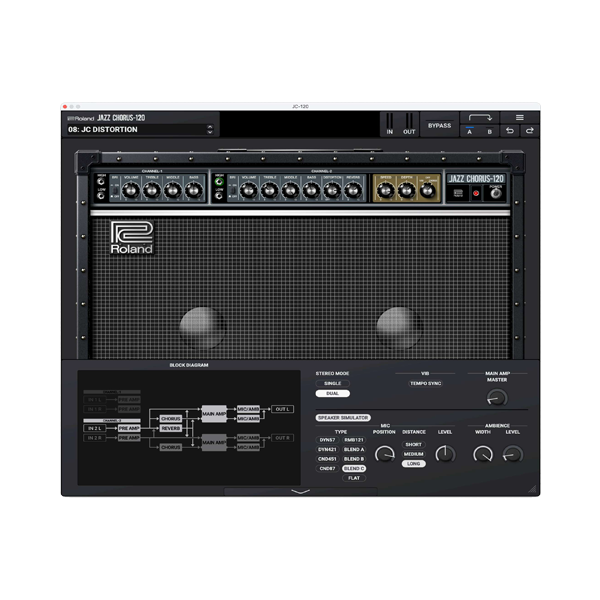
Roland Cloud – JC 120 (Windows)

 Roland Cloud - JC 120 (Windows) | Iconic Jazz Chorus Tone in Your DAW! 🌟
Formats: VST3 · AAX

£20.00

Discover Roland Cloud – JC 120 (Windows)

 Roland Cloud - JC 120 (Windows) | Iconic Jazz Chorus Tone in Your DAW! 🌟

Clean & Bright – Sparkling highs, punchy mids

"High Boost" Mode – Extra presence for solos

Stereo Chorus – From subtle shimmer to swirling depth

Explore product features & full description

 Roland Cloud - JC 120 (Windows) | Iconic Jazz Chorus Tone in Your DAW! 🌟

Experience the Legendary JC-120 Amp – The Clean Machine That Shaped Decades of Music History! 🎶✨

🔥 Why the JC 120 Plugin?

✔ 1:1 Emulation of Roland’s most famous amp – the ultra-clean Jazz Chorus 120
✔ Crystal-Clear Stereo Chorus – The same lush modulation used on countless hits
✔ Vibrant Stereo Image – Iconic dual-speaker sound that cuts through any mix
✔ Built-In Noise Gate & EQ – Tighten your tone without extra plugins
✔ VST3/AAX – Seamless DAW integration

🎛️ Authentic Features:

🎶 Dual-Channel Amp

  • Clean & Bright – Sparkling highs, punchy mids
  • "High Boost" Mode – Extra presence for solos

🌀 Legendary Effects

  • Stereo Chorus – From subtle shimmer to swirling depth
  • Built-In Reverb – Plate-style ambiance

⚡ Play Like the Pros

  • Used by Andy Summers (The Police), Robert Smith (The Cure), Metallica (clean tones), and more!

🎯 Perfect For:

  • 🎸 Clean Guitar Lovers – Jazz, indie, post-punk, shoegaze
  • 🎹 Keyboardists – Iconic 80s electric piano & synth pads
  • 🎶 Producers needing pristine, chorus-drenched tones
  • 🎧 Mix Engineers – The ultimate "always works" clean amp
Compatibility checklist

  • Windows 10,11 (64-bit Only)
  • VST3, AAX
  • Formats: VST3 · AAX

Requirements vary by supplied version. Confirm your setup with support before purchasing.

Delivery & activation

  1. Complete your purchaseReview compatibility and purchase details.
  2. Download your filesAccess available downloads through your order and account.
  3. Follow the included setup guideContact GetPlugins if you need installation help.

Activation, where included, is provided by GetPlugins. Publisher-account registration, transferable publisher keys and a publisher-issued licence are not included. Read the activation policy.

Frequently asked questions

How do I receive my download?

After payment, access available files from your order details and GetPlugins account. Contact support if a download is missing.

What activation is included?

Follow the activation instructions supplied with your download. Activation is provided by GetPlugins. Confirm device allowances and reinstall arrangements before ordering.

Will this work with my computer and DAW?

Check the compatibility information for this listing and ask us to confirm the exact supplied build. Libraries may require a compatible sampler or additional software.

What if I need installation help?

Email support@getplugins.io with your order number, operating system, DAW and any error message.

Which updates are included?

Activation and updates are separate. Confirm the available version and update arrangements before ordering; do not assume access to future publisher releases.

How do I request a refund?

Contact support with your order number and issue details. Read our Refund Policy for eligibility and the request process.

Customer Reviews

Reviews

There are no reviews yet.

Be the first to review “Roland Cloud – JC 120 (Windows)”

Your email address will not be published. Required fields are marked *