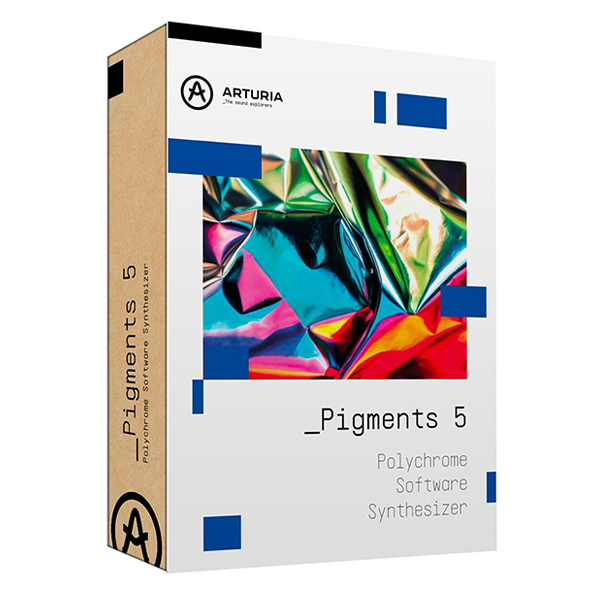
Arturia Pigments 5 (Windows)

Pigments is a software VST with the power to create any sound, from the best mix-ready modern presets…
Formats: VST3 · AAX · Standalone · VST

£30.00

Discover Arturia Pigments 5 (Windows)

Pigments is a software VST with the power to create any sound, from the best mix-ready modern presets to deep custom sound design. Explore every shade of synthesis and make your wildest sonic fantasy a full-color reality, whatever your style.

Virtual Analog triple-osc engine

Complex Wavetable engine

Sample and Granular engine

Explore product features & full description

Pigments

Polychrome software synthesizer.

Pigments is a software VST with the power to create any sound, from the best mix-ready modern presets to deep custom sound design. Explore every shade of synthesis and make your wildest sonic fantasy a full-color reality, whatever your style.

Bridging the gap between mind and matter

A revolution in modern synthesis, Pigments’ approach to sound design is as intricate as it is accessible. Craft epic, high-resolution, surgically-precise, and hard-hitting sounds with an all-encompassing interface, tailor-made for forward-thinking producers.

Limitless sound design

A powerful end-to-end software synthesizer, Pigments makes it easier than ever to explore an infinite spectrum of sound. Four forms of synthesis, 1500 + sounds, one-click modulation & sequencing, immediately expressive macros & FX - all instantly gratifying to use.

Vibrant and intuitive workflow

Visualize and refine your sound in style with an interface that matches your creative flow. Whether honing a composition in the Play View, tuning a color-coded modulation, or seeing a patch or preset come alive with dynamic visualization - Pigments invite play and support process.

On the pulse

Pigments’ sonic powers truly shine at the forefront of contemporary music production. Its vast and clear-cut sounds are no stranger to the world’s leading electronic genres - from trap, bass music, and EDM to house, electro, lo-fi, electronica, cinematic sounds, and beyond.

Make it your own

Personalize Pigments to suit your setup and create your sounds with custom appearance, play modes, audio routing, preset playlists, external sound sources, and more.

Main Features

Two engines in parallel

  • Virtual Analog triple-osc engine
  • Complex Wavetable engine
  • Sample and Granular engine
  • Harmonic Oscillator additive engine
  • Includes Engine Crossmod

Utility Engine

  • 5-shape Virtual Analog Oscillator
  • 2 Sample-based Noise Engines
  • External audio input

Two filters

  • Classic filter types from V Collection instruments
  • Modern filter types
  • Continuous series/parallel routing

Powerful FX section

  • 2 Insert buses, 1 Send bus, 3 FX per bus
  • Modulable parameters
  • 18 algorithms including Shimmer Reverb, MultiBand Compressor, Chorus JUN-6, and more.

Advanced modulation system

  • Color-coded workflow
  • Drag-and-drop assign, hover-over adjustment
  • Envelopes, LFOs, Function generators, Random src, and more
  • 4 dynamic, assignable Macro controls

Visual interface

  • Graphical representation of the most important modules
  • Simplified Play Mode
  • Dark or Light themes

Compatibility checklist

  • Windows 10,11 (64Bit Only)
  • VST, VST3, AAX and Standalone
  • Formats: VST3 · AAX · Standalone · VST

Requirements vary by supplied version. Confirm your setup with support before purchasing.

Delivery & activation

  1. Complete your purchaseReview compatibility and purchase details.
  2. Download your filesAccess available downloads through your order and account.
  3. Follow the included setup guideContact GetPlugins if you need installation help.

Activation, where included, is provided by GetPlugins. Publisher-account registration, transferable publisher keys and a publisher-issued licence are not included. Read the activation policy.

Frequently asked questions

How do I receive my download?

After payment, access available files from your order details and GetPlugins account. Contact support if a download is missing.

What activation is included?

Follow the activation instructions supplied with your download. Activation is provided by GetPlugins. Confirm device allowances and reinstall arrangements before ordering.

Will this work with my computer and DAW?

Check the compatibility information for this listing and ask us to confirm the exact supplied build. Libraries may require a compatible sampler or additional software.

What if I need installation help?

Email support@getplugins.io with your order number, operating system, DAW and any error message.

Which updates are included?

Activation and updates are separate. Confirm the available version and update arrangements before ordering; do not assume access to future publisher releases.

How do I request a refund?

Contact support with your order number and issue details. Read our Refund Policy for eligibility and the request process.

Customer Reviews

Reviews

There are no reviews yet.

Be the first to review “Arturia Pigments 5 (Windows)”

Your email address will not be published. Required fields are marked *