iZotope – VEA (Windows)
£20.00
Discover iZotope – VEA (Windows)
VEA is an AI audio enhancer that takes any voice recording and makes it more powerful, more polished, and more professional. This easy-to-use tool is perfect for podcasters and content creators of all skill sets, whether you’re a beginner or a seasoned pro.
Explore product features & full description
Enjoy the sound of your voice
VEA is an AI audio enhancer that takes any voice recording and makes it more powerful, more polished, and more professional. This easy-to-use tool is perfect for podcasters and content creators of all skill sets, whether you’re a beginner or a seasoned pro.
VEA Features
Built with industry-leading audio enhancement technology from RX, Ozone, and Nectar, VEA increases clarity, sets more consistent levels, and reduces background noise.
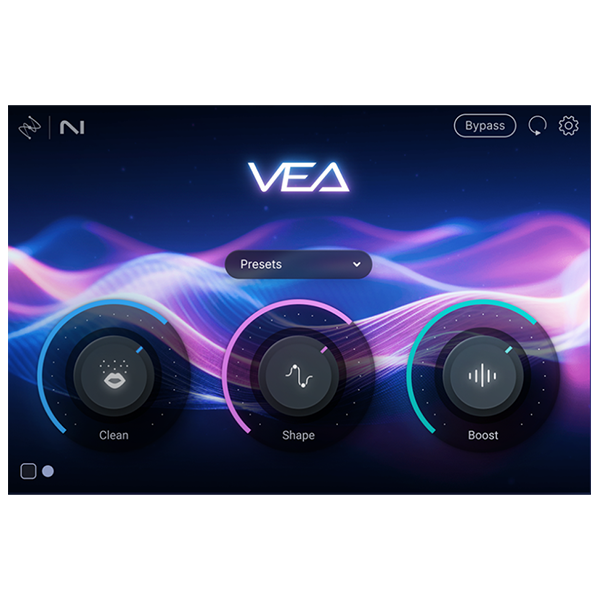
Shape
VEA’s Shape control is tailored to your voice, instantly making you sound more polished and professional. No more playing with equalizers or surfing presets to improve your voice mixing. Whether you're narrating a video or hosting an interview on your podcast, VEA ensures your voice sounds audience-ready in seconds.
Boost
Easily add presence and power to your voice with Boost. VEA takes the guesswork out of voice mixing. Don’t worry about understanding compression and limiting, just focus on sounding your best. For content producers, this means getting an even sound for your vlogs and tutorials to create a smoother and more engaging experience for your audience.
Clean
VEA features essential noise reduction software that trims noise while leaving your voice sounding great. The Clean control helps de-noise your audio, taking background noise out of the spotlight so your voice can shine. Recording a vlog under the AC? Taking a virtual interview with signal interference? It’s no problem with VEA.
Compatibility checklist
- Windows 10,11 (64Bit Only)
- VST3, AAX
- Formats: VST3 · AAX
Requirements vary by supplied version. Confirm your setup with support before purchasing.
Delivery & activation
- Complete your purchaseReview compatibility and purchase details.
- Download your filesAccess available downloads through your order and account.
- Follow the included setup guideContact GetPlugins if you need installation help.
Activation, where included, is provided by GetPlugins. Publisher-account registration, transferable publisher keys and a publisher-issued licence are not included. Read the activation policy.
Frequently asked questions
How do I receive my download?
After payment, access available files from your order details and GetPlugins account. Contact support if a download is missing.
What activation is included?
Follow the activation instructions supplied with your download. Activation is provided by GetPlugins. Confirm device allowances and reinstall arrangements before ordering.
Will this work with my computer and DAW?
Check the compatibility information for this listing and ask us to confirm the exact supplied build. Libraries may require a compatible sampler or additional software.
What if I need installation help?
Email support@getplugins.io with your order number, operating system, DAW and any error message.
Which updates are included?
Activation and updates are separate. Confirm the available version and update arrangements before ordering; do not assume access to future publisher releases.
How do I request a refund?
Contact support with your order number and issue details. Read our Refund Policy for eligibility and the request process.

Reviews
There are no reviews yet.