
Discover Zynaptiq – Unmix Drums (Windows)
Take total command of your drums with Zynaptiq UNMIX::DRUMS, the world’s first real-time drum isolation plugin for mixed audio. Designed for producers, mastering engineers, DJs, and sound designers, UNMIX::DRUMS lets you boost or reduce drums inside any stereo mix — no stems required. Whether you're rescuing a muddy beat, remixing a classic track, or surgically…
🎛️ Bass Synth – Clean, deep, musical sub enhancement powered by sample-accurate resynthesis
✂️ Impact Equalization – Adjust transient detail without a compressor
🎚️ Drum Solo/Mute Macros – Instantly preview or remove drums with smart toggle controls
Explore product features & full description
🥁 Zynaptiq UNMIX::DRUMS for Windows 🎛️
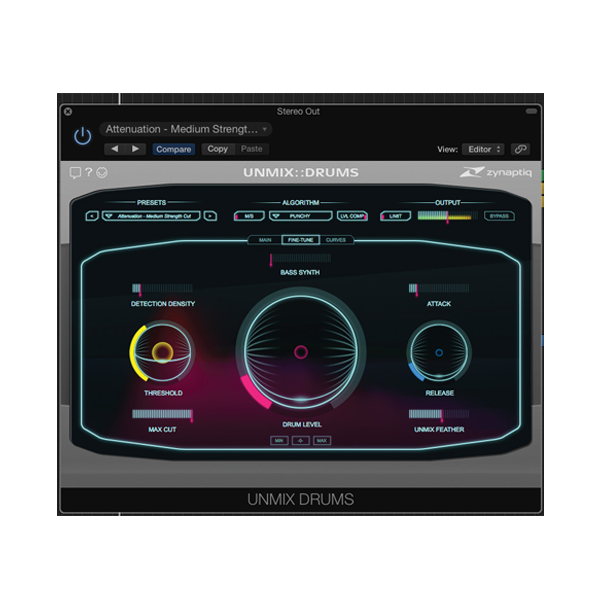
Take total command of your drums with Zynaptiq UNMIX::DRUMS, the world’s first real-time drum isolation plugin for mixed audio. Designed for producers, mastering engineers, DJs, and sound designers, UNMIX::DRUMS lets you boost or reduce drums inside any stereo mix — no stems required. Whether you're rescuing a muddy beat, remixing a classic track, or surgically sculpting your rhythm section, this cutting-edge plugin gives you studio-grade results in seconds. 🔥🕹️

⚙️ Key Features:
🥁 Drum-Level Control in Any Mix – Boost or cut drum presence up to ±18dB
🚀 Real-Time De-Mixing Technology – Works directly on the stereo master
🎯 SMOOTH & PUNCHY Boost Modes – Choose your flavor: natural or tight and aggressive
📊 Frequency-Dependent Adjustments – Fine-tune drums with surgical precision
🔁 Sample-Accurate Sub-Bass Synth – Add clean, punchy low-end without muddying your mix
🎛️ Minimalist 3-Layer UI – Focused, streamlined interface for fast workflows
🧠 CURVES Impact EQ View – Control drum punch without compressors or transients
🎧 M/S Processing & Built-in Limiter – Pro-grade tools for mastering-ready output
📦 Artist-Crafted Presets – Quick-start your sessions with expertly dialed-in settings
🎵 Why UNMIX::DRUMS Is a Game-Changer:
UNMIX::DRUMS isn’t just another EQ or transient shaper — it’s a smart audio separation engine that detects and isolates percussive content in real-time. You can turn drums up or down inside a mastered track, tweak their tone frequency-by-frequency, or even remove them completely for remixing or mashups. No artifacts, no phase issues, no hassle. 🎯🔬
🔧 Need to soften harsh snares in a stereo mix?
💣 Want to add thunderous sub energy to a weak kick?
🚫 Removing drums for sampling, remixes or vocal overlays?
✅ With UNMIX::DRUMS, it’s all just a few clicks away.
🧠 Bonus Creative Tools:
-
🎛️ Bass Synth – Clean, deep, musical sub enhancement powered by sample-accurate resynthesis
-
✂️ Impact Equalization – Adjust transient detail without a compressor
-
🎚️ Drum Solo/Mute Macros – Instantly preview or remove drums with smart toggle controls
🎯 Perfect For:
🎧 Producers & Beatmakers – Isolate or tweak drums in sample-based tracks
🎚️ Mastering Engineers – Fix or enhance drums without multitrack sessions
🎶 Remix Artists & DJs – Remove or repurpose drum content effortlessly
🥁 Sound Designers – Extract rhythmic textures or reshape grooves creatively
🎬 Post-Production Editors – Adjust or tame percussion in full audio mixes
✅ Why Choose UNMIX::DRUMS?
✔️ First-of-its-kind real-time drum manipulation plugin
✔️ Pro-grade precision with zero-latency operation
✔️ Creative & corrective tool all in one powerful package
✔️ Compatible with all major Windows DAWs (VST, AAX)
✔️ Trusted by audio professionals in music, post-production, and sound design
Compatibility checklist
- Windows 10,11 (64-bit Only)
- VST,VST3
- Formats: VST3 · VST
Requirements vary by supplied version. Confirm your setup with support before purchasing.
Delivery & activation
- Complete your purchaseReview compatibility and purchase details.
- Download your filesAccess available downloads through your order and account.
- Follow the included setup guideContact GetPlugins if you need installation help.
Activation, where included, is provided by GetPlugins. Publisher-account registration, transferable publisher keys and a publisher-issued licence are not included. Read the activation policy.
Frequently asked questions
How do I receive my download?
After payment, access available files from your order details and GetPlugins account. Contact support if a download is missing.
What activation is included?
Follow the activation instructions supplied with your download. Activation is provided by GetPlugins. Confirm device allowances and reinstall arrangements before ordering.
Will this work with my computer and DAW?
Check the compatibility information for this listing and ask us to confirm the exact supplied build. Libraries may require a compatible sampler or additional software.
What if I need installation help?
Email support@getplugins.io with your order number, operating system, DAW and any error message.
Which updates are included?
Activation and updates are separate. Confirm the available version and update arrangements before ordering; do not assume access to future publisher releases.
How do I request a refund?
Contact support with your order number and issue details. Read our Refund Policy for eligibility and the request process.








Reviews
There are no reviews yet.