
Discover Zynaptiq – Unfilter (Windows)
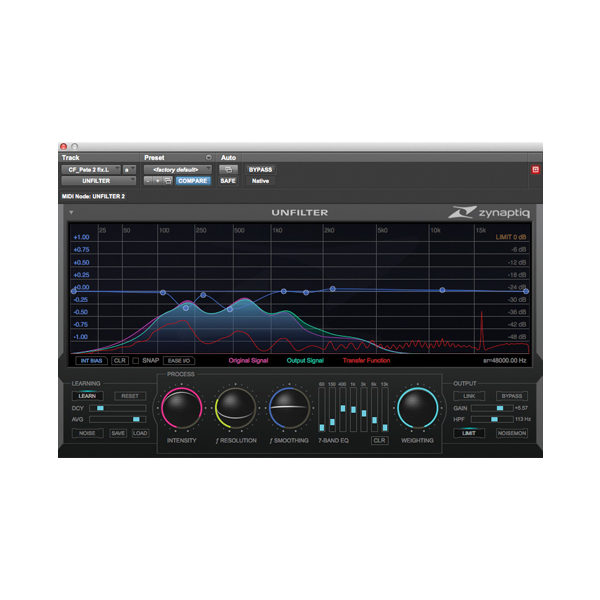
Zynaptiq UNFILTER (Windows) is a revolutionary real-time audio plugin designed to automatically detect and remove frequency response issues like resonance, comb filtering, excessive EQ, and tonal coloration. Whether you're mixing music, editing dialogue, designing game audio, or restoring forensic recordings, UNFILTER delivers pro-grade results in seconds — no guesswork, no compromises. 🎯🔊
Explore product features & full description
🎛️ Zynaptiq UNFILTER for Windows 🎧
Zynaptiq UNFILTER (Windows) is a revolutionary real-time audio plugin designed to automatically detect and remove frequency response issues like resonance, comb filtering, excessive EQ, and tonal coloration. Whether you're mixing music, editing dialogue, designing game audio, or restoring forensic recordings, UNFILTER delivers pro-grade results in seconds — no guesswork, no compromises. 🎯🔊
🔬 Powered by advanced blind de-convolution DSP technology, UNFILTER gives you the ability to analyze, correct, and enhance spectral balance with a simple and intuitive interface. Say goodbye to hours of tweaking — and hello to effortless clarity. 💡🎶

⚙️ Key Features & Benefits:
🎚️ Auto-Corrective Magic – Instantly remove unwanted EQ, resonances & comb filtering
🎨 IR Profile Tools – Apply, save, or export acoustic “fingerprints” (WAV impulse responses)
🎛️ Triple Threat EQ Engine – Adaptive EQ, Free-Form EQ & 7-Band Graphic EQ
🌀 Real-Time Blind De-Convolution – Reconstruct the original signal with surgical precision
📂 Impulse Response I/O – Import or export linear/minimum-phase filter curves
🚀 Super-Steep HP Filter – 96dB/oct shelving to eliminate low-end rumble
🧠 Streamlined UI – Achieve mix-ready results in seconds
🛡️ Built-In Limiter – Batch process confidently with auto-level protection
🪟 Windows Optimized – Fully compatible with major DAWs on Windows platforms
👥 Perfect For:
🎙️ Dialogue Editors & ADR Specialists – Remove mic coloration & blend ADR seamlessly
🎬 Film & TV Post-Production – Restore production sound, synthesize room tone, match scenes
🎧 Mixing & Mastering Engineers – Clean muddy recordings, enhance tonal clarity, fix buildup
🎮 Game Audio Creators – Shape environments, design textures, and create immersive worlds
📻 Broadcast & ENG Professionals – Balance speech and music on-the-fly, improve clarity
🕵️♂️ Forensic Audio Experts – Boost hidden details, restore occluded speech, isolate voices
🧪 What Makes UNFILTER Unique?
UNFILTER isn’t just another EQ. It’s an intelligent, self-correcting processor that reverse-engineers the spectral imprint left by unwanted filters — and removes it with near-magical precision. Using cutting-edge real-time de-convolution algorithms, it restores transparency, balance, and definition faster than any manual process. 💥📊
🎨 Creativity Meets Control
UNFILTER is just as much a creative tool as it is a technical fix. Apply tonal curves from one sound to another, build your own color library using IR exports, or reshape entire soundscapes with adaptive EQ that dynamically reacts to audio changes. Want to simulate different environments? Enhance textures? Create living, breathing tones from static sounds? UNFILTER makes it effortless. 🔄🌈
✅ Why Professionals Trust UNFILTER:
✔️ Fix unwanted coloration in seconds
✔️ Match tonal characteristics across takes
✔️ Enhance mix translation across devices
✔️ Save hours on dialogue cleanup and EQ matching
✔️ Deliver pristine, broadcast-ready results every time
Compatibility checklist
- Windows 10,11 (64-bit Only)
- VST,VST3
- Formats: VST3 · VST
Requirements vary by supplied version. Confirm your setup with support before purchasing.
Delivery & activation
- Complete your purchaseReview compatibility and purchase details.
- Download your filesAccess available downloads through your order and account.
- Follow the included setup guideContact GetPlugins if you need installation help.
Activation, where included, is provided by GetPlugins. Publisher-account registration, transferable publisher keys and a publisher-issued licence are not included. Read the activation policy.
Frequently asked questions
How do I receive my download?
After payment, access available files from your order details and GetPlugins account. Contact support if a download is missing.
What activation is included?
Follow the activation instructions supplied with your download. Activation is provided by GetPlugins. Confirm device allowances and reinstall arrangements before ordering.
Will this work with my computer and DAW?
Check the compatibility information for this listing and ask us to confirm the exact supplied build. Libraries may require a compatible sampler or additional software.
What if I need installation help?
Email support@getplugins.io with your order number, operating system, DAW and any error message.
Which updates are included?
Activation and updates are separate. Confirm the available version and update arrangements before ordering; do not assume access to future publisher releases.
How do I request a refund?
Contact support with your order number and issue details. Read our Refund Policy for eligibility and the request process.









Reviews
There are no reviews yet.