We are pleased to announce the release of ValhallaDelay 3.0.0 update. Major changes: two new delay modes, Chrome Tape and Analog!
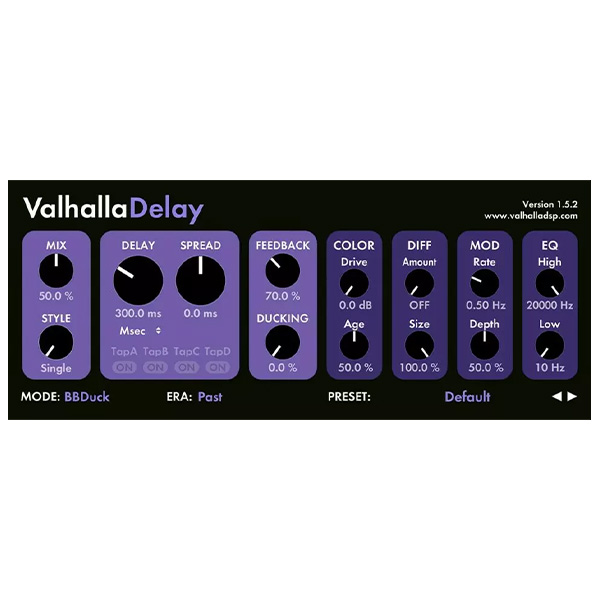
ValhallaDelay is a classic and modern system of delay and echo. Tape delay, BBD, old school digital, pitch shift all in one plugin. ValhallaDelay expands the classic into new dimensions with unique Ratio and Quad delay styles, a Ghost mode (which adds frequency shift) and a powerful diffuse section that can create anything from smeared echoes to ethereal reverbs.
ValhallaDelay has seven unique delay modes (Tape, HiFi, BBD, Digital, Ghost, Pitch, RevPitch) and five delay styles (Single, Dual, Ratio, PingPong, Quad). By combining modes and styles, you can get classic tape echoes, Bucket Brigade chip-style delays, old-school digital delays, pitch doublers, reversed delays, elusive chorus… the list goes on and on.
We spent much time modeling vintage hardware delays, but we didn’t stop there. A lot of thought has gone into the ValhallaDelay controls. The GUI has all the necessary controls for such a generic delay while leaving only the controls you need, so the interface is fast and easy to use. All controls are on the same screen – no hidden tabs or menus.
The goal is to create an instrument that you can quickly master to get the sounds you want and get the job done!
What’s new in version 3.0.0
Analog: More real than real
Analog is a Brigade Bucket echo model but with some modern twists. It uses a compounded BBD model like the original ValhallaDelay BBD mode but with 2x the bandwidth, 1/2 the noise, and a new saturation model that sounds closer to the fatter BBD units. The analog sound is much brighter than a real BBD unit, but less bright than a digital delay. The result is the perfect frequency balance for delays, choruses, and reverbs. Dark enough to have character and cut off unpleasant highs, but bright enough to avoid muddying. We use Analog non-stop in our music production. It may be our favorite mode in ValhallaDelay.
Analog: More real than real
Chrome Tape is very close to the original Tape mode in ValhallaDelay but with significantly reduced feedback noise and tape splice artifacts (tape splice artifacts will be removed in version 3.0.1). This makes Chrome Tape a less accurate model of old-school tape delays than the original Tape mode, but it’s also an answer to users who like the sound of Tape but want fewer artifacts. It sounds boring, but Chrome Tape turns out to be incredibly useful in a mix.










Reviews
There are no reviews yet.