Unison – Mangler
Creative Distortion & Sound Design Effects Plugin
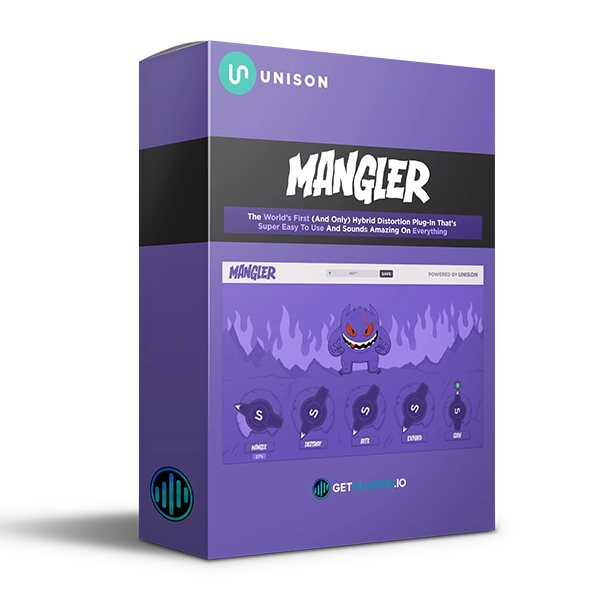
Unison Mangler is a creative audio effects plugin designed to transform ordinary sounds into aggressive, distorted, wide, and character-filled sounds using a simple four-knob interface.
Instead of navigating through complicated effect chains, Mangler puts four powerful processing controls directly at your fingertips: Mangle, Destroy, Bite, and Expand.
From subtle saturation and compression to extreme distortion, digital bitcrushing, and ultra-wide stereo processing, Mangler provides a fast workflow for producers and sound designers looking to add character and energy to their tracks.
Explore our audio effects and music production plugins for more creative processing tools.
Four Knobs. Endless Sound Possibilities.
Mangler is built around four dedicated controls, each designed to dramatically change the character of your sound.
Mangle
The Mangle control activates a custom hybrid distortion and compression effect designed to add character, density, and energy.
Use it to make sounds feel more aggressive and present without building a complex processing chain manually.
Destroy
The Destroy control delivers aggressive analog-style distortion for extreme sound shaping.
Push it harder for heavily saturated and destructive textures or use lower settings to add warmth and attitude.
Bite
The Bite control introduces bitcrushing for a more digital, gritty, and distinctive character.
It's useful for adding:
- Digital grit
- Lo-fi character
- Crunch
- Texture
- Aggressive transients
- Experimental effects
Expand
The Expand control enhances stereo width, helping sounds occupy a larger space in the mix.
Use it to create wider synths, effects, drums, vocals, and other elements.
Professional Effect Chains in Seconds
Mangler is designed to simplify creative processing.
Instead of loading multiple plugins and manually adjusting complicated chains, you can use its four controls to quickly transform your sound.
This makes it particularly useful when you need to experiment quickly and find new sonic directions.
Creative Sound Design
Mangler can be used on a wide range of sources, including:
- Drums
- Bass
- Synths
- Vocals
- Leads
- Loops
- Samples
- FX
- Sound-design elements
- Full mixes
Whether you're producing electronic music, hip-hop, trap, EDM, experimental music, or cinematic sound design, Mangler provides fast access to creative processing.
Distortion, Bitcrushing & Stereo Widening
Mangler combines several popular sound-design techniques into one streamlined plugin.
Its processing can help you create:
- Aggressive drums
- Distorted bass
- Gritty synths
- Lo-fi textures
- Wide leads
- Experimental effects
- Saturated vocals
- Creative transitions
- Digital sound effects
For additional distortion, saturation and mixing plugins, explore our collection.
Simple & Fast Workflow
Mangler is designed for producers who want immediate results.
The four-knob workflow makes it easy to experiment without spending excessive time adjusting technical parameters.
Simply turn the controls and listen to how your sound changes.
This makes Mangler suitable for both beginners and experienced producers who want a fast creative effects solution.
Key Features
- Four-knob creative effects workflow
- Hybrid distortion and compression
- Aggressive analog-style distortion
- Bitcrushing effect
- Stereo widening
- Creative sound manipulation
- Fast effect-chain creation
- Simple user interface
- Suitable for drums, bass, synths and vocals
- Designed for modern music production
- Useful for sound design and experimental processing
Perfect For
- Music Producers
- EDM Producers
- Electronic Music Producers
- Hip-Hop Producers
- Trap Producers
- Sound Designers
- Beat Makers
- Mixing Engineers
- Experimental Producers
- Synth Producers
- Vocal Producers
Why Choose Unison Mangler?
Unison Mangler brings multiple creative processing techniques together in an extremely simple workflow.
With Mangle, Destroy, Bite, and Expand, you can quickly add distortion, compression, digital grit, and stereo width to almost any sound.
Whether you want subtle character or extreme sound destruction, Mangler provides a fast way to experiment and create distinctive sonic textures.
Explore our creative audio plugins and discover more tools for modern music production. Unison Audio Official Website


Reviews
There are no reviews yet.