SpecCraft is a next-generation dynamic resonance suppressor, spectral compressor, and intelligent equalizer. It specializes in eliminating the worst enemy in your mix: unwanted resonances. Whether they’re sharp, piercing sounds or dirty hits, SpecCraft recognizes them all and dynamically applies the appropriate suppression to each audio frame.
But wait, there’s more! Not only does SpecCraft help you “find and fix” resonance problems, it can also fill the void by generating real-time spectrum compensation curves, ensuring there are no dynamic losses or artifacts due to resonance suppression.
With SpecCraft, your mix will stay clean, balanced, and full of life from start to finish.
Advanced Resonance Suppression, a Practical Workflow
Resonances aren’t inherently bad – unwanted resonances are bad. That’s why it’s better to correct them gently than to suppress them forcefully. SpecCraft’s comprehensive and concise controls let you spot unwanted resonances faster than ever before, while its carefully crafted algorithms suppress them with unrivaled efficiency. And it’s all done with just simple clicks and drags, the same way you’re most familiar with dynamics processors.
Adaptive Real-Time Threshold Control
At the same time, SpecCraft offers an intelligent, real-time, amplitude-based threshold algorithm that continuously finds the optimal amplitude threshold for the resonances that need to be suppressed, acting as a self-adapting threshold automation. You can choose fully automatic, fully manual threshold adjustment, or anything in between. You’re Sherlock, and SpecCraft is your Watson.
Self-Adaptive Spectral Compensation
Like the yin-yang balance, if we only suppress and do not boost, the overall audio spectrum inevitably becomes flat and lacking. To restore balance, you may have heard of a common mixing practice: applying narrow Q cuts to remove harsh resonances, followed by wide Q boosts to improve the overall frequency band. Based on this approach, SpecCraft includes its proprietary “self-adaptive spectral compensation” algorithm, which continuously calculates three potential global EQ compensation curves based on the number, frequencies, and levels of suppressed resonances. These intelligent improvements allow SpecCraft to avoid flat, unnatural, and overly compressed sound by effectively managing resonances.
Dynamic Compensation
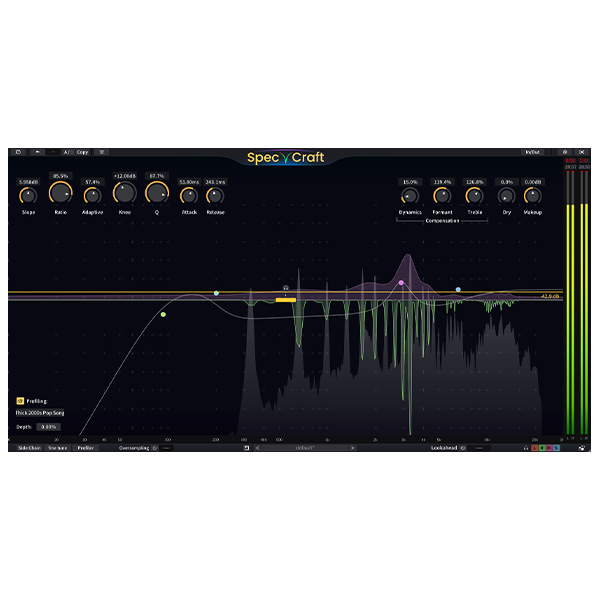
A psychoacoustic algorithm that continuously compensates for the loss of loudness due to resonance suppression. By restoring the dynamics (loudness envelope) of audio content, it preserves the perceived sound energy while eliminating unwanted resonances.
Formant Enhancement
When a resonance is overly suppressed, the formant (spectral envelope) flattens out, causing sounds to lose their distinctiveness. This algorithm can continuously compensate for the contribution of suppressed resonances to their formants while preserving the spectral character of the sound.
High-Frequency Compensation
A dedicated high-frequency response compensation algorithm with adjustable strength. When handling bright cymbals, compensation can be applied to preserve their presence while eliminating harshness; when handling vocal sibilants, no compensation can be selected, allowing SpecCraft to function as a de-esser.
Spectrum Slope
Different audio content can exhibit different frequency balances, making it difficult to maintain a flat threshold curve in all situations. With Spectrum Slope, you can tilt the spectral display from 0 dB/OCT to 12 dB/OCT, ensuring that both high and low unwanted resonances interact equally with the threshold curve.
Priority Curve
Like all Three-Body Technology products, SpecCraft offers maximum flexibility. In addition to the Threshold, Adaptive Threshold, and Slope controls, the carefully designed Priority Curve allows you to fine-tune the amount of processing in the various frequency ranges to shape the frequency envelope with surgical precision.
Profiling
With SpecCraft, you can apply a custom frequency response curve as a threshold – similar to EQ mapping but performed dynamically for each audio frame.
You can choose one of the preset threshold profiles, extract it from audio files, or even record and save it on the fly.
Highest Sound Quality
As always, Three-Body Technology maintains the highest standards of sound quality. Every feature in SpecCraft – be it resonance detection/cancellation algorithms, compensation algorithms or the processing structure itself – is carefully designed to achieve only perfection.
Zero-Delay Feedback Detector
ZDF (Zero-Delay Feedback Filter) is a digital filter structure that provides better sound quality than other structures when the filter coefficient changes rapidly. As a result, it is often used in software synthesizers. Now, Three-Body Technology has innovatively applied ZDF to the SpecCraft envelope detector, allowing it to provide superior sound quality compared to conventional envelope detectors, whether it is processing fast percussive sounds or continuously changing sibilants.
Analog Modeling of Resonance Suppression/Compensation
As a digital frequency processor, SpecCraft goes beyond mere numbers. At its core, it functions as thousands of analog-modeled units orchestrated with digital precision. Whether suppressing or compensating at any frequency, SpecCraft models its behavior after famous classic hardware, delivering a natural, warm tone rather than the coldness typical of digital dynamics processors.
Lookahead
A longer attack can preserve more natural transients, but there is also a risk that their resonances will remain unprocessed. SpecCraft offers an adjustable Lookahead function, ensuring that musical transients are preserved even with minimal attack settings and resonances are effectively controlled.
SpecCraft Oversampling
supports switchable oversampling options of 2x, 4x, and 8x, effectively eliminating artifacts.
Stereo Linking/MC Linking
Channel links can be configured to process in any mode, from 100% stereo-linked compression to 100% dual mono compression.
Sidechain EQ
8-band parametric equalizer with sidechain, intuitive controls, and exceptional customizability based on our proven Kirchhoff EQ.











Reviews
There are no reviews yet.