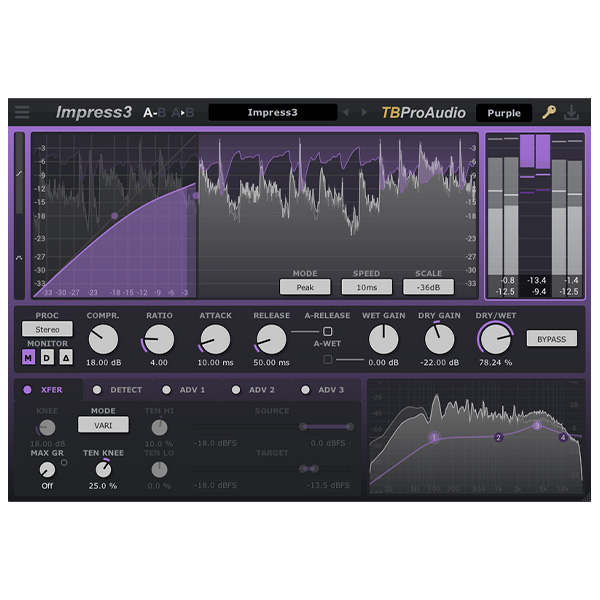
Impress is a wideband stereo compressor that includes sidechain, various prefilter options and state-of-the-art oversampling. The goal of the development was to cover a wide range of compression applications in modern mixing and mastering situations with a strong emphasis on low aliasing. Thus, Impress can be used to give subtle shape to the sound of…
64-bit internal processing with zero latency and no clicks.
Low aliasing compressor.
“True” oversampling, up to 8x.
Explore product features & full description
Wideband stereo compressor
Impress is a wideband stereo compressor that includes sidechain, various prefilter options and state-of-the-art oversampling. The goal of the development was to cover a wide range of compression applications in modern mixing and mastering situations with a strong emphasis on low aliasing. Thus, Impress can be used to give subtle shape to the sound of a ratchet, glue together different tracks on an instrument bus and even perform such complex tasks as de-essing or vocal overdubbing.
Peculiarities
64-bit internal processing with zero latency and no clicks.
Low aliasing compressor.
“True” oversampling, up to 8x.
Stereo/left/right/mid/side processing.
5 compressor modes: classic, source/target, variable, extended and feedback.
Non-linear and linear attack/release time shapes.
Dependent saturation with gain reduction.
4 level detection modes: peak, RMS, EBU ML and EBU SL.
Complete your purchaseReview compatibility and purchase details.
Download your filesAccess available downloads through your order and account.
Follow the included setup guideContact GetPlugins if you need installation help.
Activation, where included, is provided by GetPlugins. Publisher-account registration, transferable publisher keys and a publisher-issued licence are not included. Read the activation policy.
Frequently asked questions
How do I receive my download?
After payment, access available files from your order details and GetPlugins account. Contact support if a download is missing.
What activation is included?
Follow the activation instructions supplied with your download. Activation is provided by GetPlugins. Confirm device allowances and reinstall arrangements before ordering.
Will this work with my computer and DAW?
Check the compatibility information for this listing and ask us to confirm the exact supplied build. Libraries may require a compatible sampler or additional software.
What if I need installation help?
Email support@getplugins.io with your order number, operating system, DAW and any error message.
Which updates are included?
Activation and updates are separate. Confirm the available version and update arrangements before ordering; do not assume access to future publisher releases.
How do I request a refund?
Contact support with your order number and issue details. Read our Refund Policy for eligibility and the request process.
Customer Reviews
Reviews
There are no reviews yet.
Be the first to review “TBProAudio – Impress 3 (Windows)” Cancel reply








Reviews
There are no reviews yet.