Slate Digital Virtual Tape Machines Plug-in at a Glance:
- Tape's magical properties can be yours, instantly
- Virtual Tape Machines gives you the ne plus ultra of analog taped
- Dynamically reacts to the music you're laying down
Tape's magical properties can be yours, instantly
For those of us fortunate enough to have recorded through a vintage console to 2" analog 16-track, that sound is the gold standard; the sound by which all else is measured. In comparison, tracking in your modern DAW-based studio can be a rude awakening. Incredible modern workflow conveniences aside, straight digital mixes have a way of, well, just sitting there lifelessly. Fortunately, there's something you can do about that. We get it that you really don't want to go back to chopping tape with a razor blade, but the best of analog is yours for the taking - with Slate Digital Virtual Tape Machines.
Virtual Tape Machines gives you the ne plus ultra of analog taped
In the development of this eagerly-awaited plug-in, Slate Digital Chief Technology Guru Fabrice Gabriel put his EE degree to work and studied the physical processes that take place when your record to analog tape threaded onto a good ol' tape machine. To nail what they were after, Slate Digital then engaged in a year of critical listening and algorithm tweaks. Finally, they modeled the best-sounding analog tape machines they could lay their hands on. And being located in LA's Laurel Canyon, wouldn't you know they had quite a selection to choose from? The result? An easy-to-use plug-in that will juice even the most lackluster digital recordings with stunning analog warmth and punch.
Dynamically reacts to the music you're laying down
As compared with cold, unyielding digital, analog tape is a recording medium that dynamically reacts to the music being laid down on it. If you've never experienced the delight of recording analog, please take our word for it: the difference is like night and day. Analog recording is alchemy - during tracking, you actually hit the tape with a certain level to achieve the desired degree of tape limiting / saturation on that instrument. So kick drums are the size of a barn, and snares are so impactful, they split your face in half when you play them back. You get the idea. Slate Digital Virtual Tape Machines. You want this.
Slate Digital Virtual Tape Machines Plug-in Features:
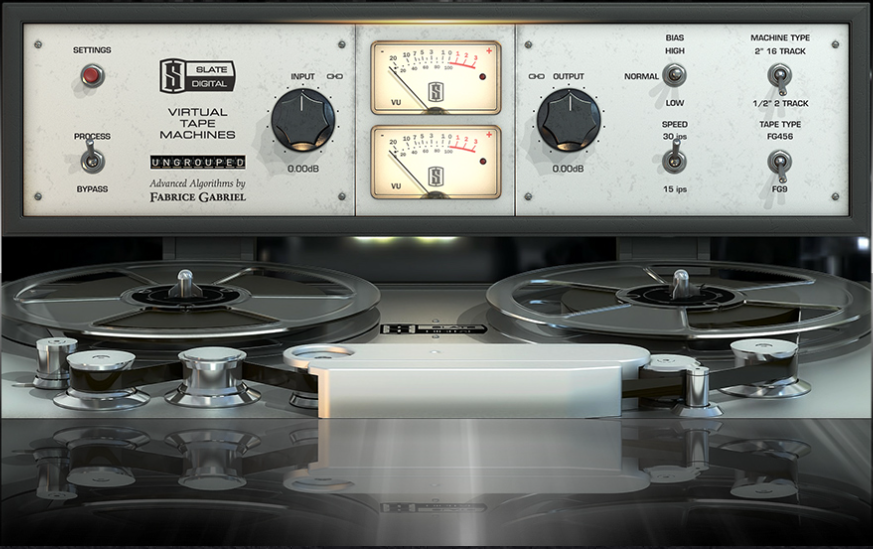
- Modeled on tape machine types: 2" 16-track and a 1/2" mastering deck
- Two tape formulations
- Two tape speeds: 15 ips and 30 tips
- Noise reduction control and auto mute
- Wow & Flutter control
- Bass alignment control
- Normal, Low & High Bias settings
- Level Calibration
- VU ballistics
- Grouping control
- Settings global or per channel
- Tape reels start and stop in sync with your DAW's transport









Reviews
There are no reviews yet.