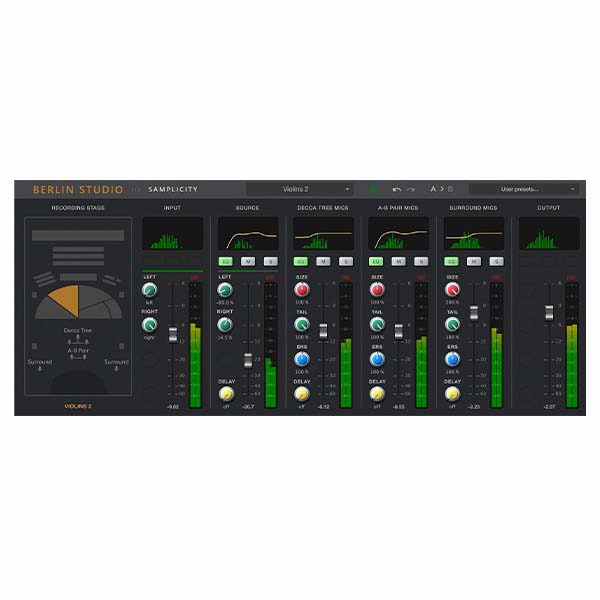
Samplicity Berlin Studio (Windows)

Formats: VST2, VST3 (Windows) AAX not yet available
Formats: confirm before ordering

£10.00

Discover Samplicity Berlin Studio (Windows)

Formats: VST2, VST3 (Windows) AAX not yet available

Explore product features & full description


REQUIREMENTS

Formats: VST2, VST3 (Windows) AAX not yet available

CPU – Windows Intel i5, i7+, AMD

Zero latency

Works with any host buffer size


Sample rates: the convolution engine works with sample rates up to 96 kHz. With higher host sample rates its input signal is downsampled to 96 kHz or 88.2 kHz, processed and upsampled. Other components work at rates up to 192 kHz.

Berlin Studio

With Berlin Studio you can add the beautiful acoustics of Teldex Studio to your mixes. This studio is famous for decades of classical recordings and well known to composers for being the home of many acclaimed sample libraries.

The signature sound of this recording stage – approximately the same size as Abbey Road One – has been captured by recording special signals emitted from the main orchestral stage positions with the studio’s main microphones and processing these recordings into acoustical “fingerprints”, also known as impulse responses (IRs).

Meticulous post-pro editing has resulted in a very consistent and accurate set of IRs in True-Stereo format. If you are already familiar with previous IRs from Samplicity, you know they are rated among the very best, with low signal-to-noise ratios and excellent stereo imaging.

With its flexible handling of microphone perspectives, pre-delays, early reflections and reverb tails Berlin Studio allows you to seamlessly mix and match virtual instruments from different vendors in a unique acoustic environment.

Of course Berlin Studio is also an excellent tool for making real instruments sound like they were recorded in this great venue.

Compatibility checklist

  • Confirm the supplied build, operating system and required host before ordering.

Requirements vary by supplied version. Confirm your setup with support before purchasing.

Delivery & activation

  1. Complete your purchaseReview compatibility and purchase details.
  2. Download your filesAccess available downloads through your order and account.
  3. Follow the included setup guideContact GetPlugins if you need installation help.

Activation, where included, is provided by GetPlugins. Publisher-account registration, transferable publisher keys and a publisher-issued licence are not included. Read the activation policy.

Frequently asked questions

How do I receive my download?

After payment, access available files from your order details and GetPlugins account. Contact support if a download is missing.

What activation is included?

Follow the activation instructions supplied with your download. Activation is provided by GetPlugins. Confirm device allowances and reinstall arrangements before ordering.

Will this work with my computer and DAW?

Check the compatibility information for this listing and ask us to confirm the exact supplied build. Libraries may require a compatible sampler or additional software.

What if I need installation help?

Email support@getplugins.io with your order number, operating system, DAW and any error message.

Which updates are included?

Activation and updates are separate. Confirm the available version and update arrangements before ordering; do not assume access to future publisher releases.

How do I request a refund?

Contact support with your order number and issue details. Read our Refund Policy for eligibility and the request process.

Customer Reviews

Reviews

There are no reviews yet.

Be the first to review “Samplicity Berlin Studio (Windows)”

Your email address will not be published. Required fields are marked *