Muramasa Audio – Electrum (Windows)

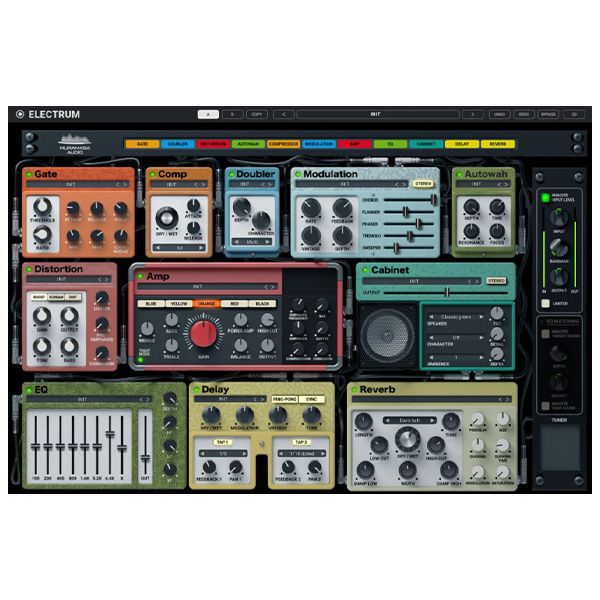
Electrum by Muramasa Audio is an all-in-one guitar amp and FX suite, designed to provide premium guitar tones…
Formats: VST3 · AAX · VST

£25.00

Discover Muramasa Audio – Electrum (Windows)

Electrum by Muramasa Audio is an all-in-one guitar amp and FX suite, designed to provide premium guitar tones without the hassle of complex setups. Whether you're into crystal-clear cleans, crunchy blues, or high-gain metal, Electrum delivers studio-quality sound with an intuitive and powerful interface.

Explore product features & full description

Muramasa Audio - Electrum ⚡🎸

Electrum by Muramasa Audio is an all-in-one guitar amp and FX suite, designed to provide premium guitar tones without the hassle of complex setups. Whether you're into crystal-clear cleans, crunchy blues, or high-gain metal, Electrum delivers studio-quality sound with an intuitive and powerful interface.


🔥 Key Features

🎛 Five Versatile Amp Models – Covers a wide range of tones, from vintage tube warmth to modern high-gain aggression.
🎚 Dual Cab Simulators – Blend two cabinet impulse responses (IRs) for rich, full-bodied tone shaping.
⚡ Comprehensive Effects Chain – Features EQ, reverb, delay, modulation, compression, and overdrive.
🔁 Smart Control & Morphing – Seamlessly morph between amp settings to create unique, evolving tones.
🎸 Dynamic Pick Response – Ensures an organic, realistic feel, reacting naturally to your playing dynamics.
🛠️ User-Friendly Interface – Intuitive design makes it easy to dial in professional guitar sounds quickly.


🎛 Sound & Applications

🎸 Cleans – Crystal-clear, shimmering tones perfect for ambient and jazz styles.
🎚 Crunch – Warm overdriven tones ideal for classic rock and blues.
🎛 High Gain – Aggressive distortion for metal, djent, and hard rock.
🔊 Ambient & Experimental – Built-in reverb and delay make it great for atmospheric soundscapes.
🎹 Synth Processing – Not just for guitars! Electrum works well on synths, bass, and even vocals.


🎚 Why Choose Electrum?

✅ One Plugin, Infinite Tones – Everything you need for guitar production in a single package.
✅ Ultra-Realistic Tube Modeling – Captures the feel and response of real amplifiers.
✅ Flexible Sound Design – Perfect for traditional guitarists, producers, and experimental musicians.
✅ Low CPU Usage – Optimized for smooth performance in any DAW.
✅ MIDI & Automation Support – Automate parameters for dynamic, evolving guitar tones.


🚀 Bring Your Guitar Sound to Life!

Whether you're crafting radio-ready tones, cinematic textures, or crushing metal riffs, Muramasa Audio Electrum is the ultimate guitar tone workstation. 🎸⚡

Compatibility checklist

  • Windows 10,11 (64Bit Only)
  • VST, VST3, AAX
  • Formats: VST3 · AAX · VST

Requirements vary by supplied version. Confirm your setup with support before purchasing.

Delivery & activation

  1. Complete your purchaseReview compatibility and purchase details.
  2. Download your filesAccess available downloads through your order and account.
  3. Follow the included setup guideContact GetPlugins if you need installation help.

Activation, where included, is provided by GetPlugins. Publisher-account registration, transferable publisher keys and a publisher-issued licence are not included. Read the activation policy.

Frequently asked questions

How do I receive my download?

After payment, access available files from your order details and GetPlugins account. Contact support if a download is missing.

What activation is included?

Follow the activation instructions supplied with your download. Activation is provided by GetPlugins. Confirm device allowances and reinstall arrangements before ordering.

Will this work with my computer and DAW?

Check the compatibility information for this listing and ask us to confirm the exact supplied build. Libraries may require a compatible sampler or additional software.

What if I need installation help?

Email support@getplugins.io with your order number, operating system, DAW and any error message.

Which updates are included?

Activation and updates are separate. Confirm the available version and update arrangements before ordering; do not assume access to future publisher releases.

How do I request a refund?

Contact support with your order number and issue details. Read our Refund Policy for eligibility and the request process.

Customer Reviews

Reviews

There are no reviews yet.

Be the first to review “Muramasa Audio – Electrum (Windows)”

Your email address will not be published. Required fields are marked *