Kiive Audio - Tape Face 🎛️🔥
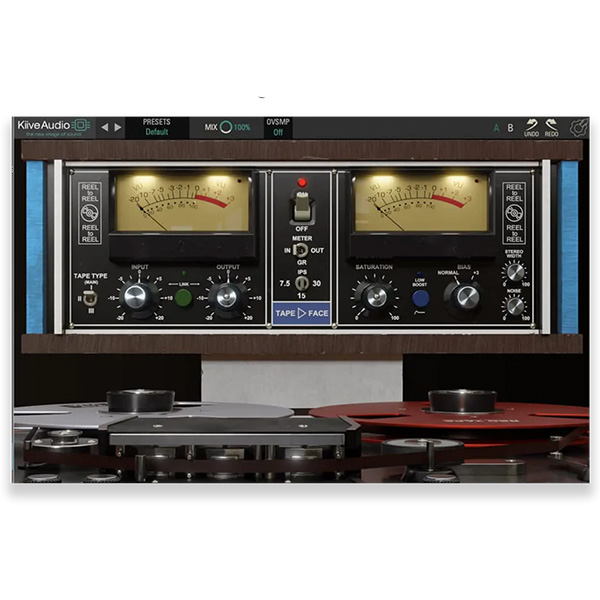
Kiive Audio Tape Face is a vintage tape saturation and compression plugin designed to bring the warmth, depth, and harmonic richness of classic tape machines into your digital productions. Whether you're looking for subtle analog warmth, rich harmonic distortion, or full-on tape saturation, Tape Face delivers the authentic tone and dynamic response of real tape processing.
🔹 Key Features
✅ Authentic Analog Tape Emulation – Modeled after classic reel-to-reel tape machines for true analog warmth.
🎛 Saturation & Compression – Smooth out transients and add vintage tape compression.
🔊 Wow & Flutter Control – Introduce natural tape movement and instability for organic character.
🎚 Adjustable Tape Speed – Switch between 15 IPS (cleaner, tighter) and 7.5 IPS (warmer, fuller) for tonal variation.
⚙️ Bias & Noise Control – Dial in the perfect amount of tape hiss and harmonic drive.
🔁 Built-in Oversampling – Ensures high-quality processing with minimal aliasing.
🎛 Sound & Applications
🎚 Vocals – Add smoothness, warmth, and classic tape compression.
🥁 Drums – Enhance punch, fatness, and transient control with subtle or aggressive tape saturation.
🎸 Guitars & Basses – Bring out rich harmonics and analog character for a classic tone.
🎹 Synths & Keys – Introduce warmth, movement, and vintage texture.
🎚 Mix Bus & Mastering – Glue your mix together with tape compression and saturation for a polished sound.
🎚 Why Use Tape Face?
✅ Easy-to-Use Interface – Simple controls with powerful sound-shaping options.
✅ Perfect for Lo-Fi, Hip-Hop, and Vintage Vibes – Get that worn-out cassette or high-end studio tape tone.
✅ Subtle to Extreme Saturation – Works as both a gentle enhancer or a full-on distortion unit.
✅ CPU-Friendly & DAW-Compatible – Runs efficiently in VST, AAX formats.
✅ Modern Flexibility, Classic Sound – Enjoy the warmth of tape without the maintenance hassle.
🚀 Give Your Mix That Classic Analog Glow!
Whether you want subtle warmth, punchy tape compression, or full-blown saturation, Kiive Audio Tape Face delivers authentic tape character for producers and engineers who crave that vintage studio magic.








Reviews
There are no reviews yet.