Mountainroad DSP – Lumina Delay (Windows)

The world’s first parametric and fully immersive delay Lumina Delay is the world’s first fully visual and immersive…
Formats: VST3

£15.00

Discover Mountainroad DSP – Lumina Delay (Windows)

The world’s first parametric and fully immersive delay Lumina Delay is the world’s first fully visual and immersive (7.1.4) delay, freeing you from the limitations of standard delays.

Explore product features & full description

The world’s first parametric and fully immersive delay Lumina Delay is the world’s first fully visual and immersive (7.1.4) delay, freeing you from the limitations of standard delays.

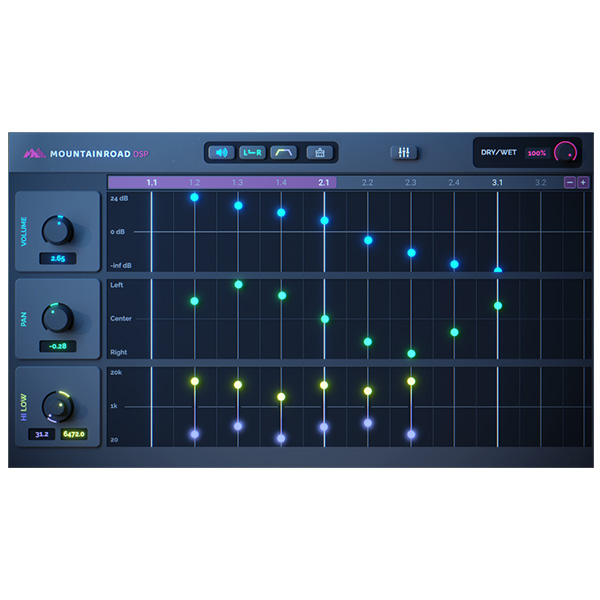
Instead of traditional knobs, Lumina Delay uses an intuitive click-and-drag feature, allowing users to create delay points on the grid and easily adjust parameters.

With volume control, panning (now available in versions up to 7.1.4), HighPass and LowPass filters, this plugin offers unrivaled versatility.

Ideal for music producers, engineers and mixers, Lumina Delay has already been used on several well-known tracks including Tayla’s “Butterflies”, the Deluxe version of Eric Nam’s “House on a Hill” and Alec Benjamin’s “I Sent My Therapist to Therapy”. “King Size Bed”.

Pan

Create completely new panning patterns. Whatever panning pattern you can think of, Lumina Delay can handle it. Drag the dot up to pan an individual delay to the left, and drag it down to pan to the right.

High|Low Cut

Lumina Delay visually shows you which frequencies you’re hearing. Want to cut some more highs? Drag the top of the rectangle down. Want to cut more lows? Drag the bottom line up. You’ll instantly see which frequencies you’re hearing and which are being cut.

Wet|Dry Handles

We’ve included an easy-to-use Wet/Dry knob. Turning the knob up increases the wet signal while simultaneously decreasing the dry signal.

Precise mode

Need more precision? Hold down CMD/CTRL while moving the delay point to increase precision by 10x. Or right-click the delay point to open the delay point pop-up menu where you can enter a precise value.

Immersive control

With the release of version 2.0, we added the ability to create delay patterns in 3D space. Lumina Delay now supports Mono, Stereo, 5.1, 7.1.2 and 7.1.4 configurations.

Global parameters

Global parameter controls give you the ability to fine-tune all delay points at once.

Volume and time

Create creative and complex delay patterns with just a few clicks. Wherever you click on the grid, a new delay will be created. Drag the dot up or down to change the volume of a specific delay, or drag it from left to right to adjust the time.
Compatibility checklist

  • Windows 10,11 (64Bit Only)
  • VST3 Only
  • Formats: VST3

Requirements vary by supplied version. Confirm your setup with support before purchasing.

Delivery & activation

  1. Complete your purchaseReview compatibility and purchase details.
  2. Download your filesAccess available downloads through your order and account.
  3. Follow the included setup guideContact GetPlugins if you need installation help.

Activation, where included, is provided by GetPlugins. Publisher-account registration, transferable publisher keys and a publisher-issued licence are not included. Read the activation policy.

Frequently asked questions

How do I receive my download?

After payment, access available files from your order details and GetPlugins account. Contact support if a download is missing.

What activation is included?

Follow the activation instructions supplied with your download. Activation is provided by GetPlugins. Confirm device allowances and reinstall arrangements before ordering.

Will this work with my computer and DAW?

Check the compatibility information for this listing and ask us to confirm the exact supplied build. Libraries may require a compatible sampler or additional software.

What if I need installation help?

Email support@getplugins.io with your order number, operating system, DAW and any error message.

Which updates are included?

Activation and updates are separate. Confirm the available version and update arrangements before ordering; do not assume access to future publisher releases.

How do I request a refund?

Contact support with your order number and issue details. Read our Refund Policy for eligibility and the request process.

Customer Reviews

Reviews

There are no reviews yet.

Be the first to review “Mountainroad DSP – Lumina Delay (Windows)”

Your email address will not be published. Required fields are marked *