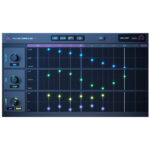
Lunacy Audio – BEAM (Windows)
£15.00
Discover Lunacy Audio – BEAM (Windows)
BEAM is an interactive multi-effects plugin featuring a state-of-the-art granular processing engine, convolution reverb, and filters with an innovative dynamic audiograph system. Color your keys, bring your vocals to life, reshape your drums, and launch your synths into outer space.
Explore product features & full description
BEAM is an interactive multi-effects plugin featuring a state-of-the-art granular processing engine, convolution reverb, and filters with an innovative dynamic audiograph system. Color your keys, bring your vocals to life, reshape your drums, and launch your synths into outer space.
Cosmic Node
A stunning convolution reverb effect with a carefully curated set of impulse responses, including sound design from Benn Jordan and Venus Theory. These are no ordinary spaces – delve deeper into a collection of textural spaces designed to transform sound into new soundscapes.
Grain Knot
A detailed, real-time effect that’s perfect for shimmering particle clouds, glittering percussive grooves, and rhythmic soundscapes. Built for speed and performance, BEAM lets you run up to three parallel grain engines at once.
Filter unit
A powerful collection of low-pass, high-pass, band-pass, notch, comb, and formant filters with frequency, resonance, and stereo offset controls. Use up to four filter nodes in series or parallel to tailor the frequencies for each patch.
Dynamic chart
Create complex effect layouts using an interactive visual audio graph. BEAM allows you to create endless combinations of parallel and serial sequences using up to 6 parallel paths.
Deep modulation
Harness the power of LFOs, envelope followers, and macro controls with drag-and-drop modulation. Browse dozens of LFO presets or draw your own shapes with the powerful curve editor, including quick edit tools, grid snapping, and a magical LFO shape generator. Easily remap modulators with the intuitive modulation matrix.
Compatibility checklist
- Windows 10,11 (64Bit Only)
- VST3 Only
- Formats: VST3
Requirements vary by supplied version. Confirm your setup with support before purchasing.
Delivery & activation
- Complete your purchaseReview compatibility and purchase details.
- Download your filesAccess available downloads through your order and account.
- Follow the included setup guideContact GetPlugins if you need installation help.
Activation, where included, is provided by GetPlugins. Publisher-account registration, transferable publisher keys and a publisher-issued licence are not included. Read the activation policy.
Frequently asked questions
How do I receive my download?
After payment, access available files from your order details and GetPlugins account. Contact support if a download is missing.
What activation is included?
Follow the activation instructions supplied with your download. Activation is provided by GetPlugins. Confirm device allowances and reinstall arrangements before ordering.
Will this work with my computer and DAW?
Check the compatibility information for this listing and ask us to confirm the exact supplied build. Libraries may require a compatible sampler or additional software.
What if I need installation help?
Email support@getplugins.io with your order number, operating system, DAW and any error message.
Which updates are included?
Activation and updates are separate. Confirm the available version and update arrangements before ordering; do not assume access to future publisher releases.
How do I request a refund?
Contact support with your order number and issue details. Read our Refund Policy for eligibility and the request process.

Reviews
There are no reviews yet.