



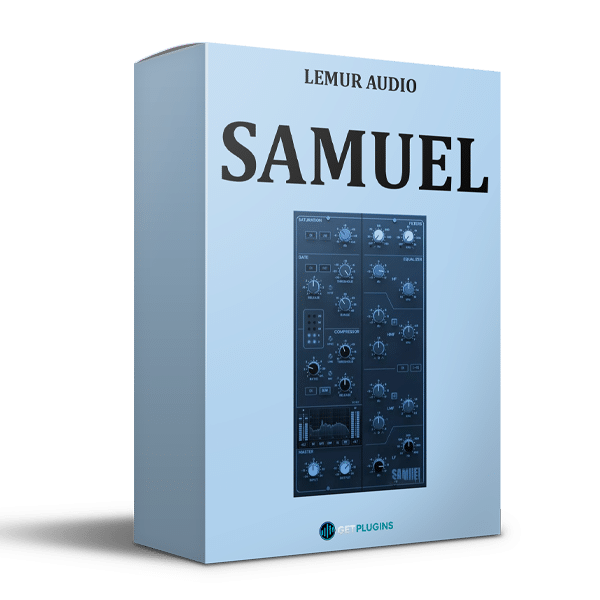
Lemur Audio – SAMUEL (Windows)
£35.99
Discover Lemur Audio – SAMUEL (Windows)
Lemur Audio SAMUEL v1.0.19 is a versatile console-style channel strip plugin designed for music producers, mixing engineers, recording professionals, and modern audio creators. Combining preamp saturation, a console-style gate, flexible feedback compression, four-band equalization, and high-pass and low-pass filters, SAMUEL brings essential track-processing tools together in one streamlined interface.
MIC Mode: Delivers a broader, brighter tonal character.
LINE Mode: Adds low-frequency warmth while retaining clean high frequencies.
Drive Control: Offers a range from −12 dB to +24 dB.
Explore product features & full description
Lemur Audio – SAMUEL v1.0.19
Professional Console-Style Channel Strip Plugin
Lemur Audio SAMUEL v1.0.19 is a versatile console-style channel strip plugin designed for music producers, mixing engineers, recording professionals, and modern audio creators. Combining preamp saturation, a console-style gate, flexible feedback compression, four-band equalization, and high-pass and low-pass filters, SAMUEL brings essential track-processing tools together in one streamlined interface.
With zero-latency processing, configurable signal routing, level-compensated saturation, and detailed real-time visualizations, SAMUEL provides precise control over dynamics, tonal balance, and harmonic coloration. Use it on individual tracks, buses, live inputs, and other mixing applications where an efficient channel-strip workflow is essential.
Console-Style Preamp Saturation
SAMUEL features an oversampled preamp saturation stage with two distinct tonal characters: MIC and LINE. These voicings let you introduce harmonic coloration and adjust the character of your audio without relying on separate saturation plugins.
- MIC Mode: Delivers a broader, brighter tonal character.
- LINE Mode: Adds low-frequency warmth while retaining clean high frequencies.
- Drive Control: Offers a range from −12 dB to +24 dB.
- Automatic Level Compensation: Helps maintain consistent perceived loudness as saturation increases.
- Oversampled Processing: Supports smoother nonlinear processing and harmonic generation.
From subtle console-style coloration to more pronounced saturation, SAMUEL helps shape the character of vocals, instruments, drums, and other audio sources.
Flexible Feedback Compressor
The integrated feedback compressor provides detailed dynamic control for both individual tracks and group processing. Its adjustable settings allow you to manage transients, control dynamic variation, and achieve a more consistent sound.
Key compression features include:
- Variable compression ratio from 1:1 to limiting
- Release times from 0.1 to 4 seconds
- Program-dependent automatic release
- Selectable slow-attack mode
- High-pass sidechain filtering up to 250 Hz
- Adjustable stereo linking
- Parallel compression through the Mix control
- Switchable compressor and EQ order
- Internal EQ routing to the compressor sidechain
The compressor's flexible routing makes SAMUEL suitable for transparent dynamic control, punchier drum processing, vocal leveling, and more assertive mix-bus compression.
Four-Band Console-Style Equalizer
SAMUEL includes a four-band equalizer featuring two shelving bands and two parametric bell bands. Its frequency ranges and gain controls support broad tonal shaping as well as more targeted corrective adjustments.
Equalizer Specifications
- Low-Frequency Shelf: 30–450 Hz
- Low-Mid Bell: 200 Hz–2.5 kHz
- High-Mid Bell: 600 Hz–7 kHz
- High-Frequency Shelf: 1.5–16 kHz
- Bell-Band Q Range: 0.5–3
- Gain Range: ±17 dB
Additional frequency-range options extend the equalizer's flexibility:
- LMF ÷3: Extends low-mid processing into lower frequencies.
- HMF ×3: Extends high-mid processing to approximately 21 kHz.
Each band remains in the signal path, but its centered gain position introduces no tonal change. This design allows you to keep the EQ configured while making neutral adjustments when needed.
High-Pass and Low-Pass Filters
The integrated high-pass and low-pass filters help remove unwanted frequency content and refine the tonal balance of a track before it reaches the rest of the processing chain.
- High-Pass Filter: Adjustable from 20–350 Hz.
- Low-Pass Filter: Adjustable from 3–12 kHz.
- Dedicated filter-status indicators.
- Filters leave the signal path completely when switched off.
- Global EQ bypass also bypasses both filters.
Use these filters to reduce low-frequency rumble, control excessive high-frequency content, and prepare audio for subsequent equalization and compression.
Console-Style Gate with Hysteresis
SAMUEL's integrated noise gate provides control over unwanted background noise and low-level signal content. Adjustable threshold, attenuation, release, and hysteresis parameters help tailor its behavior to different audio sources.
Gate features include:
- Threshold range from −30 to +10
- Attenuation range from 0–40 dB
- Release times from 0.1–4 seconds
- Selectable fast-attack option
- Adjustable hysteresis
- LED gain-reduction display
Hysteresis helps reduce unwanted gate chatter, making the gate useful when processing decaying drums, ringing snares, and other sources where the signal level fluctuates near the threshold.
Intelligent EQ-to-Sidechain Routing
One of SAMUEL's useful workflow features is its ability to route the equalizer exclusively into the compressor's sidechain. This allows the compressor to respond selectively to particular frequency ranges without applying the same EQ curve directly to the audible signal.
Combined with the sidechain high-pass filter and flexible compressor placement, this routing supports frequency-conscious compression and de-essing workflows. You can tailor how the compressor reacts to low-frequency energy, vocal sibilance, and other frequency-dependent elements.
Five Real-Time Display Modes
SAMUEL includes five dedicated visualization modes that provide feedback on different aspects of the processing chain.
- SAT: Displays harmonics generated by the saturation stage.
- GATE: Shows input, output, and threshold behavior.
- COMP: Visualizes compression activity.
- EQ: Displays the selected equalizer curve.
- FFT: Shows the output-frequency spectrum.
These displays help producers and engineers understand how each processor affects the signal, making it easier to refine settings during recording, mixing, and sound design.
Streamlined Mixing Workflow
SAMUEL combines detailed processing controls with practical workflow features for everyday studio use.
Additional features include:
- Zero-latency audio processing
- Mono and stereo operating modes
- Input and output trim controls
- A/B comparison with copy functionality
- Undo and redo controls
- Resizable user interface
- No subscription required
Its integrated architecture reduces the need to assemble a separate chain of saturation, gating, compression, equalization, and filtering plugins for routine channel processing.
Who Is Lemur Audio SAMUEL For?
Lemur Audio SAMUEL is designed for audio professionals and creators who want console-inspired processing in a single channel strip.
It is particularly useful for:
- Music producers shaping individual tracks and instrument groups.
- Mixing engineers controlling dynamics and refining tonal balance.
- Recording engineers applying saturation, gating, and compression.
- Vocal producers managing vocal dynamics and frequency-sensitive compression.
- Electronic music producers processing synthesizers, drum machines, and bass.
- Composers and sound designers refining audio for music, media, and creative projects.
Key Features of Lemur Audio SAMUEL
- Complete console-style channel strip
- Zero-latency audio processing
- Oversampled MIC and LINE preamp saturation
- Level-compensated drive control
- Four-band console-style equalizer
- Adjustable high-pass and low-pass filters
- Console-style gate with adjustable hysteresis
- Flexible feedback compressor
- Compressor placement before or after the EQ
- Internal EQ-to-sidechain routing
- Sidechain high-pass filtering up to 250 Hz
- Parallel compression with Mix control
- Program-dependent automatic release
- Adjustable stereo linking
- Five real-time display modes
- Mono and stereo operating modes
- Input and output trim controls
- A/B comparison, undo, and redo
- Resizable interface
- No subscription required
Explore More Mixing and Audio Effects Plugins
Build a more flexible studio workflow with additional processing tools for equalization, dynamics, saturation, and creative sound shaping.
Browse our collections of Mixing and Mastering Plugins and Audio Effects Plugins to discover more tools for music production and audio engineering.
For official product information and demonstrations, visit the Lemur Audio website.
Frequently Asked Questions
What is Lemur Audio SAMUEL?
Lemur Audio SAMUEL is a console-style channel strip plugin that combines preamp saturation, gating, compression, equalization, and high-pass and low-pass filtering in one interface.
Does SAMUEL introduce processing latency?
SAMUEL is specified as a zero-latency processing plugin, making it suitable for workflows where timing accuracy is important.
Can I change the order of the EQ and compressor?
Yes. SAMUEL lets you switch the compressor and equalizer order, allowing you to choose the signal-processing sequence that best suits your source.
Does SAMUEL support parallel compression?
Yes. Its compressor includes a Mix control for blending processed and unprocessed signals.
Can the EQ affect only the compressor's sidechain?
Yes. SAMUEL can route the EQ exclusively into the compressor's sidechain, enabling frequency-conscious compression without directly applying that EQ curve to the audible signal.
What types of audio can SAMUEL process?
SAMUEL can be used on vocals, drums, bass, synthesizers, instruments, buses, and other audio sources where saturation, dynamics control, and equalization are useful.
Conclusion
Lemur Audio SAMUEL v1.0.19 combines essential console-style processing with flexible signal routing and detailed visual feedback. Its oversampled saturation, four-band EQ, responsive gate, feedback compressor, and sidechain options make it a practical solution for producers and engineers who want to shape tone, manage dynamics, and streamline their mixing workflow with one integrated plugin.
Compatibility checklist
- Windows 10,11 (64Bit Only)
- VST, VST3, AAX
- Formats: VST3 · AAX · VST
Requirements vary by supplied version. Confirm your setup with support before purchasing.
Delivery & activation
- Complete your purchaseReview compatibility and purchase details.
- Download your filesAccess available downloads through your order and account.
- Follow the included setup guideContact GetPlugins if you need installation help.
Activation, where included, is provided by GetPlugins. Publisher-account registration, transferable publisher keys and a publisher-issued licence are not included. Read the activation policy.
Frequently asked questions
How do I receive my download?
After payment, access available files from your order details and GetPlugins account. Contact support if a download is missing.
What activation is included?
Follow the activation instructions supplied with your download. Activation is provided by GetPlugins. Confirm device allowances and reinstall arrangements before ordering.
Will this work with my computer and DAW?
Check the compatibility information for this listing and ask us to confirm the exact supplied build. Libraries may require a compatible sampler or additional software.
What if I need installation help?
Email support@getplugins.io with your order number, operating system, DAW and any error message.
Which updates are included?
Activation and updates are separate. Confirm the available version and update arrangements before ordering; do not assume access to future publisher releases.
How do I request a refund?
Contact support with your order number and issue details. Read our Refund Policy for eligibility and the request process.











Reviews
There are no reviews yet.