Audio Blast – Drum Blaster v1.2.2
Advanced Drum Sampler and Beat Production Plugin
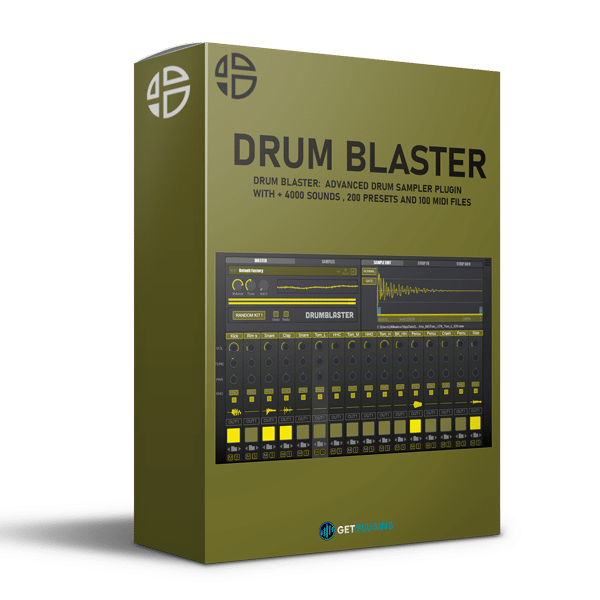
Audio Blast Drum Blaster v1.2.2 is a powerful drum sampler and beat-generation plugin designed for electronic music producers, beatmakers, composers, and modern music creators. Combining an extensive drum library with flexible sample editing, 16 independent channel strips, multi-output routing, and creative randomization tools, Drum Blaster provides an efficient environment for building custom drum kits and producing punchy, detailed rhythms.
With more than 4,000 drum and percussion samples, 200 factory presets, and 100 MIDI files, Drum Blaster supports a wide range of production styles, from techno and house to EDM, trap, hip-hop, dub, and breaks.
Extensive Drum Library with Analog Character
Drum Blaster includes a diverse collection of genre-focused drum sounds inspired by classic drum machines and modern electronic music production. The samples were recorded at Oasis Studio on Réunion Island through a restored Neve VR32 console and processed using professional analog hardware, including Distressors, Pultec equalizers, and Manley processors.
This carefully produced sound library delivers a combination of punch, clarity, warmth, and character, helping producers create polished drum parts without starting every beat from scratch.
Key library contents include:
- 4,000+ drum and percussion samples
- 200 factory presets for different musical styles
- 100 MIDI drum patterns for quick beat creation
- Classic drum-machine-inspired sounds
- Professionally recorded analog drum samples
- Genre-focused electronic drum kits
16 Independent Channel Strips
The plugin features 16 individual channel strips, giving you detailed control over every sound in your drum kit. Adjust each channel independently to shape the groove, balance individual elements, and create a more cohesive mix.
Each channel provides:
- Volume and panning controls
- Tuning and fine-tuning adjustments
- Independent mute and solo functions
- Individual output assignment
- Three dedicated effects slots
- Flexible sample selection and editing
The individual channel architecture makes Drum Blaster suitable for everything from quick beat sketches to more detailed drum programming and sound design.
Built-In Effects for Creative Drum Processing
Each channel includes three effects slots, allowing you to process individual drum sounds directly within the plugin. Use the integrated effects to add movement, space, saturation, and character to kicks, snares, claps, percussion, and other rhythmic elements.
Included Effects
- Filters
- Reverb
- Synth Verb
- Rage Clip
- Four-Band Fuzz
- Disto Fuzz
- Overdrive
- Flanger
- Chorus
- Phaser
- Delay
From subtle tonal adjustments to aggressive distortion and modulation, these processors help you develop distinctive drum sounds without relying entirely on external effects plugins.
Integrated Sample Editor
Drum Blaster includes a visual sample editor for refining individual drum sounds directly inside the instrument. Inspect waveforms and adjust sample playback to achieve tighter transients, cleaner endings, and more controlled rhythmic performances.
Sample-editing capabilities include:
- Sample trimming
- Fade and smoothing controls
- Tuning and fine-tuning
- Waveform visualization
- Sample preview
- Sample randomization
- Custom sample loading
These tools allow producers to customize the included sounds or incorporate their own samples into personalized drum kits.
Instant Drum-Kit Randomization
The dedicated drum-kit randomizer makes creative experimentation faster by generating new combinations of sounds from multiple sample folders. Discover unexpected kick, snare, percussion, and other drum combinations without manually auditioning every file.
Use randomization to overcome creative blocks, explore alternative grooves, and develop fresh rhythmic ideas. You can also combine randomized selections with manual editing to create more controlled and distinctive results.
Flexible Routing and Performance Controls
Drum Blaster offers individual output assignment for flexible integration into a music production workflow. Route drum channels separately to your DAW mixer for independent equalization, compression, effects processing, and automation.
Additional global controls include:
- Master volume
- Velocity control
- Global oscilloscope
- VU meter
- Sample browsing and preview
- Resizable user interface
Native Apple Silicon support is also included, providing compatibility with supported Apple Silicon systems.
Who Is Audio Blast Drum Blaster For?
Drum Blaster is designed for producers and creators who need a flexible drum instrument with extensive sound choices and practical sound-shaping tools.
It is particularly useful for:
- Electronic music producers creating techno, house, EDM, and breaks
- Hip-hop and trap beatmakers designing custom rhythmic patterns
- Sound designers experimenting with drum processing and randomization
- Composers building rhythmic foundations for music and media projects
- Music creators who want to combine sample editing with multi-channel mixing
Key Features of Audio Blast Drum Blaster
- Advanced drum sampler and beat generator
- More than 4,000 included samples
- 200 factory presets and 100 MIDI files
- 16 independent channel strips
- Individual multi-output routing
- Three effects slots per channel
- 11 listed integrated effect types and algorithms
- Precision waveform sample editor
- One-click drum-kit randomization
- Custom sample loading and processing
- Independent tuning, fine-tuning, volume, and panning
- Channel mute and solo controls
- Sample browsing and preview functions
- Global oscilloscope and VU meter
- Master volume and velocity controls
- Resizable interface
- Native Apple Silicon support
Explore More Drum and Audio Effects Plugins
Expand your production setup with more tools for rhythm programming, sound design, mixing, and creative processing.
Browse our collections of Drum Plugins and Audio Effects Plugins to discover additional instruments and processors for your studio.
For official product information, specifications, and demonstrations, visit the Audio Blast Drum Blaster official product page.
Frequently Asked Questions
What is Audio Blast Drum Blaster?
Audio Blast Drum Blaster is a drum sampler and beat-production plugin featuring 16 channel strips, a large sample collection, integrated effects, sample editing, and drum-kit randomization.
How many samples and presets are included?
The plugin includes more than 4,000 drum and percussion samples, 200 factory presets, and 100 MIDI files.
Can I use my own drum samples?
Yes. Drum Blaster supports loading custom samples, allowing you to combine your own sounds with the included library.
Can I process each drum sound independently?
Yes. Each of the 16 channel strips provides individual sound controls, three effects slots, and output assignment for flexible mixing and processing.
Which music genres is Drum Blaster suitable for?
Drum Blaster is suitable for techno, house, EDM, trap, hip-hop, dub, breaks, and other styles that benefit from customizable electronic drum sounds.
Does Drum Blaster support Apple Silicon?
Yes. Native Apple Silicon support is listed among its features. Check the official product page for the latest operating-system and plugin-format requirements.
Conclusion
Audio Blast Drum Blaster v1.2.2 combines a substantial drum library, flexible 16-channel architecture, integrated effects, detailed sample editing, and instant kit randomization in one production tool. Whether you are creating electronic beats, shaping custom percussion, or building rhythmic foundations for a composition, Drum Blaster provides a versatile workflow for developing distinctive drum sounds and grooves.











Reviews
There are no reviews yet.