Fuse Audio Labs – OCELOT Clipper 🎛🔥
The OCELOT Clipper from Fuse Audio Labs is a high-performance soft and hard clipper designed to give rich harmonic saturation, enhanced loudness, and precise peak control without unwanted distortion. Whether you're working on mixing, mastering, or sound design, OCELOT Clipper helps add punch, presence, and warmth to your tracks while keeping dynamics intact.
🎛️ Key Features & Sound Characteristics
✅ Soft & Hard Clipping Modes – Choose between smooth saturation or aggressive peak shaping.
✅ Transparent & Musical Sound – Retains clarity and punch while boosting loudness.
✅ Intelligent Peak Control – Prevents unwanted distortion and preserves transients.
✅ Customizable Drive & Shape – Tailor the clipping curve for subtle warmth or heavy saturation.
✅ True Peak & Anti-Alias Processing – Ensures clean, distortion-free output.
✅ Stereo Link Function – Keeps both channels balanced for consistent stereo imaging.
✅ Simple, Intuitive Interface – Get quick, professional results with minimal tweaking.
✅ Low CPU Usage – Process multiple tracks effortlessly without latency or lag.
🔧 How It Works
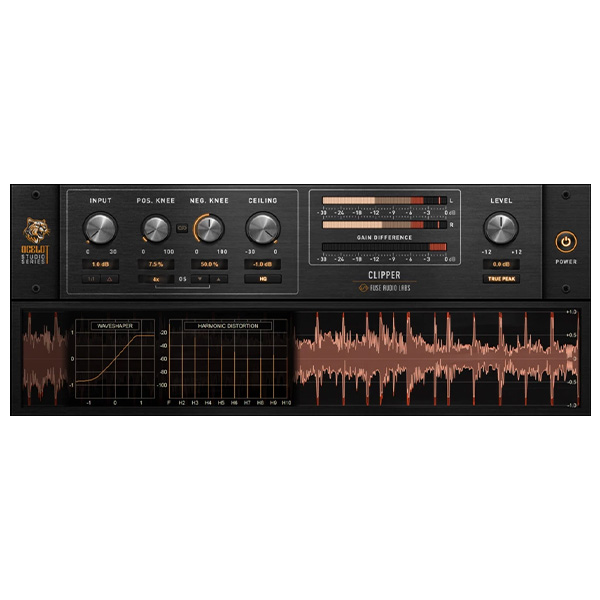
The OCELOT Clipper works by rounding off peaks intelligently and musically pleasingly, allowing you to increase perceived loudness without harshness. It features:
🎚️ Drive Control – Adds saturation and harmonic richness, from subtle warmth to full-on distortion.
🎚️ Shape Control – Adjusts the softness or aggressiveness of the clipping curve.
🎚️ Ceiling Control – Prevents peaks from exceeding a set level, making it perfect for mastering.
🎚️ True Peak & Anti-Alias Mode – Ensures cleaner, more precise clipping without unwanted artifacts.
🎚️ Stereo Link – Maintains balance and consistency in stereo tracks.
🎵 Perfect for...
🥁 Drums & Percussion – Add punch and presence while taming peaks.
🎸 Guitars & Bass – Enhance warmth and body with natural saturation.
🎤 Vocals – Control dynamics while adding subtle harmonics for more character.
🎚️ Mix Bus Processing – Shape your entire mix's final tone and dynamics.
🔊 Mastering – Push your track to commercial loudness levels without over-compression.
🎛 Sound Design – Sculpt unique textures and harmonically rich distortion.
🎛️ Why Choose OCELOT Clipper?
✅ Analog-style warmth with modern precision
✅ Smooth, transparent, or aggressive clipping options
✅ Perfect for both subtle and extreme processing
✅ Quick and easy to dial in
✅ Optimized for efficient CPU usage
🚀 Achieve pro-level loudness and tonal shaping with OCELOT Clipper! 🎶🔥







Reviews
There are no reviews yet.