

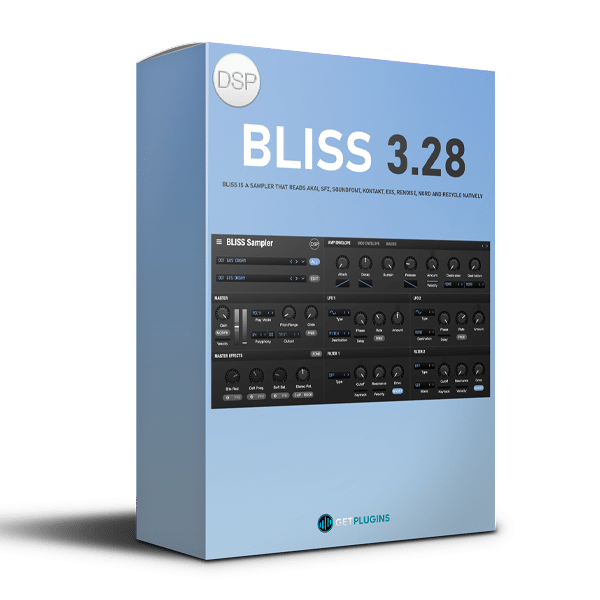
discoDSP Bliss 3.26 is a powerful software sampler designed for music producers, composers, sound designers, and musicians who need flexible sample management, detailed audio editing, and high-quality instrument playback. Combining an advanced sampling engine with extensive format compatibility, intuitive sample…
DiscoDSP – Bliss 3.26 (Windows)
£41.99
Guaranteed Safe Checkout

Features & Compatibility
discoDSP – Bliss 3.26
Professional Software Sampler and Virtual Instrument
discoDSP Bliss 3.26 is a powerful software sampler designed for music producers, composers, sound designers, and musicians who need flexible sample management, detailed audio editing, and high-quality instrument playback. Combining an advanced sampling engine with extensive format compatibility, intuitive sample mapping, and versatile sound-shaping tools, Bliss provides a comprehensive environment for building custom virtual instruments from recorded audio and existing sample libraries.
With support for VST and VST3 instrument sampling, external hardware sampling, multilayered sample mapping, advanced interpolation, MIDI Polyphonic Expression (MPE), and integrated effects, Bliss makes it easier to transform individual sounds into playable instruments for music production, sound design, and creative experimentation.
Extensive Audio and Sampler Format Compatibility
Bliss supports a wide range of audio formats and sampler instrument formats, making it a practical solution for producers working with existing sound libraries and custom sample collections.
Compatible audio formats include WAV, AIFF, FLAC, OGG, and MP3, while supported sampler formats include Akai, SFZ, SoundFont, Kontakt 1–4, EXS, Renoise, ReCycle, and Nord Sample Library files. Additional formats associated with instruments from manufacturers such as Korg, Kurzweil, EMU, and Yamaha can be converted using ConvertWithMoss, depending on the source format and conversion support.
This broad compatibility helps users consolidate sample collections, reuse existing instruments, and create new sampler programs without rebuilding every sound from scratch.
Sample VST and VST3 Instruments Directly
One of Bliss’s key capabilities is its ability to sample compatible VST and VST3 instruments directly, capturing their output and converting it into playable multisample instruments using the SFZ format.
Instead of relying on a source instrument every time a sound is played, users can capture notes across selected ranges and turn the recordings into mapped samples. This workflow is useful for creating lightweight versions of synthesizer patches, preserving custom sounds, and building sample-based instruments for future projects.
Bliss supports sampling rates of 44.1, 48, 88.2, and 96 kHz, offering flexibility for different recording and production requirements.
Automatic External Hardware Sampling
The standalone version of Bliss can also capture audio from external hardware, including synthesizers, drum machines, and other audio equipment connected to your recording setup.
Users can specify the desired note range, velocity layers, recording duration, and release tail. Bliss then triggers the connected instrument, records its output, and organizes the captured audio into mapped sample zones.
This automated process helps streamline multisampling workflows, particularly when creating virtual versions of hardware instruments or building playable collections from custom synthesizer patches.
Integrated Waveform and Sample Editing
Bliss includes a built-in waveform editor that provides essential sample-preparation tools without requiring a separate audio-editing application.
Users can refine recorded and imported audio with tools for:
- Sample selection and trimming
- Loop-point adjustment
- Fade-in and fade-out processing
- Audio normalization
- Automatic transient detection
- Waveform inspection and editing
These features help prepare clean, consistent samples for instrument construction. Accurate loop editing is particularly useful for sustained pads, strings, drones, and other sounds that need to play smoothly across longer notes.
Visual Key Mapping and Velocity Zones
The integrated visual key mapper makes it easier to organize samples across a keyboard range and create instruments with multiple velocity layers.
Users can adjust root notes, key ranges, and velocity zones through an intuitive visual interface. This allows individual samples to respond to different pitches and playing intensities, creating more expressive and realistic instruments.
Build custom multisampled keyboards, velocity-switched percussion, layered synthesizer patches, and detailed instruments from recordings or imported sample collections.
High-Quality Playback and Advanced Interpolation
Bliss is designed to deliver detailed sample playback with flexible performance options for demanding production sessions.
Its playback engine supports up to 64-voice polyphony and uses SINC 128 interpolation during normal playback. For more demanding offline rendering tasks, interpolation of up to 512 points is available.
The engine also supports processor-specific optimizations, including AVX2 acceleration on compatible Intel and AMD processors and NEON optimization on Apple Silicon. These optimizations can help improve processing efficiency on supported hardware.
For producers working with layered instruments, extended sample recordings, and complex multisample programs, Bliss provides a capable foundation for detailed sample-based production.
Advanced Modulation and Sound Shaping
Bliss offers more than sample playback. Its synthesis and modulation tools allow users to shape the tonal character, movement, and dynamics of their instruments.
Key sound-design features include:
- Dual multimode filters for tonal shaping and resonance control
- Independent envelopes for detailed parameter control
- Two synchronized LFOs for cyclic modulation
- Parameter morphing for expressive sound variations
- Eight assignable macro controls for convenient performance adjustments
- MIDI control for integrating external hardware and software workflows
Use these tools to transform straightforward samples into evolving pads, expressive leads, animated textures, rhythmic effects, and distinctive hybrid instruments.
Seven Integrated Effects and Oversampling
Bliss includes seven integrated effects with 8x oversampling, providing a range of processing options for shaping samples and adding character to custom instruments.
Its effects and processing tools include:
- Chorus for width and modulation
- Delay for rhythmic echoes and spatial depth
- Reverb for ambience and space
- Phaser for sweeping tonal movement
- Distortion for harmonic richness and aggression
- Bit reduction for lo-fi and digital textures
- Stereo rotation for spatial manipulation
- Soft clipping for controlled saturation
- Rock Da Disco multiband processing
These tools provide a flexible internal processing environment for refining samples and developing distinctive instrument sounds without depending entirely on external effects plugins.
Full MIDI and MPE Support
Bliss supports MIDI control for integrating its sampling and sound-design capabilities into modern music-production workflows.
With MIDI Polyphonic Expression (MPE) support, compatible controllers can provide independent per-note control over parameters such as pitch, timbre, and pressure. This enables more expressive performances than conventional channel-wide modulation alone.
MPE is especially useful for expressive synthesizer-style playing, evolving sample textures, nuanced melodic performances, and instruments that respond dynamically to compatible controllers.
What’s New in Bliss 3.26?
Version 3.26 introduces several improvements to format compatibility and instrument-management workflows.
Key updates include:
- Gigasampler
.gigimport for additional sampler-format compatibility - Background processing for third-party instrument imports
- Velocity curves for more flexible performance response
- Individual program export from banks
These additions make it easier to import supported instrument collections, manage larger libraries, and customize how sampled instruments respond to MIDI performance.
Key Features of discoDSP Bliss 3.26
- Professional software sampler and virtual instrument
- Direct sampling of VST and VST3 instruments
- Automatic external hardware sampling in standalone mode
- Support for WAV, AIFF, FLAC, OGG, and MP3 audio
- Compatibility with multiple sampler and instrument formats
- Akai, SFZ, SoundFont, EXS, and Kontakt 1–4 support
- Gigasampler
.gigimport - ConvertWithMoss conversion workflow for additional formats
- Up to 64-voice polyphony
- SINC 128 real-time interpolation
- Up to 512-point SINC offline processing
- Integrated waveform and loop editor
- Automatic transient detection and normalization
- Visual key mapping and velocity-zone editing
- Dual multimode filters
- Independent envelopes and two synchronized LFOs
- Parameter morphing and eight assignable macro controls
- MIDI and full MPE support
- Seven integrated effects with 8x oversampling
- Chorus, delay, reverb, phaser, distortion, bit reduction, and stereo processing
- AVX2 and Apple Silicon NEON optimizations on compatible hardware
- Scalable graphical interface
- Windows, macOS, and Linux compatibility
Ideal for Music Producers, Composers, and Sound Designers
discoDSP Bliss 3.26 is suited to a wide range of sampling and instrument-creation tasks.
- Music Producers: Sample synthesizer patches, build custom instruments, and organize personal sound collections for use in production.
- Composers: Create playable sample-based instruments, layered textures, and custom sounds for musical arrangements and scoring projects.
- Sound Designers: Transform recorded audio into experimental instruments using modulation, filters, effects, and advanced sample editing.
- Electronic Musicians: Develop custom basses, leads, pads, plucks, and evolving textures from existing synthesizers and audio recordings.
- Hardware Synthesizer Owners: Capture compatible external instruments and build multisampled versions of favorite sounds.
- Sample Library Creators: Organize recordings into key zones and velocity layers to create structured, playable instruments.
Why Choose discoDSP Bliss 3.26?
Bliss combines extensive sampler-format compatibility, automated instrument sampling, detailed sample editing, high-quality playback, and creative sound-shaping tools in one application. Its ability to sample software instruments and external hardware makes it particularly useful for producers who want to turn existing sounds into reusable sample-based instruments.
Whether you are building a personal multisample library, converting compatible instrument collections, capturing hardware synthesizers, or designing original sounds from recorded audio, Bliss 3.26 provides a flexible toolkit for modern sampling and music production.
Explore More Music Production Software
Discover more professional instruments in our Synthesizer Plugins collection, or browse our complete range of audio software for additional tools to support your music-production workflow.
For complete specifications, supported formats, documentation, and compatibility information, visit the official discoDSP Bliss website.
Compatibility checklist
- Windows 10,11 (64Bit Only)
- VST, VST3, AAX & Standalone
Confirm the supplied version and any additional requirements with GetPlugins before ordering.
From purchase to installation
- Check compatibility. Review this product’s operating system, required host, formats and any additional software requirements. Ask us before ordering if anything is unclear.
- Access your download. Digital delivery is provided through GetPlugins after purchase. Check your order details and account for available downloads.
- Follow the supplied instructions. For download or installation help, email support@getplugins.io with your order number, operating system, host software and any error message.
Where activation is included, it is supplied by GetPlugins, not the publisher. Publisher-issued licences, publisher-account registration and transferable publisher serial keys are not included. Read our Licensing & Activation Policy.
Before you order: common questions
Which version and content will I receive?
Contact us to confirm the exact supplied version and included content. Do not assume every expansion, library or extra shown on the publisher’s website is included.
Will this work with my computer and music software?
Use this listing’s compatibility details. Plugins, standalone applications, sample packs and libraries have different requirements. Some libraries require a compatible sampler or additional software. Ask us to confirm your setup before purchasing.
Can I reinstall or use another computer?
Ask us to confirm the device allowance and reinstall arrangements for this product. Lifetime activation, where included, does not itself mean unlimited devices, transferable publisher licences or compatibility with future systems.
Are future updates included?
Activation and updates are separate. Confirm the available version and update arrangements with GetPlugins before ordering. Do not assume access to future publisher releases or publisher-account updates.
How do I get support or request a refund?
Email support@getplugins.io with your order number and a description of the issue. Read our Refund Policy for eligibility and the request process.
Need help choosing? Contact GetPlugins before purchasing.



Reviews
There are no reviews yet.