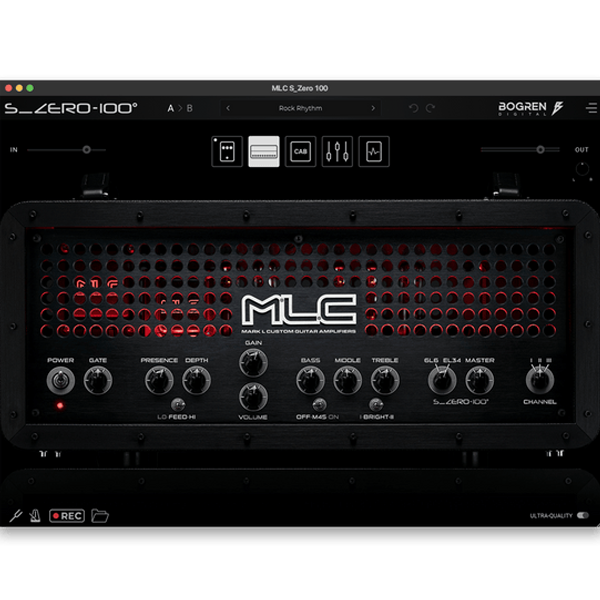
Bogren Digital – MLC Subzero 100 (Windows)
£25.00
Discover Bogren Digital – MLC Subzero 100 (Windows)
Bring legendary tone straight into your DAW with Bogren Digital’s MLC Subzero 100 – a next-level amp simulation that captures the soul of the iconic MLC Subzero 100 guitar amplifier. Designed for producers, composers, and modern music creators, this plugin blends authentic tube dynamics with cutting-edge digital precision.
Explore product features & full description
🔥 Bogren Digital – MLC Subzero 100 (Windows)
Bring legendary tone straight into your DAW with Bogren Digital’s MLC Subzero 100 – a next-level amp simulation that captures the soul of the iconic MLC Subzero 100 guitar amplifier. Designed for producers, composers, and modern music creators, this plugin blends authentic tube dynamics with cutting-edge digital precision.
⚡ Ultra-Realistic Amp Modeling
Built with state-of-the-art amp modeling technology, the Subzero 100 replicates every detail of the original hardware. From tight metal chugs ⚔️ to warm vintage leads 🎶, this plugin gives you studio-ready tones without worrying about mic placement, noise, or expensive gear.
🎶 Perfect for Music Production
Whether you’re producing heavy riffs, cinematic scores, or chart-topping tracks, the MLC Subzero 100 is the ultimate virtual amp. Its versatile presets and highly responsive controls make it easy to shape your sound for any genre or style.
🛠️ Key Features
✔️ Authentic MLC Subzero 100 amp simulation 🎛️
✔️ High-quality presets for instant inspiration 🎵
✔️ Flexible EQ & Gain controls for personalized tones 🎚️
✔️ Optimized for modern DAWs with ultra-low CPU usage 💻
✔️ Ideal for guitars, re-amping, and sound design 🎸
🚀 Why Choose Bogren Digital?
Bogren Digital is trusted by world-class producers, engineers, and guitarists for delivering unmatched realism and reliability. With the Subzero 100, you get studio-grade guitar tones instantly – no hardware, no hassle, just pure inspiration.
Compatibility checklist
- Windows 10,11 (64Bit Only)
- VST, VST3
- Formats: VST3 · VST
Requirements vary by supplied version. Confirm your setup with support before purchasing.
Delivery & activation
- Complete your purchaseReview compatibility and purchase details.
- Download your filesAccess available downloads through your order and account.
- Follow the included setup guideContact GetPlugins if you need installation help.
Activation, where included, is provided by GetPlugins. Publisher-account registration, transferable publisher keys and a publisher-issued licence are not included. Read the activation policy.
Frequently asked questions
How do I receive my download?
After payment, access available files from your order details and GetPlugins account. Contact support if a download is missing.
What activation is included?
Follow the activation instructions supplied with your download. Activation is provided by GetPlugins. Confirm device allowances and reinstall arrangements before ordering.
Will this work with my computer and DAW?
Check the compatibility information for this listing and ask us to confirm the exact supplied build. Libraries may require a compatible sampler or additional software.
What if I need installation help?
Email support@getplugins.io with your order number, operating system, DAW and any error message.
Which updates are included?
Activation and updates are separate. Confirm the available version and update arrangements before ordering; do not assume access to future publisher releases.
How do I request a refund?
Contact support with your order number and issue details. Read our Refund Policy for eligibility and the request process.

Reviews
There are no reviews yet.