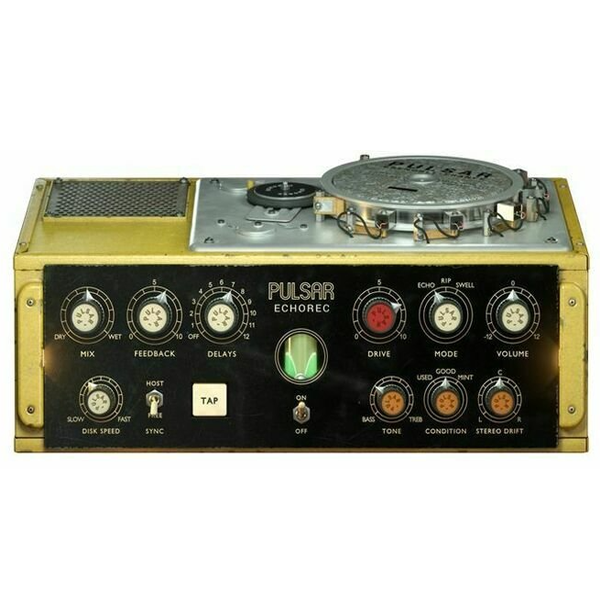
Pulsar Audio – Echorec (Windows)

Bring back the magic of the iconic Binson Echorec with Pulsar Audio’s Echorec plugin – a faithful recreation…
Formats: VST3 · VST

£20.00

Discover Pulsar Audio – Echorec (Windows)

Bring back the magic of the iconic Binson Echorec with Pulsar Audio’s Echorec plugin – a faithful recreation of the legendary hardware unit that shaped countless classic records. Now reimagined for the digital age, it delivers the warm, organic character of vintage tape echoes while offering modern flexibility for today’s music producers.

Explore product features & full description

🎛️ Pulsar Audio – Echorec (Windows)

Bring back the magic of the iconic Binson Echorec with Pulsar Audio’s Echorec plugin – a faithful recreation of the legendary hardware unit that shaped countless classic records. Now reimagined for the digital age, it delivers the warm, organic character of vintage tape echoes while offering modern flexibility for today’s music producers.

🎶 Perfect for Producers & Composers

Designed with music producers, film composers, and sound designers in mind, Echorec is your secret tool for atmospheric textures, deep ambience, and rhythmic echoes. From cinematic soundscapes 🌌 and modern EDM drops 🎧 to lo-fi beats 🎶 and rock guitars 🎸, this plugin elevates every production with timeless echo vibes.

⚡ Key Features

✔️ Authentic Binson Echorec emulation 🎚️
✔️ Multiple delay modes for endless creativity 🎵
✔️ Built-in analog warmth & saturation 🔥
✔️ DAW tempo sync for seamless workflow ⏱️
✔️ Perfect for guitars, synths, vocals & cinematic scoring 🎸🎹🎤

🚀 Why Choose Pulsar Audio?

Pulsar Audio is renowned among professional producers and engineers for delivering ultra-precise analog emulations with modern usability. The Echorec plugin blends vintage character with digital control, ensuring you get the best of both worlds – classic sound and future-ready workflow.
Compatibility checklist

  • Windows 10,11 (64Bit Only)
  • VST, VST3
  • Formats: VST3 · VST

Requirements vary by supplied version. Confirm your setup with support before purchasing.

Delivery & activation

  1. Complete your purchaseReview compatibility and purchase details.
  2. Download your filesAccess available downloads through your order and account.
  3. Follow the included setup guideContact GetPlugins if you need installation help.

Activation, where included, is provided by GetPlugins. Publisher-account registration, transferable publisher keys and a publisher-issued licence are not included. Read the activation policy.

Frequently asked questions

How do I receive my download?

After payment, access available files from your order details and GetPlugins account. Contact support if a download is missing.

What activation is included?

Follow the activation instructions supplied with your download. Activation is provided by GetPlugins. Confirm device allowances and reinstall arrangements before ordering.

Will this work with my computer and DAW?

Check the compatibility information for this listing and ask us to confirm the exact supplied build. Libraries may require a compatible sampler or additional software.

What if I need installation help?

Email support@getplugins.io with your order number, operating system, DAW and any error message.

Which updates are included?

Activation and updates are separate. Confirm the available version and update arrangements before ordering; do not assume access to future publisher releases.

How do I request a refund?

Contact support with your order number and issue details. Read our Refund Policy for eligibility and the request process.

Customer Reviews

Reviews

There are no reviews yet.

Be the first to review “Pulsar Audio – Echorec (Windows)”

Your email address will not be published. Required fields are marked *