Accentize – SpectralBalance 2 (Windows)

SpectralBalance 2 is a next-generation EQ plugin crafted for producers, sound engineers, and modern music creators who need…
Formats: VST3 · VST

£35.00

Discover Accentize – SpectralBalance 2 (Windows)

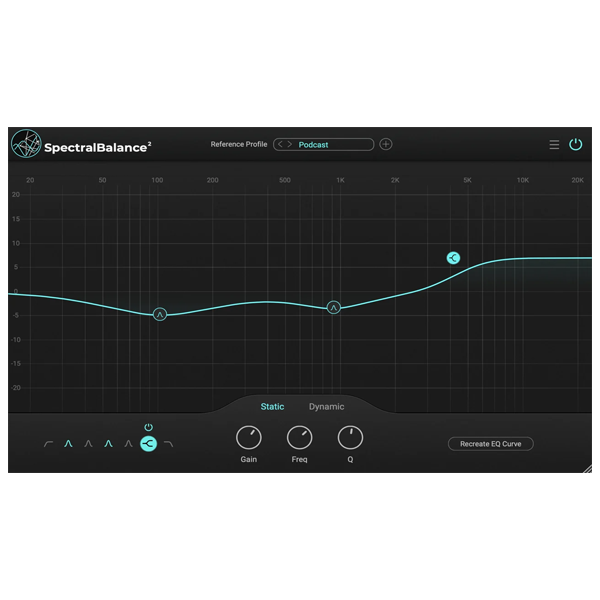
SpectralBalance 2 is a next-generation EQ plugin crafted for producers, sound engineers, and modern music creators who need consistent, polished vocal tonality across multiple recordings. Using advanced spectral analysis, it automatically generates an EQ curve that matches your reference audio, making it perfect for ADR, vocal replacement, localization, podcasts, and professional dialogue work.

ADR and dialogue replacement

Voiceovers and podcasts

Localization and multi-language recordings

Explore product features & full description

🎚️ Accentize – SpectralBalance 2

Intelligent EQ for Perfectly Balanced Vocals

SpectralBalance 2 is a next-generation EQ plugin crafted for producers, sound engineers, and modern music creators who need consistent, polished vocal tonality across multiple recordings. Using advanced spectral analysis, it automatically generates an EQ curve that matches your reference audio, making it perfect for ADR, vocal replacement, localization, podcasts, and professional dialogue work.

Achieve perfectly balanced vocals in seconds—no tedious frequency hunting, no trial-and-error EQ adjustments.

🤖 Intelligent Matching EQ

Automatically match tonal characteristics

SpectralBalance 2 analyzes the spectral profile of a reference track and applies it to your target recording. Manual EQ sweeps are a thing of the past, and workflow on dialogue, speech, and vocal recordings becomes faster and more precise.

Perfect for:

  • ADR and dialogue replacement

  • Voiceovers and podcasts

  • Localization and multi-language recordings

⚙️ Two Operating Modes

Flexible processing for every project

Static Mode:

  • Creates a fixed EQ curve based on the reference track

  • Ideal for ADR sessions or recordings with stable tonality

Dynamic Mode:

  • Offers real-time adaptive EQ as the input signal changes

  • Perfect for interviews, podcasts, and recordings with moving or varying speakers

✨ QuickMatch One-Click Mode

Fast results, precise control

QuickMatch analyzes your reference and applies a basic EQ match with one click. Once applied, you can refine the result in Static or Dynamic mode, combining speed with professional precision.

🚀 Why Choose SpectralBalance 2?

  • Intelligent EQ matching for vocals and speech

  • Fast, efficient workflow for ADR, podcasts, and localization

  • Static and Dynamic modes for ultimate flexibility

  • QuickMatch one-click mode for instant tonal balance

Accentize – SpectralBalance 2 isn’t just an EQ plugin—it’s an intelligent vocal processing solution that delivers consistent, professional-quality vocals effortlessly, saving time and elevating the sound of every production.
Compatibility checklist

  • Windows 10,11 (64-bit Only)
  • VST, VST3
  • Formats: VST3 · VST

Requirements vary by supplied version. Confirm your setup with support before purchasing.

Delivery & activation

  1. Complete your purchaseReview compatibility and purchase details.
  2. Download your filesAccess available downloads through your order and account.
  3. Follow the included setup guideContact GetPlugins if you need installation help.

Activation, where included, is provided by GetPlugins. Publisher-account registration, transferable publisher keys and a publisher-issued licence are not included. Read the activation policy.

Frequently asked questions

How do I receive my download?

After payment, access available files from your order details and GetPlugins account. Contact support if a download is missing.

What activation is included?

Follow the activation instructions supplied with your download. Activation is provided by GetPlugins. Confirm device allowances and reinstall arrangements before ordering.

Will this work with my computer and DAW?

Check the compatibility information for this listing and ask us to confirm the exact supplied build. Libraries may require a compatible sampler or additional software.

What if I need installation help?

Email support@getplugins.io with your order number, operating system, DAW and any error message.

Which updates are included?

Activation and updates are separate. Confirm the available version and update arrangements before ordering; do not assume access to future publisher releases.

How do I request a refund?

Contact support with your order number and issue details. Read our Refund Policy for eligibility and the request process.

Customer Reviews

Reviews

There are no reviews yet.

Be the first to review “Accentize – SpectralBalance 2 (Windows)”

Your email address will not be published. Required fields are marked *