Plugin Alliance – THE OVEN Maor Applebaum Mastering & Hendyamps ( Windows )
£17.00
Discover Plugin Alliance – THE OVEN Maor Applebaum Mastering & Hendyamps ( Windows )
Step into the kitchen of sonic excellence with THE OVEN — a one-of-a-kind analog-style tone shaper crafted by mastering legend Maor Appelbaum and boutique amp wizard Chris Henderson (Hendyamps). Whether you're cooking up rich harmonics or sizzling high-end clarity, THE OVEN brings tube-powered flavor and creative saturation right to your DAW. 🎛️🔥
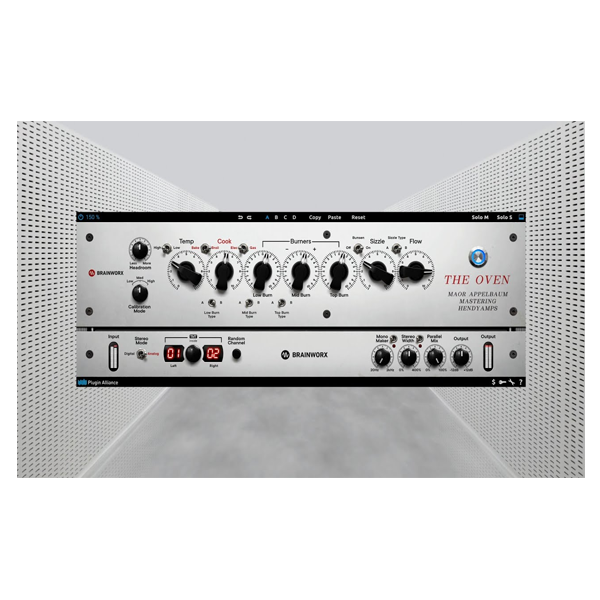
COOK Knob – Add smooth, analog-style tube coloration instantly
3 BURNERS – Multiband saturation with custom “BURN TYPE” control for targeted tonal spice
TEMP Control – Adjust saturation depth and richness to taste 🔥
Explore product features & full description
https://youtu.be/qqpVL18gaeM
🔥 Plugin Alliance – THE OVEN ( Windows )
By Maor Appelbaum Mastering & Hendyamps
Turn Up the Heat on Your Sound 🔊🍳
Step into the kitchen of sonic excellence with THE OVEN — a one-of-a-kind analog-style tone shaper crafted by mastering legend Maor Appelbaum and boutique amp wizard Chris Henderson (Hendyamps). Whether you're cooking up rich harmonics or sizzling high-end clarity, THE OVEN brings tube-powered flavor and creative saturation right to your DAW. 🎛️🔥
🎯 Why THE OVEN Is a Must-Have Plugin
🌀 Analog Warmth + Creative Control
From subtle harmonic enhancement to bold tube-like saturation, THE OVEN delivers everything from thick low-end bloom to silky top-end air. It’s more than an EQ or saturator — it’s your personal sonic flavor station.
🍽️ Key Features – Cook Your Mix to Perfection
-
COOK Knob – Add smooth, analog-style tube coloration instantly
-
3 BURNERS – Multiband saturation with custom “BURN TYPE” control for targeted tonal spice
-
TEMP Control – Adjust saturation depth and richness to taste 🔥
-
BAKE/BROIL Modes + GAS/ELEC Switch – Flip between tube voicings for unique character
-
BUNSEN & SIZZLE – Sculpt beautiful highs and enhance presence effortlessly
🧠 Analog Vibe with Digital Precision
Powered by Brainworx’s TMT (Tolerance Modeling Technology), THE OVEN mimics real-world analog gear – complete with natural stereo variation and lifelike depth.
🛠️ Modern Workflow Features:
✅ Mono Maker – Tightens up your low-end
✅ Stereo Width Control – Expand your soundstage with ease
✅ Resizable Interface – Customizable GUI fits any setup
✅ Dedicated Mono Version – Ideal for vocals, bass, and drum hits
🎧 Trusted by Pros Around the Globe
Used and endorsed by mixing and mastering heavyweights:
-
🎚️ Bob Horn (Usher, Timbaland)
-
🎛️ Kane Churko (Papa Roach, FFDP)
-
🎚️ Geoff Swan (Ed Sheeran, Rudimental)
-
🔥 …and Maor Appelbaum himself
🎯 Who’s THE OVEN For?
🎙️ Mixing & Mastering Engineers – Add final polish and warmth
🎶 Music Producers – Inject analog tone without the hardware hassle
🎧 Sound Designers – Explore bold, characterful textures
🎚️ Artists – Make every mix shine with pro-level depth and vibe
✨ Final Thoughts
If your mixes feel flat, cold, or sterile, THE OVEN is your ticket to vintage soul and modern sonic fire. With its intuitive design and delicious results, it’s the secret sauce your mix chain has been missing. 🍲🔊
Compatibility checklist
- Windows 10,11 (64-bit Only)
- VST,VST3
- Formats: VST3 · VST
Requirements vary by supplied version. Confirm your setup with support before purchasing.
Delivery & activation
- Complete your purchaseReview compatibility and purchase details.
- Download your filesAccess available downloads through your order and account.
- Follow the included setup guideContact GetPlugins if you need installation help.
Activation, where included, is provided by GetPlugins. Publisher-account registration, transferable publisher keys and a publisher-issued licence are not included. Read the activation policy.
Frequently asked questions
How do I receive my download?
After payment, access available files from your order details and GetPlugins account. Contact support if a download is missing.
What activation is included?
Follow the activation instructions supplied with your download. Activation is provided by GetPlugins. Confirm device allowances and reinstall arrangements before ordering.
Will this work with my computer and DAW?
Check the compatibility information for this listing and ask us to confirm the exact supplied build. Libraries may require a compatible sampler or additional software.
What if I need installation help?
Email support@getplugins.io with your order number, operating system, DAW and any error message.
Which updates are included?
Activation and updates are separate. Confirm the available version and update arrangements before ordering; do not assume access to future publisher releases.
How do I request a refund?
Contact support with your order number and issue details. Read our Refund Policy for eligibility and the request process.

Reviews
There are no reviews yet.