PITCHMAP COLORS Overview
PITCHMAP COLORS is a groundbreaking plugin designed for creative sound design, real-time production, and seamless pitch mapping. By merging pitch correction with advanced harmonic transformation, this tool allows users to reshape audio in unique and expressive ways, all while maintaining high-quality output. Developed in collaboration with acclaimed producer Au5, PITCHMAP COLORS introduces an optimized interface and advanced features tailored for modern sound design.
Key Features of PITCHMAP COLORS
1. Match and Transform Tonality
- Easily align your audio to the key and tonality of your composition.
- Transform atonal or noisy elements into resonating harmonic textures effortlessly.
2. Unique Sound Modes
Three distinct modes for sound manipulation:
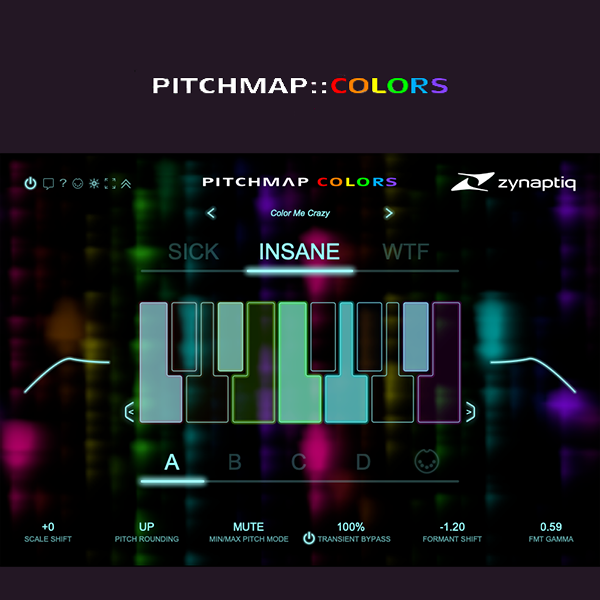
- SICK Mode: Natural and smooth pitch mapping.
- NSANE Mode: Adds rich, resonant harmonics for a lush sound.
- Electric Mode: Generates electrifying, futuristic tonalities.
3. Pitch Mapping and Grid Customization
- Analyze and divide the input into individual pitches.
- Shift pitches to match a customizable grid via:
- On-screen keyboard UI.
- MIDI input.
- Instantly reconfigure scales and tonalities, e.g., from A Minor to F Major.
4. Advanced Sound Customization Tools
- Scale Shift:
- Quickly find the perfect tonal balance or create dynamic arrangements.
- MIDI-controllable for precise automation.
- Formant Shifting:
- Adjust the perceived size of sounds over a two-octave range.
- Create natural or exaggerated effects, from deep basses to high-pitched textures.
- Includes FORMANT GAMMA for organic, alien-like audio mutations.
- Transient Bypass:
- Retain transient details while applying pitch manipulation.
- Mix and boost transients beyond their original intensity.
5. Filters and Precision Control
- High- and Low-Pass Filters for isolating specific frequency ranges.
- Fine-tune sound with a resolution of 0.01 semitones for seamless automation.
Creative Applications
- Sound Design: Create dynamic textures, alien harmonics, and morphing tones for cinematic and electronic projects.
- Music Production: Bring basslines, synths, and vocals into the perfect scale, or generate entirely new harmonic content.
- Remixing: Transform source material into cohesive, key-matched components.
- Live Performance: Use real-time controls for on-the-fly pitch adjustments and sound transformations.
Why Choose PITCHMAP COLORS?
- Combines precision pitch mapping with artistic sound design tools.
- Simplifies complex harmonic processing into a user-friendly interface.
- Developed with input from a renowned producer for real-world application.
Whether you're a producer, sound designer, or performer, PITCHMAP COLORS offers endless creative possibilities, making it an essential addition to any modern music production or sound design workflow. 🎵
https://youtu.be/az6sH9v01r4











Reviews
There are no reviews yet.