MORPH 3 PRO is the definitive upgrade of the classic MORPH 2, designed to push the boundaries of audio morphing and hybrid sound creation. With new algorithms, advanced processing modules, and an enhanced interface, this powerhouse tool lets you blend two input sounds into entirely new, cohesive, and seamless hybrids. Whether you’re crafting voices for…
6 New Morphing Algorithms, exclusive to this version: INTERWEAVE V3: Improved blending of intricate textures.
MORPH 3 PRO is the definitive upgrade of the classic MORPH 2, designed to push the boundaries of audio morphing and hybrid sound creation. With new algorithms, advanced processing modules, and an enhanced interface, this powerhouse tool lets you blend two input sounds into entirely new, cohesive, and seamless hybrids. Whether you’re crafting voices for fantastical creatures, designing alien atmospheres, or creating innovative soundscapes, MORPH 3 PRO is your gateway to unprecedented sonic exploration.
Key Features of MORPH 3 PRO
1. Expanded Morphing Algorithms
6 New Morphing Algorithms, exclusive to this version:
INTERWEAVE V3: Improved blending of intricate textures.
ENHARMONIC: Ideal for pitch-related transformations.
FUSION (PRO-only): Advanced layering for high-fidelity hybrids.
SONANCE (PRO-only): Focused on tonal depth and harmonic richness.
Includes all algorithms from MORPH 2, for a total of 11 unique processing options.
2. New MODELER Module
Style Transfer: Employs granular synthesis to apply the character of one sound to another.
Direct File Playback: Morph directly from pre-recorded samples.
Advanced Analysis Tools (PRO-only): Fine-tune morphing precision with detailed visualization.
Multi-Zone Mapping (PRO-only): Assign morphing zones for complex, multi-layered designs.
3. Enhanced Sound Control
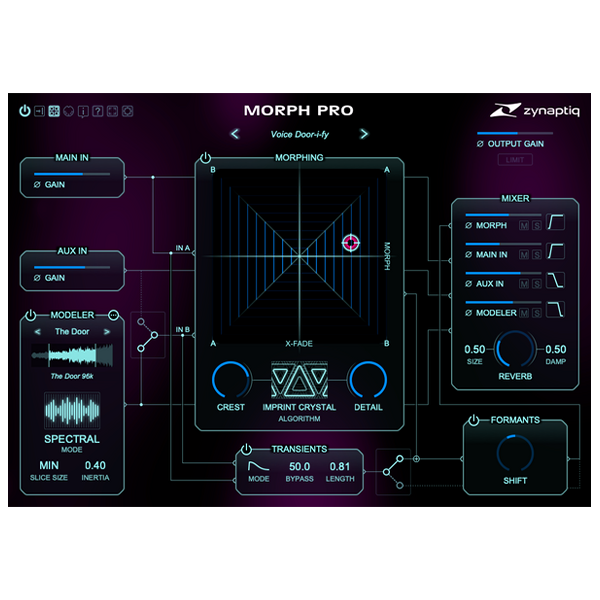
FORMANT SHIFTER: Adjust vocal and tonal characteristics with a ±24 semitone range.
Includes the classic MORPH 2 algorithm for familiar sound shaping.
TRANSIENT BYPASS: Preserve transients for crystal-clear morphing results.
Detail Mode (PRO-only) for fine control over transient shaping.
Double-Precision Processing (64-bit): Ensure pristine sound quality for high-end production.
4. Redesigned User Interface
Scalable UI: Supports up to 200% scaling, optimized for 4K and larger displays.
Interactive Signal Flow Diagram: Visualize and tweak the signal chain effortlessly.
Channel Filters (PRO-only): Lowcut and highcut filters for precise frequency management across mixer channels.
5. Professional-Grade Audio Tools
Soft-Knee Output Limiter: Prevent clipping and maintain smooth dynamics.
Internal Routing Flexibility: Blend, shape, and manipulate morphs with ease.
Applications of MORPH 3 PRO
Sound Design: Create hybrid sounds for films, games, and other media.
Music Production: Develop unique instruments, textures, and experimental layers.
Voice Creation: Design alien, robotic, or otherworldly voices with unmatched realism.
Post-Production: Add creative effects and transformative processing to dialogue, effects, and ambient soundtracks.
Why MORPH 3 PRO?
MORPH 3 PRO builds on the legacy of its predecessor with new tools and enhanced capabilities, making it the ultimate sound morphing solution. Its combination of cutting-edge algorithms, deep customization options, and intuitive workflow empowers audio professionals and creative artists to redefine what’s possible in sound design and music production.
Whether you’re a seasoned pro or a curious sound explorer, MORPH 3 PRO is an indispensable tool in your creative arsenal. 🌌
Complete your purchaseReview compatibility and purchase details.
Download your filesAccess available downloads through your order and account.
Follow the included setup guideContact GetPlugins if you need installation help.
Activation, where included, is provided by GetPlugins. Publisher-account registration, transferable publisher keys and a publisher-issued licence are not included. Read the activation policy.
Frequently asked questions
How do I receive my download?
After payment, access available files from your order details and GetPlugins account. Contact support if a download is missing.
What activation is included?
Follow the activation instructions supplied with your download. Activation is provided by GetPlugins. Confirm device allowances and reinstall arrangements before ordering.
Will this work with my computer and DAW?
Check the compatibility information for this listing and ask us to confirm the exact supplied build. Libraries may require a compatible sampler or additional software.
What if I need installation help?
Email support@getplugins.io with your order number, operating system, DAW and any error message.
Which updates are included?
Activation and updates are separate. Confirm the available version and update arrangements before ordering; do not assume access to future publisher releases.
How do I request a refund?
Contact support with your order number and issue details. Read our Refund Policy for eligibility and the request process.
Customer Reviews
Reviews
There are no reviews yet.
Be the first to review “Zynaptiq MORPH 3 PRO (Windows)” Cancel reply








Reviews
There are no reviews yet.