Zynaptiq – Morph 3 Pro (Windows)
£42.00
Discover Zynaptiq – Morph 3 Pro (Windows)
Reimagine what’s possible in sound design with Zynaptiq MORPH 3 PRO — the cutting-edge audio morphing plugin that blends, warps, and transforms two input signals into stunning hybrid creations. Whether you’re sculpting alien voices, building surreal ambiences, or inventing instruments that have never existed before, MORPH 3 PRO is your gateway to next-level creativity. 🎧🚀…
🎚️ Morph two audio sources in real-time
🧠 Explore 11 powerful algorithms including MORPH 2 classics
🎯 Intuitive X/Y blending interface for creative control
Explore product features & full description
🎛️ Zynaptiq MORPH 3 PRO (Windows) – Shape Reality with Sound 🌌🔊🎨
Reimagine what’s possible in sound design with Zynaptiq MORPH 3 PRO — the cutting-edge audio morphing plugin that blends, warps, and transforms two input signals into stunning hybrid creations. Whether you’re sculpting alien voices, building surreal ambiences, or inventing instruments that have never existed before, MORPH 3 PRO is your gateway to next-level creativity. 🎧🚀
🌀 Unleash the Power of Audio Morphing
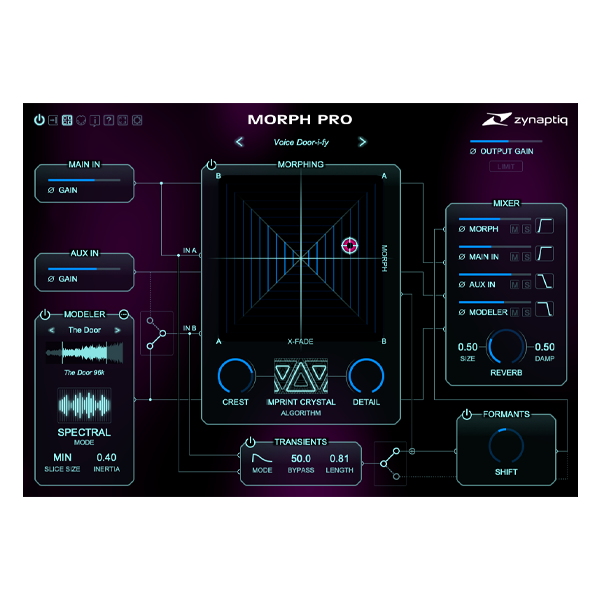
MORPH 3 PRO does more than just mix — it intelligently reshapes audio, crafting two simultaneous transitions from Source A ➡️ B and Source B ➡️ A. Crossfade between them using a slick X/Y pad interface and uncover a universe of sonic possibilities. Whether subtle or extreme, the results are always musically inspiring. 🎶🧪
🔥 What’s New in MORPH 3 PRO?
🎛️ 6 Next-Gen Morphing Algorithms – Includes Interweave V3, Imprint Smooth, Crystal & more
🎙️ Formant Shifter Upgrade – ±24 semitones for natural, artifact-free transformations
⚡ Transient Bypass Module – Keep your punch and precision when morphing rhythmic elements
🧬 Modeler Module – Add AI-driven style transfer and granular synthesis magic
📊 Multi-Zone Mapping – Advanced control of sample-based morphing
🖥️ Redesigned UI – Scalable up to 200% for high-res displays (4K+)
🔒 Soft-Knee Output Limiter – Get polished, controlled output every time
💡 64-bit Internal Processing – High-performance, pro-grade audio handling
🎯 Who Is It For?
🎧 Sound Designers pushing creative boundaries in film, TV, and games
🎼 Music Producers looking to craft fresh, hybrid textures and instruments
🎮 Game Audio Pros building dynamic, immersive environments
🎙️ Voice Artists & Engineers transforming speech into otherworldly characters
🎬 Post-Production Wizards who want futuristic flair in every scene
✅ Why Zynaptiq MORPH 3 PRO?
-
🎚️ Morph two audio sources in real-time
-
🧠 Explore 11 powerful algorithms including MORPH 2 classics
-
🎯 Intuitive X/Y blending interface for creative control
-
🔊 Crystal-clear results thanks to formant preservation & transient shaping
-
💡 Great for sound design, vocal effects, atmospheres, and FX layering
Compatibility checklist
- Windows 10,11 (64-bit Only)
- VST,VST3
- Formats: VST3 · VST
Requirements vary by supplied version. Confirm your setup with support before purchasing.
Delivery & activation
- Complete your purchaseReview compatibility and purchase details.
- Download your filesAccess available downloads through your order and account.
- Follow the included setup guideContact GetPlugins if you need installation help.
Activation, where included, is provided by GetPlugins. Publisher-account registration, transferable publisher keys and a publisher-issued licence are not included. Read the activation policy.
Frequently asked questions
How do I receive my download?
After payment, access available files from your order details and GetPlugins account. Contact support if a download is missing.
What activation is included?
Follow the activation instructions supplied with your download. Activation is provided by GetPlugins. Confirm device allowances and reinstall arrangements before ordering.
Will this work with my computer and DAW?
Check the compatibility information for this listing and ask us to confirm the exact supplied build. Libraries may require a compatible sampler or additional software.
What if I need installation help?
Email support@getplugins.io with your order number, operating system, DAW and any error message.
Which updates are included?
Activation and updates are separate. Confirm the available version and update arrangements before ordering; do not assume access to future publisher releases.
How do I request a refund?
Contact support with your order number and issue details. Read our Refund Policy for eligibility and the request process.

Reviews
There are no reviews yet.