Analog synthesizer with vibration
Create sounds full of character and personality. In every note.
Our first synth is built from the ground up to deliver unrivaled character and tonal depth. Whether you’re shaping modern tones or rough vintage textures, Ember brings every sound to life with warmth and vibration. Designed as a true vibration machine, its intuitive interface lets you easily shape expressive, rich tones that go beyond the limits of conventional synth sounds, offering endless possibilities for your sonic exploration and creativity.
Discover Amber
Vibration machine
Ember delivers more than just analog warmth; it’s a synth designed for pure character. Built from the ground up, it offers bright, vibrant tones that breathe life into your tracks. Whether you’re looking for modern clarity or overly vintage grit, the unique circuitry brings out the raw soul in every sound.
Simplicity and character
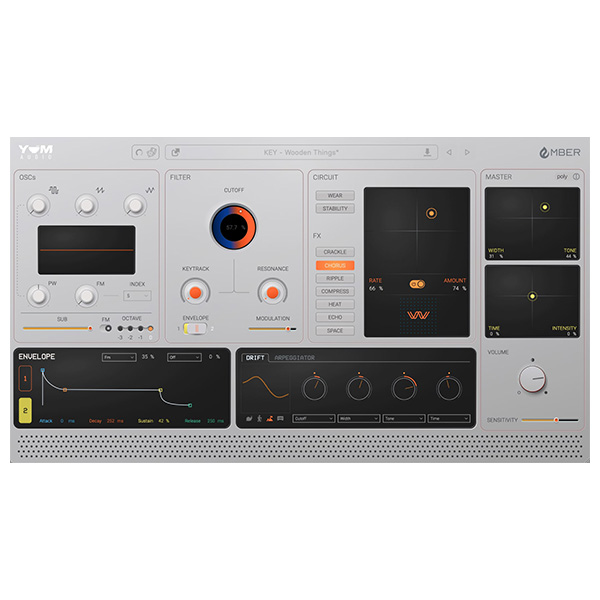
The elegant interface makes creation easy while still packing powerful features. With a single swipe, the main controls shape the entire synth, adjusting envelope timing, effects, and circuit intensity to bring your sound to life.
The Drift section features a subtle, evolving movement through the parameters, including the main controls, making each tone rich, dynamic and full of character.
FX is designed to inspire
The effects suite enhances its character with Crackle, Ripple, Chorus, Compress, Heat, Echo and Space, each tuned to work seamlessly with its oscillator generator. There’s no need for an external effects chain to make your synth sound interesting – Ember delivers a fully produced, ready-to-mix sound right out of the box, with warmth, depth and texture to bring your tracks to life.
Characteristics
- Designed to create rich, distinctive sounds with vibration in every note
- Intuitive interface designed for fast music production
- Master controllers to easily shape complex sounds with pitch, time and width adjustments
- Over 200 presets from artists like Stimming, Craig Bauer, Steve Levine, Mr. Bill,
Undulae, Jae Deal, Mike Schmid, Henkka Niemistö and many more
- Circuit control that alters the internal precision and modulation, bringing analog-style unpredictability
- Oscillators with built-in saturation and sub-oscillator
- FM modulation for complex harmonic textures
- Resonant analog low-pass filter with key tracking
- Creative FX section with Crackle, Ripple, Chorus, Compress, Heat, Echo and Space effects
- Drift section for evolving organic modulation
- Arpeggiator for rhythmic movement and complexity


Reviews
There are no reviews yet.