XLN Audio – RC-20 Retro Color (Windows)

XLN Audio RC-20 Retro Color is a powerful creative effect plugin designed to add warmth, texture, and nostalgic…
Formats: VST3 · AAX · VST

£35.00

Discover XLN Audio – RC-20 Retro Color (Windows)

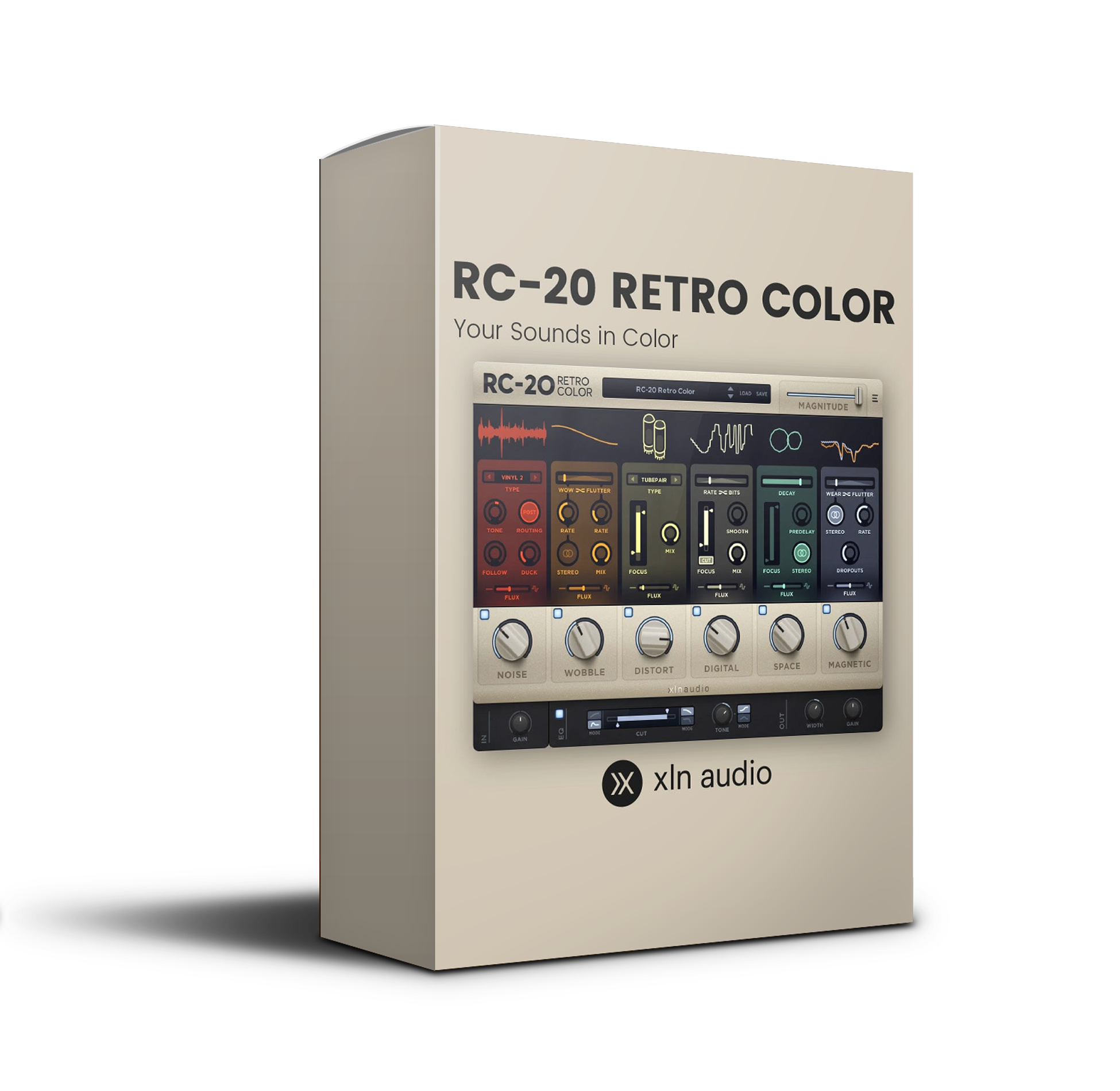
XLN Audio RC-20 Retro Color is a powerful creative effect plugin designed to add warmth, texture, and nostalgic vibe to your tracks. Perfect for producers, composers, and sound designers, RC-20 delivers everything from subtle analog coloration to extreme lo-fi degradation — all in one intuitive interface.

🎛️ Noise – Add vinyl crackle, tape hiss, and ambient textures

🎚️ Wobble – Create pitch instability and tape warble effects

🔊 Distort – Introduce saturation, crunch, and analog distortion

Explore product features & full description

🎛️ XLN Audio – RC-20 Retro Color

Bring Vintage Character to Modern Productions ✨

XLN Audio RC-20 Retro Color is a powerful creative effect plugin designed to add warmth, texture, and nostalgic vibe to your tracks. Perfect for producers, composers, and sound designers, RC-20 delivers everything from subtle analog coloration to extreme lo-fi degradation — all in one intuitive interface.

🔥 Transform Your Sound with Instant Vintage Flavor

Add character and personality to any sound source with ease. Whether you're working on hip-hop, lo-fi, cinematic scores, or electronic music, RC-20 helps you achieve that timeless analog feel in seconds.

From clean digital to gritty vintage — shape your tone effortlessly.

🎚️ Six Powerful Effect Modules

Each module is designed to emulate classic hardware imperfections and creative textures:

  • 🎛️ Noise – Add vinyl crackle, tape hiss, and ambient textures
  • 🎚️ Wobble – Create pitch instability and tape warble effects
  • 🔊 Distort – Introduce saturation, crunch, and analog distortion
  • 🎧 Digital – Apply bit reduction, sample rate degradation, and artifacts
  • 🌊 Space – Enhance with reverb and stereo width
  • 🎵 Magnetic – Simulate tape compression and warmth

Combine modules for endless creative possibilities.

🎨 Flux Engine – Dynamic Movement Control

Bring your sounds to life with the Flux Engine, allowing organic modulation and evolving textures.

Create movement, randomness, and human-like imperfections — perfect for modern production styles.

⚡ Fast Workflow & Intuitive Design

RC-20 is built for speed and creativity:

  • 🎛️ Simple, clean interface
  • ⚡ Instant presets for quick inspiration
  • 🎯 Drag-and-drop control for effortless tweaking

Spend less time tweaking — more time creating.

🎧 Perfect for Every Producer

Whether you're crafting lo-fi beats, cinematic atmospheres, or polished commercial tracks, RC-20 fits seamlessly into any workflow.

✔️ Music Producers – Add vibe and uniqueness
✔️ Composers – Create emotional textures
✔️ Sound Designers – Build complex sonic layers

💻 System Compatibility

  • ✅ Works on Windows & macOS
  • ✅ Supports all major DAWs (VST, AU, AAX)

🚀 Why Choose RC-20 Retro Color?

✔ Industry-standard lo-fi & vintage effect plugin
✔ Extremely versatile and easy to use
✔ Perfect balance of simplicity and depth
✔ Trusted by top producers worldwide
Compatibility checklist

  • Windows 10.11 (64-bit)
  • Instant Download | Full Version
  • VST, VST3, AAX
  • Formats: VST3 · AAX · VST

Requirements vary by supplied version. Confirm your setup with support before purchasing.

Delivery & activation

  1. Complete your purchaseReview compatibility and purchase details.
  2. Download your filesAccess available downloads through your order and account.
  3. Follow the included setup guideContact GetPlugins if you need installation help.

Activation, where included, is provided by GetPlugins. Publisher-account registration, transferable publisher keys and a publisher-issued licence are not included. Read the activation policy.

Frequently asked questions

How do I receive my download?

After payment, access available files from your order details and GetPlugins account. Contact support if a download is missing.

What activation is included?

Follow the activation instructions supplied with your download. Activation is provided by GetPlugins. Confirm device allowances and reinstall arrangements before ordering.

Will this work with my computer and DAW?

Check the compatibility information for this listing and ask us to confirm the exact supplied build. Libraries may require a compatible sampler or additional software.

What if I need installation help?

Email support@getplugins.io with your order number, operating system, DAW and any error message.

Which updates are included?

Activation and updates are separate. Confirm the available version and update arrangements before ordering; do not assume access to future publisher releases.

How do I request a refund?

Contact support with your order number and issue details. Read our Refund Policy for eligibility and the request process.

Customer Reviews

Reviews

There are no reviews yet.

Be the first to review “XLN Audio – RC-20 Retro Color (Windows)”

Your email address will not be published. Required fields are marked *