Wave Arts – FinalPlug 7 (Windows)

FinalPlug combines a lookahead peak limiter with ITU BS.1770 loudness metering, making it an ideal plugin for audio…
Formats: VST3 · VST

£10.00

Discover Wave Arts – FinalPlug 7 (Windows)

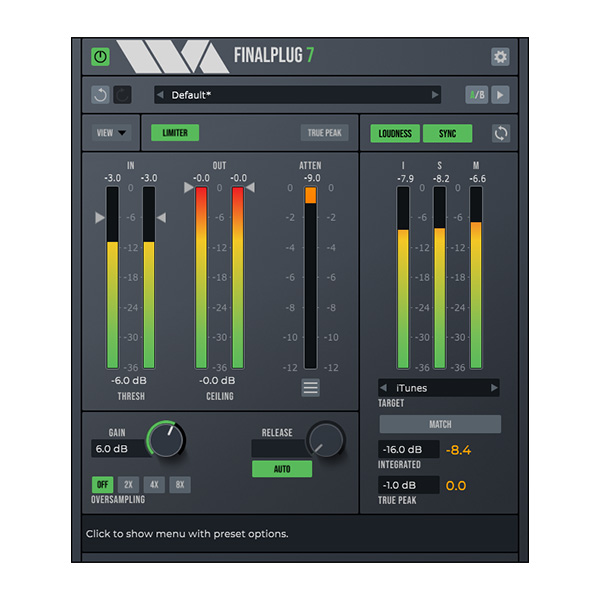
FinalPlug combines a lookahead peak limiter with ITU BS.1770 loudness metering, making it an ideal plugin for audio mastering. It can be used as an insert effect to provide limiting for gain staging or volume maximization. Additionally, FinalPlug can be placed at the end of your mastering chain to ensure your audio meets loudness and…

Sonically transparent peak limiting, for use as peak limiter or volume maximizer.

True peak limiting mode.

Limiter oversampling up to 8x.

Explore product features & full description

FinalPlug combines a lookahead peak limiter with ITU BS.1770 loudness metering, making it an ideal plugin for audio mastering. It can be used as an insert effect to provide limiting for gain staging or volume maximization. Additionally, FinalPlug can be placed at the end of your mastering chain to ensure your audio meets loudness and true peak delivery requirements, making it a crucial component for achieving professional audio standards. FinalPlug installs as a fully functional 30-day demo, allowing you to try out all the features before making a purchase.

The FinalPlug interface could hardly be simpler. When used as a loudness maximizer, select a desired output ceiling level, say -0.1 dB, and then adjust the threshold level. As you decrease the threshold you increase the volume.

To meet loudness and true peak delivery standards, select the "Analyze" preset and then select a delivery target specification. This sets up the integrated loudness and true peak target levels. Then play your session. The integrated loudness and true peak levels are displayed as the music plays, and will be colored orange if they exceed the target levels. At the end of playback, click MATCH. This sets the limiter parameters to meet the target specification. Playing the session again will yield the desired integrated loudness level without exceeding the true peak level. You can now export your compliant audio.

https://youtu.be/lfe2VyDlQ84

HIGHLIGHTS

  • Sonically transparent peak limiting, for use as peak limiter or volume maximizer.
  • True peak limiting mode.
  • Auto-release mode.
  • Limiter oversampling up to 8x.
  • ITU BS.1770 loudness metering.
  • Writes loudness and overflow state as automation parameters.
Compatibility checklist

  • Windows 10,11 (64Bit Only)
  • VST, VST3
  • Formats: VST3 · VST

Requirements vary by supplied version. Confirm your setup with support before purchasing.

Delivery & activation

  1. Complete your purchaseReview compatibility and purchase details.
  2. Download your filesAccess available downloads through your order and account.
  3. Follow the included setup guideContact GetPlugins if you need installation help.

Activation, where included, is provided by GetPlugins. Publisher-account registration, transferable publisher keys and a publisher-issued licence are not included. Read the activation policy.

Frequently asked questions

How do I receive my download?

After payment, access available files from your order details and GetPlugins account. Contact support if a download is missing.

What activation is included?

Follow the activation instructions supplied with your download. Activation is provided by GetPlugins. Confirm device allowances and reinstall arrangements before ordering.

Will this work with my computer and DAW?

Check the compatibility information for this listing and ask us to confirm the exact supplied build. Libraries may require a compatible sampler or additional software.

What if I need installation help?

Email support@getplugins.io with your order number, operating system, DAW and any error message.

Which updates are included?

Activation and updates are separate. Confirm the available version and update arrangements before ordering; do not assume access to future publisher releases.

How do I request a refund?

Contact support with your order number and issue details. Read our Refund Policy for eligibility and the request process.

Customer Reviews

Reviews

There are no reviews yet.

Be the first to review “Wave Arts – FinalPlug 7 (Windows)”

Your email address will not be published. Required fields are marked *