SoundGhost – Texturize (Windows)

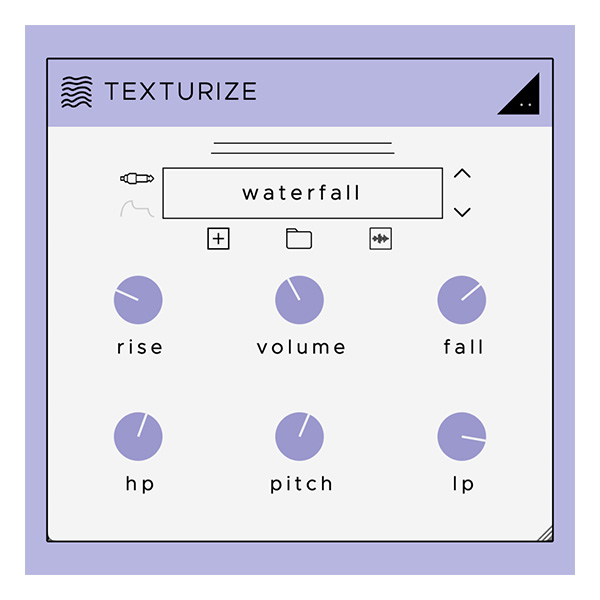
Texturize is an inspiring creative tool that adapts to any sound and seamlessly layers dense textures onto the…
Formats: VST3

£10.00

Discover SoundGhost – Texturize (Windows)

Texturize is an inspiring creative tool that adapts to any sound and seamlessly layers dense textures onto the original sound. Apply a splash of water to the hi-hat. add vinyl crackle on the piano. add paper rustle to the drum. Transform any sound by choosing from over 200 original noise sources – from retro recorders,…

Explore product features & full description

Texturize is an inspiring creative tool that adapts to any sound and seamlessly layers dense textures onto the original sound. Apply a splash of water to the hi-hat. add vinyl crackle on the piano. add paper rustle to the drum. Transform any sound by choosing from over 200 original noise sources – from retro recorders, unique followers and organic sediments to modular synthesizers and electromagnetic drones.

Shape texture with envelope controls, alter frequency content with high-quality filters, and import and save your samples for instant restoration. texturize is a simple and elegant solution for adding texture to any sound.

PECULIARITIES
Conversion

texturize reacts to audio in real-time, layering it on top of the original audio to breathe new life into it. Add rustling leaves to electronic drums to give them a more organic sound, layer reactive vinyl or cassette crackle on the piano to create a lofi feel, or add white noise to a melody to help it cut through the mix.

Form

As audio passes through texturize, a reactive texture can be formed around your audio using the plugin’s “fade” and “fall” controls. Slowly build up to peak volume and fade out slowly, or make it punchy with quick fade-in and fade-out settings. You can even turn off the shaping controls completely and solo the texture.

Sculpt

Precision parallel low and high pass filters (24dB) are designed to create noise textures around your audio. Ideal for reducing subharmonics, focusing on high-frequency crackles, or adding depth. You can also adjust the pitch of the texture, which is ideal for setting tonal textures to your input.

More Than 200 Noise Sources

We’ve developed a huge variety of noise sounds to help you get creative. Choose from 6 categories – devices, electric waves, fouls, noises, synth flexes and tones.

Importing samples

Import your samples into a custom category and call them for later use in your projects. import wav, mp3, flac, aiff and ogg formats.

Editing a Waveform

Sometimes you need to focus on one part of the sample. Easily edit the start and end points of any sample using the built-in waveform window.

Quick Access Tools

muting the sound to create new and unique rhythmic ideas. Disable the envelope to use texturize as a noise source or to fine-tune the texture to your liking.
Compatibility checklist

  • Windows 10,11 (64Bit Only)
  • VST3 Only
  • Formats: VST3

Requirements vary by supplied version. Confirm your setup with support before purchasing.

Delivery & activation

  1. Complete your purchaseReview compatibility and purchase details.
  2. Download your filesAccess available downloads through your order and account.
  3. Follow the included setup guideContact GetPlugins if you need installation help.

Activation, where included, is provided by GetPlugins. Publisher-account registration, transferable publisher keys and a publisher-issued licence are not included. Read the activation policy.

Frequently asked questions

How do I receive my download?

After payment, access available files from your order details and GetPlugins account. Contact support if a download is missing.

What activation is included?

Follow the activation instructions supplied with your download. Activation is provided by GetPlugins. Confirm device allowances and reinstall arrangements before ordering.

Will this work with my computer and DAW?

Check the compatibility information for this listing and ask us to confirm the exact supplied build. Libraries may require a compatible sampler or additional software.

What if I need installation help?

Email support@getplugins.io with your order number, operating system, DAW and any error message.

Which updates are included?

Activation and updates are separate. Confirm the available version and update arrangements before ordering; do not assume access to future publisher releases.

How do I request a refund?

Contact support with your order number and issue details. Read our Refund Policy for eligibility and the request process.

Customer Reviews

Reviews

There are no reviews yet.

Be the first to review “SoundGhost – Texturize (Windows)”

Your email address will not be published. Required fields are marked *