WA Production – Loop Engine 2 🎶
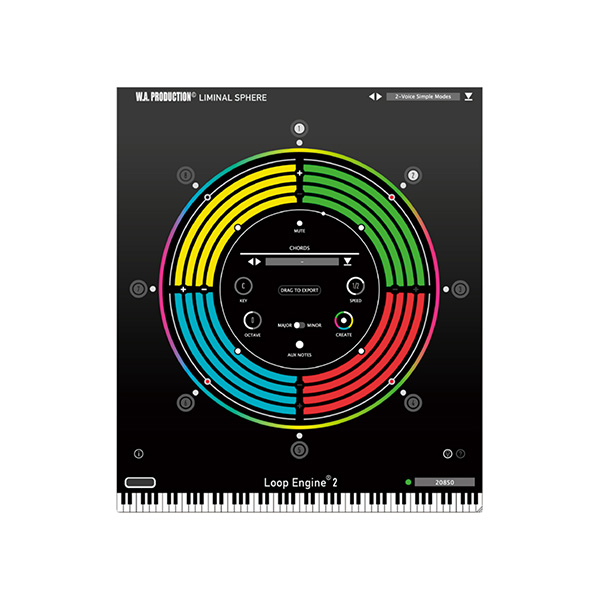
Loop Engine 2 by WA Production is a next-generation loop manipulation plugin designed to generate, transform, and layer loops effortlessly. Whether you're crafting beats, remixing tracks, or creating complex rhythmic patterns, Loop Engine 2 provides powerful sequencing, slicing, and modulation tools to elevate your productions.
🔥 Key Features & Capabilities
✅ Advanced Loop Slicing & Rearranging – Cut, slice, and rearrange loops with intuitive drag-and-drop functionality.
✅ Powerful Multi-Layered Engine – Stack up to 6 loop layers for rich, evolving textures.
✅ Built-in Effects & Processing – Apply filters, EQ, distortion, reverb, delay, and more.
✅ Tempo-Synced Playback – Perfect synchronization with your DAW’s BPM for seamless integration.
✅ MIDI & Automation Control – Trigger loops, variations, and effects using MIDI input and DAW automation.
✅ Dynamic Modulation & Randomization – Create unique grooves with LFOs, step sequencers, and randomized variations.
✅ Drag & Drop Sample Import – Easily import your own WAV, MP3, or AIFF files for custom loop creation.
✅ Extensive Preset Library – Includes a wide range of ready-to-use loops for EDM, Hip-Hop, House, Techno, and more.
🎛️ Sound Design & Creative Workflow
🎵 Real-Time Loop Transformation – Morph loops on the fly using time-stretching, pitch-shifting, and granular synthesis.
🎚️ Multi-FX Processing – Shape your loops with filters, bitcrushing, saturation, and stereo widening.
🎼 Harmonic & Rhythmic Modulation – Add chordal movement and groove manipulation with advanced step sequencing.
🎶 Beat Shuffling & Glitch FX – Instantly create chopped, stuttered, and glitchy effects for modern production styles.
🎧 Ideal for…
🔥 Electronic Music Producers – Create dynamic loops and rhythmic textures with ease.
🎤 Beatmakers & Hip-Hop Producers – Chop and flip samples for unique drum grooves and melodies.
🎼 Film & Game Composers – Layer and manipulate loops for cinematic sound design.
🎛️ Remixers & DJs – Transform existing audio into fresh, original loops.
🚀 Why Choose Loop Engine 2?
✅ Effortless Loop Manipulation – No need for manual slicing—let the engine do the work!
✅ Endless Creative Possibilities – Stack layers, add FX, and automate parameters for evolving textures.
✅ Optimized for Performance – Runs smoothly in any DAW with low CPU usage.
✅ Perfect for Any Genre – Works across EDM, hip-hop, trap, techno, house, cinematic, and more.
🎶 Take your loops to the next level with WA Production – Loop Engine 2!
Would you like preset recommendations or tips on how to integrate it into your workflow? 🚀🔥








Reviews
There are no reviews yet.