🎚️ WA Production – Drifter (Windows)
Your mix might be technically perfect—but does it truly feel alive? WA Production – Drifter is a multi-parameter modulation FX plugin that injects warmth, groove, and natural motion into your productions. From subtle analog imperfections to bold lo-fi wobble, Drifter ensures every track pulses with soul and character.
✨ Emulate the pitch drift of vintage synths
✨ Recreate the warm imperfections of tape machines
✨ Add organic depth to percussion, pads, and instruments
🔥 Bold Changes & Creative Shifts
Drifter isn’t just about subtlety—it’s a creative powerhouse for dramatic transformations.
✔️ Stack multiple modulations for evolving, complex textures
✔️ Add gritty saturation & harmonic shaping for warmth
✔️ Explore phase, shift & frequency warps for experimental sound design
From vinyl-style imperfections to wild lo-fi modulation, Drifter lets you push sound design into exciting new territories.
🎛️ Central Control, Maximum Flexibility
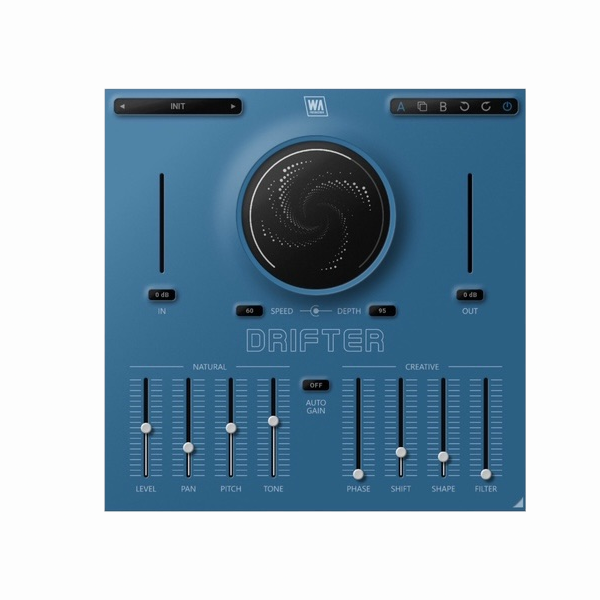
With its intuitive interface, Drifter makes it simple to design both delicate shifts and bold transformations.
✨ Global Depth & Speed controls for instant modulation
✨ Independent sliders for each target parameter
✨ Natural Modulations: Level, Pan, Pitch, Tone
✨ Creative Modulations: Phase, Shift, Shape, Filter
You get surgical precision without sacrificing speed, creativity, or inspiration.
👀 Visual Feedback & Smooth Performance
Stay in full control with real-time feedback and a sleek, resizable interface.
✅ Live metering & central visualizer for instant clarity
✅ A/B comparison & Undo/Redo for flexible testing
✅ Automatic Gain Compensation (AGC) keeps levels balanced
✅ Lightweight & CPU-friendly for smooth workflow
🎶 Built for Producers, Composers & Modern Creators
Whether you make EDM, Lo-Fi, cinematic soundscapes, or experimental music, Drifter is the ultimate tool to add soul, groove, and unpredictability. Use factory presets for quick inspiration, or dive deep into custom modulation chains to design your own sonic signature.
⚡ Key Features
✔️ Multi-parameter modulation for organic movement
✔️ Global Depth & Speed controls
✔️ Independent modulation sliders for precision shaping
✔️ Natural Modulation: Level, Pan, Pitch, Tone
✔️ Creative Modulation: Phase, Shift, Shape, Filter
✔️ AGC (Automatic Gain Compensation)
✔️ A/B comparison, Undo/Redo, Copy/Paste
✔️ Resizable, responsive interface
✔️ Flexible factory presets
🚀 Why Choose WA Production – Drifter?
Because perfection needs imperfection. With Drifter, you can transform sterile, digital sounds into alive, humanized performances. Add soul, groove, and motion to your music—and make every production feel alive. 🎶









Reviews
There are no reviews yet.