u-he – Zebra 2 (Windows)
£20.00
Discover u-he – Zebra 2 (Windows)
Zebra2 is a wireless modular synthesizer designed for flexibility, ergonomy and low CPU hit. Its Modules only appear while they are in use: Add an oscillator to the patching grid and it will appear on the left, use an LFO for anything and it will appear on the right.
NEW in v2.9: All 500+ factory presets have been refurbished and improved with X/Y assignments. They are fully tagged and NKS-ready
4 powerful wavetable oscillators (16 waves) with integrated spectral effects
1, 2, 4, or 11 times in unison, with detune and stereo spread
Explore product features & full description
- NEW in v2.9: All 500+ factory presets have been refurbished and improved with X/Y assignments. They are fully tagged and NKS-ready
- 4 powerful wavetable oscillators (16 waves) with integrated spectral effects
- 1, 2, 4, or 11 times in unison, with detune and stereo spread
- Polyphonic (up to 16 voices), duo phonic or mono, and legato modes
- 4 assignable X/Y pads
- 4 FM oscillators with 8 alternative waveforms (not only sine)
- 4 regular filters with 23 different modes
- 4 cross-modulation filters (XMF)
- 12-slot modulation matrix with depth modulation from a second source
- Flexible signal routing: 4×12 main patching grid, 3×6 effects patching grid
- 4 syncable multi-stage envelope generators (MSEG) with up to 32 segments each
- 4 per-voice LFOs plus 2 global LFOs
- 21 stereo effects: 2× chorus/flanger, 2× delay, 2× EQ, 2× compressor, 2× reverb and more
- Resizable UI from 70% to 200%
- MIDI learn page and editable list
- NEW in v2.9.3: Support for Oddsound MTS-ESP
Features
Modules
Zebra2 is a wireless modular synthesizer designed for flexibility, ergonomy and low CPU hit. Its Modules only appear while they are in use: Add an oscillator to the patching grid and it will appear on the left, use an LFO for anything and it will appear on the right.
After a little practice, you will find programming Zebra2 very comfortable and lightning fast. Which in the end translates to… more fun!
Zebra’s modules are divided into Generators and Modulators, and include freely assignable controls that directly modulate important parameters.
Mix and Match
Zebra2's Grid
The Grid
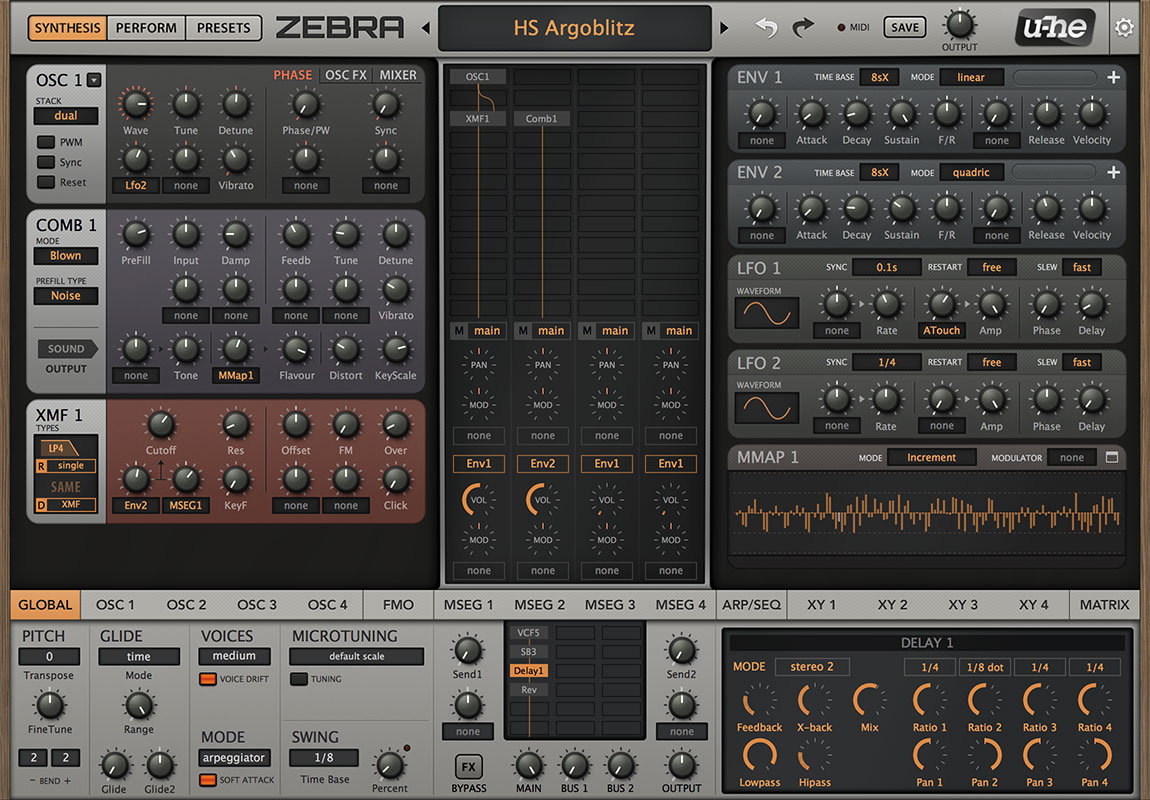
The center of the synthesis window is a Grid consisting of four vertical lanes.
This area is used for connecting generators together, whereby the signal flow is top to bottom.
Any module can route signals between lanes.
Add modules, drag them around, and change the routing – it's a playground!
The Mixer
Below the main grid is a 4-channel Mixer.
This is where you adjust pans and volumes, select envelopes,
and the routing to the FX grid for each lane.
There are 3 different routing options for the FX bus. You can also select which envelope to use for each specific lane, and specify modulation for the pan and volume parameters
Lower Pane
The Lower Pane is where you will find Zebra2's global settings and many other features: effects, in-depth controls for oscillators, MSEGs, performance control settings, arpeggiator/sequencer, and the modulation matrix.
Zebra2's Lower Pane (Global and FX settings)
The global settings include controls for the main synthesizer's pitch, glide, and voices. A Swing generator and micro tuning options are also available.
Next to the global settings is the Effects section. Zebra2 includes a Chorus / Phaser, a flexible multi-mode Delay, two different Reverb units, a Compressor, and an Equalizer. It's also possible to use certain generators as effects, such as Shape, VCF, Dist…
Zebra lets you modulate practically all effect parameters (e.g. reverb size or delay feedback).
Compatibility checklist
- Windows 10,11 (64 Bit Only)
- VST, VST3, AAX
- Formats: VST3 · AAX · VST
Requirements vary by supplied version. Confirm your setup with support before purchasing.
Delivery & activation
- Complete your purchaseReview compatibility and purchase details.
- Download your filesAccess available downloads through your order and account.
- Follow the included setup guideContact GetPlugins if you need installation help.
Activation, where included, is provided by GetPlugins. Publisher-account registration, transferable publisher keys and a publisher-issued licence are not included. Read the activation policy.
Frequently asked questions
How do I receive my download?
After payment, access available files from your order details and GetPlugins account. Contact support if a download is missing.
What activation is included?
Follow the activation instructions supplied with your download. Activation is provided by GetPlugins. Confirm device allowances and reinstall arrangements before ordering.
Will this work with my computer and DAW?
Check the compatibility information for this listing and ask us to confirm the exact supplied build. Libraries may require a compatible sampler or additional software.
What if I need installation help?
Email support@getplugins.io with your order number, operating system, DAW and any error message.
Which updates are included?
Activation and updates are separate. Confirm the available version and update arrangements before ordering; do not assume access to future publisher releases.
How do I request a refund?
Contact support with your order number and issue details. Read our Refund Policy for eligibility and the request process.

Reviews
There are no reviews yet.