
Discover U-he – ACE (Windows)
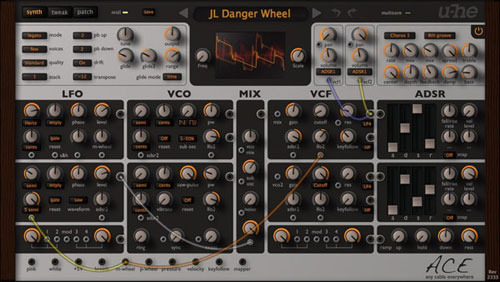
ACE belongs to a new generation of synthesizers developed with the latest, fastest computers in mind. ACE offers classic modular synthesis and more at a fraction of the cost of dedicated hardware. But like its hardware forebears, you can patch any output into any input: the number of different ways to connect modules together is…
2 x LFO (0Hz - 20kHz)
2 x VCO (0Hz - 20kHz, PWM, VCO1-linked sub)
2 x VCF (LP1/LP2/LP3/LP4 and HP/BP/BR each)
Explore product features & full description
Any Cable Everywhere
ACE belongs to a new generation of synthesizers developed with the latest, fastest computers in mind. ACE offers classic modular synthesis and more at a fraction of the cost of dedicated hardware. But like its hardware forebears, you can patch any output into any input: the number of different ways to connect modules together is practically infinite. Needless to say, you will never run out of cables!
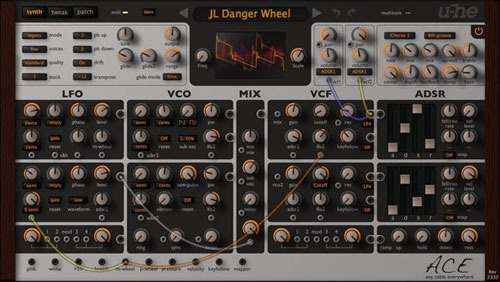
The careful selection of modules and clear layout make ACE the ideal instrument for newcomers delving into the fascinating world of modular synthesis. But ACE also delivers the goods: like any medium-sized professional hardware system, ACE has enough synthesis power to keep you discovering new tricks for many years to come!
List of Modules
- 2 x LFO (0Hz - 20kHz)
- 2 x ADSSR envelopes
- 2 x VCO (0Hz - 20kHz, PWM, VCO1-linked sub)
- 2 x VCF (LP1/LP2/LP3/LP4 and HP/BP/BR each)
- 2 x VCA with pan
- 2 x multiples (with modulation input)
- 1 x mixer (for standard sources + aux)
- 1 x ramp generator (loopable)
- 1 x mapping generator (up to 128 values)
- 1 x noise (white, pink)
- 3 x global effects (chorus, delay, 2 x tone)
Key Features
At first glance ACE may seem overly simplistic, but remember that virtually anything can be plugged into anything else. For instance, try plugging an LFO into a Filter, then use that filter as an FM source for an oscillator. Crazy routing is possible, endless fun is guaranteed!
- Semi-modular architecture, with default routing like ARP 2600
- 25 signal sources, 30+ signal targets
- Up to 8 times unison with +/-2 octave detune range each
- Exceptional filters, can self-oscillate
- LFOs can be used as VCOs and vice versa
- Sync, FM, cross modulation
- Use multiples for inversion, amp / ring modulation etc.
- Custom LFO waveform "tap map"
- Microtuning (Scala .tun standard)
- 100% free of Supersaws!
System Requirements
Windows
- Windows 7 or newer (32 / 64-bit)
- VST2, VST3
Minimum Requirements
- Host software / DAW
- 1GB RAM, more recommended
- 50MB free disk space
- 1000 × 600 or larger display
- Modern CPU required
- Intel Nehalem or newer, AMD Bulldozer or newer (for Windows / Linux)
- Linux - glibc version 2.28 or newer
Plugin Formats:
- ACE is not a standalone product, it requires host software. ACE is compatible with nearly all DAWs.
Compatibility checklist
- Confirm the supplied build, operating system and required host before ordering.
Requirements vary by supplied version. Confirm your setup with support before purchasing.
Delivery & activation
- Complete your purchaseReview compatibility and purchase details.
- Download your filesAccess available downloads through your order and account.
- Follow the included setup guideContact GetPlugins if you need installation help.
Activation, where included, is provided by GetPlugins. Publisher-account registration, transferable publisher keys and a publisher-issued licence are not included. Read the activation policy.
Frequently asked questions
How do I receive my download?
After payment, access available files from your order details and GetPlugins account. Contact support if a download is missing.
What activation is included?
Follow the activation instructions supplied with your download. Activation is provided by GetPlugins. Confirm device allowances and reinstall arrangements before ordering.
Will this work with my computer and DAW?
Check the compatibility information for this listing and ask us to confirm the exact supplied build. Libraries may require a compatible sampler or additional software.
What if I need installation help?
Email support@getplugins.io with your order number, operating system, DAW and any error message.
Which updates are included?
Activation and updates are separate. Confirm the available version and update arrangements before ordering; do not assume access to future publisher releases.
How do I request a refund?
Contact support with your order number and issue details. Read our Refund Policy for eligibility and the request process.

Reviews
There are no reviews yet.