THR – VoxGuru (Windows)
£15.00
Discover THR – VoxGuru (Windows)
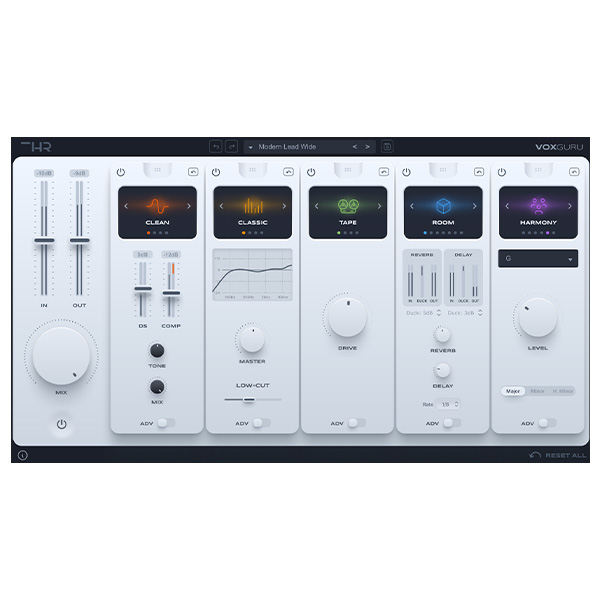
THR VoxGuru is a next-generation vocal processing plugin designed to enhance, shape, and refine your vocals with professional-grade effects and intelligent tuning. Whether you’re producing pop, hip-hop, R&B, EDM, or cinematic soundtracks, VoxGuru delivers crystal-clear vocals, rich harmonics, and precise tonal control with ease.
Explore product features & full description
Description for THR - VoxGuru
THR VoxGuru is a next-generation vocal processing plugin designed to enhance, shape, and refine your vocals with professional-grade effects and intelligent tuning. Whether you’re producing pop, hip-hop, R&B, EDM, or cinematic soundtracks, VoxGuru delivers crystal-clear vocals, rich harmonics, and precise tonal control with ease.
Key Features:
🎤 Advanced Vocal Processing – Instantly improve clarity, presence, and tonal balance.
🎚 Smart EQ & Compression – Fine-tune dynamics and sculpt your vocal tone effortlessly.
🔊 Intelligent De-Esser – Reduce sibilance while preserving vocal clarity and articulation.
🎵 Pitch & Formant Control – Adjust pitch naturally and modify formants for creative effects.
🔥 Harmonic Enhancer – Add warmth, brightness, or air to make vocals stand out.
🎼 Vocal Reverb & Delay – Create depth, space, and atmosphere with built-in FX.
⚡ User-Friendly Interface – Intuitive controls for both beginners and professionals.
Whether you need subtle vocal enhancement or bold creative effects, THR VoxGuru is the ultimate tool for modern vocal production. Elevate your vocal mixes and bring your recordings to life with VoxGuru! 🎶🔥
Compatibility checklist
- Windows 10,11 (64Bit Only)
- VST3, AAX
- Formats: VST3 · AAX
Requirements vary by supplied version. Confirm your setup with support before purchasing.
Delivery & activation
- Complete your purchaseReview compatibility and purchase details.
- Download your filesAccess available downloads through your order and account.
- Follow the included setup guideContact GetPlugins if you need installation help.
Activation, where included, is provided by GetPlugins. Publisher-account registration, transferable publisher keys and a publisher-issued licence are not included. Read the activation policy.
Frequently asked questions
How do I receive my download?
After payment, access available files from your order details and GetPlugins account. Contact support if a download is missing.
What activation is included?
Follow the activation instructions supplied with your download. Activation is provided by GetPlugins. Confirm device allowances and reinstall arrangements before ordering.
Will this work with my computer and DAW?
Check the compatibility information for this listing and ask us to confirm the exact supplied build. Libraries may require a compatible sampler or additional software.
What if I need installation help?
Email support@getplugins.io with your order number, operating system, DAW and any error message.
Which updates are included?
Activation and updates are separate. Confirm the available version and update arrangements before ordering; do not assume access to future publisher releases.
How do I request a refund?
Contact support with your order number and issue details. Read our Refund Policy for eligibility and the request process.

Reviews
There are no reviews yet.