The Him DSP – Sub Ninja (Windows)
£18.00
Discover The Him DSP – Sub Ninja (Windows)
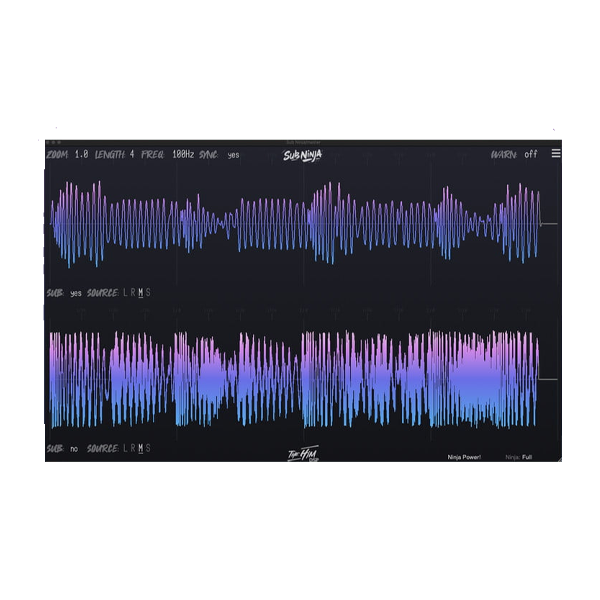
Struggling to get that tight, clean low-end in your mixes? Say goodbye to guesswork and hello to precision with Sub Ninja – the ultimate low-frequency visualizer for Windows! Designed by The Him DSP, this powerful plugin helps you see your subs, kicks, and basslines in ultra-detailed waveform form, so you can make better mixing decisions…
Explore product features & full description
🥷 The Him DSP – Sub Ninja (Windows): Master Your Low-End Like a Pro! 🔊💥
Struggling to get that tight, clean low-end in your mixes? Say goodbye to guesswork and hello to precision with Sub Ninja – the ultimate low-frequency visualizer for Windows! Designed by The Him DSP, this powerful plugin helps you see your subs, kicks, and basslines in ultra-detailed waveform form, so you can make better mixing decisions instantly. 🎚️🎧
Unlike basic spectrum analyzers, Sub Ninja delivers real-time waveform analysis with sample-level clarity, giving you a crystal-clear view of your low-end dynamics. Whether you're producing EDM, hip-hop, pop, or cinematic scores, Sub Ninja ensures your bass hits just right – every time. 🎶⚡
🌟 Key Features of Sub Ninja
🎞️ Real-Time Waveform Sync – Experience true synced waveform visualization that reveals the shape and timing of your low-end audio in motion. 🌀🔊
📊 Waveform vs. Spectrum – Go beyond traditional spectrum analyzers! Get deeper insight into balance, timing, and level of your subs and kicks. 📉💡
🎛️ Instant Filter Control – Adjust lowpass filters and redraw waveforms—even in silence—for precise frequency sculpting. 🔄🎛️
🧩 4 Sidechain Inputs – Route multiple tracks like kick, bass, or sub groups and visualize them together with pinpoint accuracy. 🎯🔗
🔬 Sample-Level Zoom – Zoom in with surgical precision and analyze every peak, transient, and phase detail of your low-end. 🧠🔍
🖱️ Easy, Intuitive Interface – Clean UI with smart controls that keep you focused on mixing, not fiddling with settings. 🖥️🚀
💼 Perfect For:
✔️ Low-End Mixing & Mastering
✔️ Sub vs. Kick Conflict Resolution
✔️ Sidechain Visualization
✔️ EDM, Trap, Techno, Hip-Hop, and Film Score Production 🎹🥁🎥
Compatibility checklist
- Windows 10,11 (64-bit Only)
- VST,VST3
- Formats: VST3 · VST
Requirements vary by supplied version. Confirm your setup with support before purchasing.
Delivery & activation
- Complete your purchaseReview compatibility and purchase details.
- Download your filesAccess available downloads through your order and account.
- Follow the included setup guideContact GetPlugins if you need installation help.
Activation, where included, is provided by GetPlugins. Publisher-account registration, transferable publisher keys and a publisher-issued licence are not included. Read the activation policy.
Frequently asked questions
How do I receive my download?
After payment, access available files from your order details and GetPlugins account. Contact support if a download is missing.
What activation is included?
Follow the activation instructions supplied with your download. Activation is provided by GetPlugins. Confirm device allowances and reinstall arrangements before ordering.
Will this work with my computer and DAW?
Check the compatibility information for this listing and ask us to confirm the exact supplied build. Libraries may require a compatible sampler or additional software.
What if I need installation help?
Email support@getplugins.io with your order number, operating system, DAW and any error message.
Which updates are included?
Activation and updates are separate. Confirm the available version and update arrangements before ordering; do not assume access to future publisher releases.
How do I request a refund?
Contact support with your order number and issue details. Read our Refund Policy for eligibility and the request process.

Reviews
There are no reviews yet.