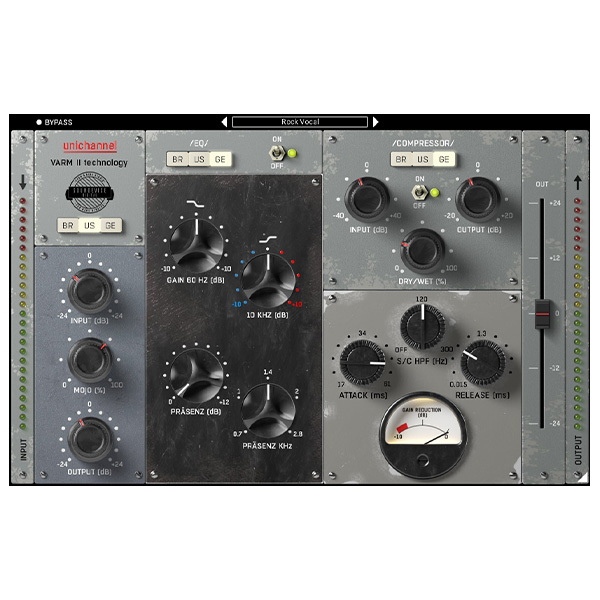
Sound Device Digital – Unichannel (Windows)

UniChannel by SounDevice Digital, under the United Plugins umbrella, is a versatile channel strip plugin that emulates the…
Formats: VST3 · AAX · VST

£20.00

Discover Sound Device Digital – Unichannel (Windows)

UniChannel by SounDevice Digital, under the United Plugins umbrella, is a versatile channel strip plugin that emulates the warm, analog sound of vintage studio hardware. It offers a comprehensive suite of tools to enhance your audio mixing and production, providing a complete vintage studio experience within your digital audio workstation.

Three Distinct Preamps: Choose from British, American, and German preamp models, each providing unique tonal characteristics to suit various audio sources.

Three Classic Equalizers: Access EQs inspired by renowned vintage units, allowing for precise tonal shaping and enhancement.

Three Vintage Compressors: Utilize compressor models that capture the essence of classic hardware, offering dynamic control with analog warmth.

Explore product features & full description

UniChannel by SounDevice Digital, under the United Plugins umbrella, is a versatile channel strip plugin that emulates the warm, analog sound of vintage studio hardware. It offers a comprehensive suite of tools to enhance your audio mixing and production, providing a complete vintage studio experience within your digital audio workstation.

Key Features:

  • Three Distinct Preamps: Choose from British, American, and German preamp models, each providing unique tonal characteristics to suit various audio sources.
  • Three Classic Equalizers: Access EQs inspired by renowned vintage units, allowing for precise tonal shaping and enhancement.
  • Three Vintage Compressors: Utilize compressor models that capture the essence of classic hardware, offering dynamic control with analog warmth.
  • 27 Unique Combinations: With the ability to mix and match preamps, EQs, and compressors, UniChannel provides 27 distinct signal path combinations, each imparting its own character to your audio.
  • VARM II Technology: Incorporates Variable Analogue Random Modeling II to simulate the subtle variances found in analog equipment, ensuring each plugin instance delivers a slightly different analog feel.
  • User-Friendly Interface: Features a photorealistic, resizable GUI that adapts to your workflow needs, providing an intuitive and engaging user experience.
  • High-Quality Audio Processing: Employs internal 64-bit audio processing and supports any sampling rate, ensuring pristine sound quality.
  • Low CPU Usage: Designed to be efficient, allowing multiple instances without significant impact on system performance.

UniChannel is compatible with major DAWs on Windows platforms, supporting VST, VST3, and AAX formats.

For a visual demonstration and overview of UniChannel's features, you can watch the following video:
Compatibility checklist

  • Windows 10,11 (64Bit Only)
  • Full Version
  • VST, VST3, AAX
  • Formats: VST3 · AAX · VST

Requirements vary by supplied version. Confirm your setup with support before purchasing.

Delivery & activation

  1. Complete your purchaseReview compatibility and purchase details.
  2. Download your filesAccess available downloads through your order and account.
  3. Follow the included setup guideContact GetPlugins if you need installation help.

Activation, where included, is provided by GetPlugins. Publisher-account registration, transferable publisher keys and a publisher-issued licence are not included. Read the activation policy.

Frequently asked questions

How do I receive my download?

After payment, access available files from your order details and GetPlugins account. Contact support if a download is missing.

What activation is included?

Follow the activation instructions supplied with your download. Activation is provided by GetPlugins. Confirm device allowances and reinstall arrangements before ordering.

Will this work with my computer and DAW?

Check the compatibility information for this listing and ask us to confirm the exact supplied build. Libraries may require a compatible sampler or additional software.

What if I need installation help?

Email support@getplugins.io with your order number, operating system, DAW and any error message.

Which updates are included?

Activation and updates are separate. Confirm the available version and update arrangements before ordering; do not assume access to future publisher releases.

How do I request a refund?

Contact support with your order number and issue details. Read our Refund Policy for eligibility and the request process.

Customer Reviews

Reviews

There are no reviews yet.

Be the first to review “Sound Device Digital – Unichannel (Windows)”

Your email address will not be published. Required fields are marked *