Sonible – prime:vocal (Windows)

prime:vocal allows you to achieve world-class studio-quality vocals, no matter the recording conditions. Available as standalone software and…
Formats: VST3 · Standalone

£15.00

Discover Sonible – prime:vocal (Windows)

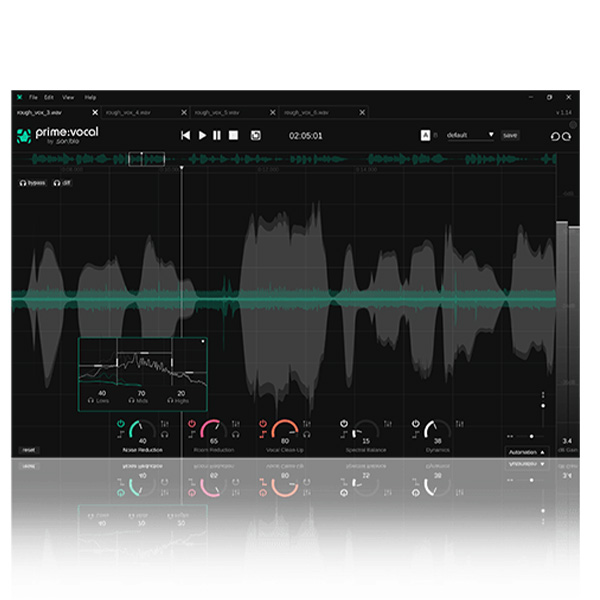
prime:vocal allows you to achieve world-class studio-quality vocals, no matter the recording conditions. Available as standalone software and an ARA plugin (beta), prime:vocal has many features that will turn demo sketches or vocals recorded in less-than-ideal conditions into commercial-grade sound ready for mixing.

Open prime:vocal as standalone software or as the ARA plugin version (Beta) in your supporting DAW.

Load a raw recording of your vocals or speech into prime:vocal.

Watch as the AI ​​system begins the analysis process.

Explore product features & full description

prime:vocal allows you to achieve world-class studio-quality vocals, no matter the recording conditions. Available as standalone software and an ARA plugin (beta), prime:vocal has many features that will turn demo sketches or vocals recorded in less-than-ideal conditions into commercial-grade sound ready for mixing.

Achieve the studio-quality sound you desire in post-production

With prime:vocal you can make your vocals sound like they were recorded and processed in a professional studio. Based on our many years of experience in artificial intelligence and creating learning audio processors, prime:vocal was specifically designed to work with vocal audio.

Improve and enhance quality – all with one tool

Save yourself the trouble of using multiple tools to prepare your vocal track for mixing. prime:vocal easily removes artifacts such as buzz, mechanical noise, reverberation reflections, and overemphasized sibilants and pluses. Thanks to the artificial intelligence used in prime:vocal, you get the best audio cleaning and enhancement tool you can find in one tool, and always get studio-quality vocal sound.

Professional sound is in the details

When creativity demands action and time and space are tight, you can still achieve the highest standards in your vocal tracks thanks to the capabilities of prime:vocal. Your new tool for improving any vocal recording also optimizes dynamics, average loudness, and spectral balance, and you can adjust the strength of each process to suit what you have in mind.

Record vocals on the go and make them shine

Whether you’re in a rehearsal room, a hotel room, or your apartment, record vocals on the go, then run them through prime:vocal before mixing. You’ll be amazed at the difference working with such a great base makes.

Using prime:vocal is incredibly simple:
  1. Open prime:vocal as standalone software or as the ARA plugin version (Beta) in your supporting DAW.
  2. Load a raw recording of your vocals or speech into prime:vocal.
  3. Watch as the AI ​​system begins the analysis process.
  4. Hear the improvements section by section while the analysis runs in the background.
  5. Adjust the parameters for fine-tuning.
  6. Export the recording in studio quality.

Compatibility checklist

  • Windows 10,11 (64Bit Only)
  • VST3, Standalone
  • Formats: VST3 · Standalone

Requirements vary by supplied version. Confirm your setup with support before purchasing.

Delivery & activation

  1. Complete your purchaseReview compatibility and purchase details.
  2. Download your filesAccess available downloads through your order and account.
  3. Follow the included setup guideContact GetPlugins if you need installation help.

Activation, where included, is provided by GetPlugins. Publisher-account registration, transferable publisher keys and a publisher-issued licence are not included. Read the activation policy.

Frequently asked questions

How do I receive my download?

After payment, access available files from your order details and GetPlugins account. Contact support if a download is missing.

What activation is included?

Follow the activation instructions supplied with your download. Activation is provided by GetPlugins. Confirm device allowances and reinstall arrangements before ordering.

Will this work with my computer and DAW?

Check the compatibility information for this listing and ask us to confirm the exact supplied build. Libraries may require a compatible sampler or additional software.

What if I need installation help?

Email support@getplugins.io with your order number, operating system, DAW and any error message.

Which updates are included?

Activation and updates are separate. Confirm the available version and update arrangements before ordering; do not assume access to future publisher releases.

How do I request a refund?

Contact support with your order number and issue details. Read our Refund Policy for eligibility and the request process.

Customer Reviews

Reviews

There are no reviews yet.

Be the first to review “Sonible – prime:vocal (Windows)”

Your email address will not be published. Required fields are marked *