Serato – Sample (Windows)

The ultimate sampling plugin trusted by top producers worldwide, now optimized for Windows.
Formats: VST3 · AAX · VST

£28.00

Discover Serato – Sample (Windows)

The ultimate sampling plugin trusted by top producers worldwide, now optimized for Windows.

Instantly sync samples to your project’s BPM and key

Stem & Chop Mode – isolate vocals, melodies, drums, and basslines in real time

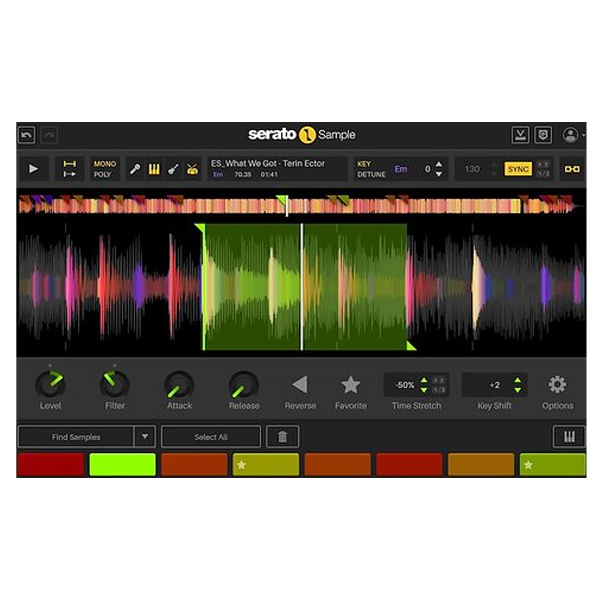
Flip samples with Time Stretch, Key Shift, Reverse, and Keyboard Mode for ultimate expressiveness 🎹

Explore product features & full description

🎛️ Serato Sample v2.2.0 (Windows) – Revolutionize Your Sampling 🚀

The ultimate sampling plugin trusted by top producers worldwide, now optimized for Windows.

Serato Sample v2.2.0 is a powerful and intuitive sampling tool for hip-hop, trap, house, EDM, and cinematic music producers. Effortlessly slice, flip, manipulate, and play samples using Serato’s industry-leading pitch-shifting and time-stretching technology. Turn vocals, melodies, basslines, and drums into completely new musical ideas in seconds. 🎶✨

🎵 Unleash Your Creativity

Take full control of your samples and workflow:

  • Instantly sync samples to your project’s BPM and key

  • Stem & Chop Mode – isolate vocals, melodies, drums, and basslines in real time

  • Flip samples with Time Stretch, Key Shift, Reverse, and Keyboard Mode for ultimate expressiveness 🎹

  • Trigger playback via MIDI, keyboard, or mouse for a fast, fluid workflow

⚡ Expand Your Sampling Capabilities

Make complex sampling tasks fast and effortless:

  • Automatically define and match BPM and key of any sample

  • Chop, isolate, and edit sounds with one click

  • Keyboard Mode allows you to play samples like an instrument, adjusting pitch and tone in real time 🎛️

🎚️ Professional Sound Quality

Ensure your tracks sound polished and cinematic:

  • Serato Pitch ‘n Time technology for pristine stretching and bending

  • Intelligent Beatgrids keep your samples perfectly aligned

  • Ultra-clean stem separation for vocals, drums, bass, and melodies

🌟 Unlock New Sound Dimensions

  • Extract stems with unmatched precision

  • Flip, rearrange, and combine isolated elements to craft original compositions

  • Keyboard Mode turns your samples into playable instruments

  • Create unique remixes, cinematic textures, and beats in minutes

🆕 What’s New in v2.2.0

  • Enhanced Stem Separation for cleaner extraction

  • Improved Find Samples engine for instant detection of the best moments

  • Optimized performance and workflow for faster, smoother sampling sessions ⚡

🎧 Perfect For Modern Music Creators

  • Hip-Hop, R&B, House, Trap, EDM, and Lo-Fi producers

  • Beatmakers and remix artists

  • Sound designers and composers seeking a fast, intelligent, and creative sampling workflow

🔹 Why Choose Serato Sample v2.2.0 (Windows)

Whether you’re chopping vinyl loops, remixing acapellas, or designing original sounds, Serato Sample provides speed, precision, and limitless creativity—making it the essential plugin for modern music production.

Compatibility checklist

  • Windows 10,11 (64-bit Only)
  • VST, VST3, AAX
  • Formats: VST3 · AAX · VST

Requirements vary by supplied version. Confirm your setup with support before purchasing.

Delivery & activation

  1. Complete your purchaseReview compatibility and purchase details.
  2. Download your filesAccess available downloads through your order and account.
  3. Follow the included setup guideContact GetPlugins if you need installation help.

Activation, where included, is provided by GetPlugins. Publisher-account registration, transferable publisher keys and a publisher-issued licence are not included. Read the activation policy.

Frequently asked questions

How do I receive my download?

After payment, access available files from your order details and GetPlugins account. Contact support if a download is missing.

What activation is included?

Follow the activation instructions supplied with your download. Activation is provided by GetPlugins. Confirm device allowances and reinstall arrangements before ordering.

Will this work with my computer and DAW?

Check the compatibility information for this listing and ask us to confirm the exact supplied build. Libraries may require a compatible sampler or additional software.

What if I need installation help?

Email support@getplugins.io with your order number, operating system, DAW and any error message.

Which updates are included?

Activation and updates are separate. Confirm the available version and update arrangements before ordering; do not assume access to future publisher releases.

How do I request a refund?

Contact support with your order number and issue details. Read our Refund Policy for eligibility and the request process.

Customer Reviews

Reviews

There are no reviews yet.

Be the first to review “Serato – Sample (Windows)”

Your email address will not be published. Required fields are marked *